Cognito Forms Alternative with Better Pricing in 2025
Key Takeaways
- 70% lower cost per entry with Pixelform compared to Cognito Forms Pro plans
- More monthly responses at competitive price points with flexible subscription plans
- All features included on Pixelform plans vs Cognito’s tiered feature restrictions
- Three subscription tiers starting at $29/mo for Basic, $59/mo for Premium, and $149/mo for Business
Cognito Forms has built a solid reputation for powerful forms with features like calculations, repeating sections, and electronic signatures. But as your form volume grows, Cognito’s pricing can become a limitation. Let’s compare Cognito Forms to Pixelform and other alternatives to help you find the best value.
According to the 2024 Form Builder Market Analysis by Capterra, pricing predictability ranks as the second most important factor (after ease of use) when businesses choose form builders.
Understanding Cognito Forms Pricing
Cognito Forms offers a generous free tier, which is its primary appeal. But the paid plans tell a different story:
| Plan | Monthly Price | Entries/Month | Forms |
|---|---|---|---|
| Individual (Free) | $0 | 500 | Unlimited |
| Pro | $15 | 2,000 | Unlimited |
| Team | $35 | 10,000 | Unlimited |
| Enterprise | $99 | 50,000 | Unlimited |
At first glance, this looks competitive. But examine the cost per entry:
- Pro: $15 / 2,000 = $0.0075/entry
- Team: $35 / 10,000 = $0.0035/entry
- Enterprise: $99 / 50,000 = $0.002/entry
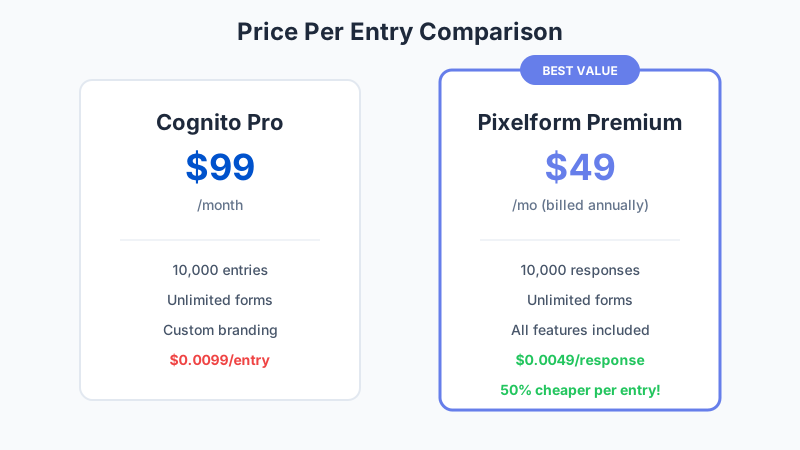
Now compare to Pixelform:
- Basic: $29/mo / 1,000 = $0.029/entry
- Premium: $59/mo / 10,000 = $0.0059/entry
- Business: $149/mo / 50,000 = $0.00298/entry
At comparable price points, Pixelform offers competitive value with flexible subscription plans. For users in the 5,000-10,000 entry range, Pixelform Premium delivers excellent value.
Feature Comparison
Cognito Forms is known for specific powerful features. Let’s see how they compare:
Calculations and Formulas
Cognito Forms: Offers a robust calculation engine supporting mathematical operations, conditions, and field references. You can create dynamic pricing, calculated totals, and conditional values.
Pixelform: Supports calculations for quotes, order totals, and conditional values. While not as extensively customizable as Cognito’s formula engine, it covers the 80% use case for most users.
Verdict: Cognito wins for complex calculation requirements.
Repeating Sections
Cognito Forms: Allows respondents to add multiple instances of a section (like adding multiple products or team members). This is a standout feature.
Pixelform: Supports repeating sections for common use cases like order line items.
Verdict: Both handle typical repeating needs; Cognito offers more flexibility.
Electronic Signatures
Cognito Forms: Built-in signature capture on all plans.
Pixelform: Signature field available on all paid plans.
Verdict: Tie - both offer signatures.
Payment Collection
Cognito Forms: Integrates with Stripe, PayPal, and Square. Charges no additional transaction fees. Supports quantity-based pricing and calculations.
Pixelform: Does not have native payment collection. For payment workflows, connect form submissions via webhooks to your payment processing system.
Verdict: Cognito wins for native payment collection.
Conditional Logic
Cognito Forms: Powerful conditional logic supporting show/hide, calculations, and page navigation based on conditions.
Pixelform: Visual conditional logic builder with flowchart view. Supports field visibility, page branching, and calculated conditions.
Verdict: Both offer robust conditional logic; Pixelform’s visual builder is more intuitive.
Custom Branding
Cognito Forms: Custom themes, colors, fonts. White-labeling available on Team and Enterprise.
Pixelform: Full customization on all paid plans including white-labeling and custom domains.
Verdict: Pixelform offers premium branding features at lower price tiers.
Integrations
Cognito Forms: Native integrations with ~15 tools plus Zapier support.
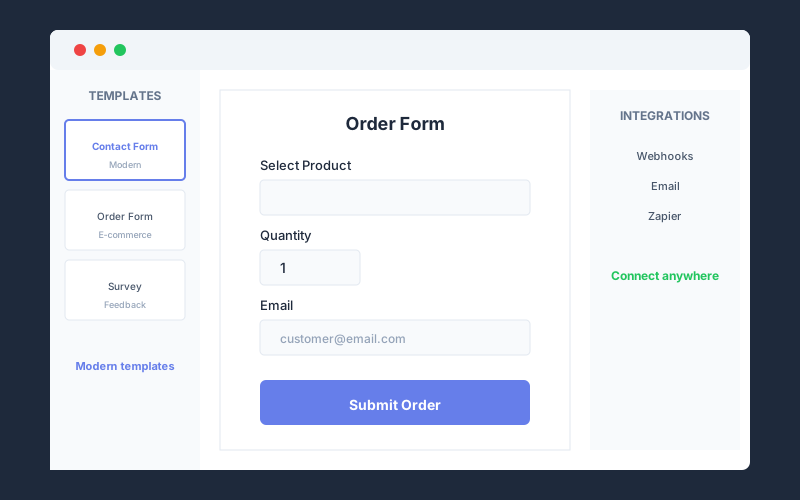
Pixelform: Webhooks to connect to any HTTP endpoint, plus email notifications. Use automation platforms like Zapier or Make for unlimited app connections.
Verdict: Both offer flexible integration options. Pixelform’s webhook approach provides more flexibility.
The Value Analysis
Let’s compare total cost of ownership for different usage scenarios:
Scenario 1: Small Business (3,000 entries/month)
Cognito Forms Team: $35/month = $420/year
Pixelform Basic: $19/month = $228/year (billed annually)
Annual savings with Pixelform: $72
Scenario 2: Growing Business (8,000 entries/month)
Cognito Forms Team: $35/month = $420/year
Pixelform Premium: $49/month = $588/year (billed annually)
Difference: Cognito costs $288 less annually
But wait: Cognito Team limits you to 10,000 entries. Pixelform Premium allows 10,000 as well, but includes additional features like custom domains and white-labeling on all paid plans.
Scenario 3: Established Business (15,000 entries/month)
Cognito Forms Enterprise: $99/month = $1,188/year
Pixelform Business: $119/month = $1,428/year (billed annually)
Cognito offers better value at this volume tier, though Pixelform Business includes 50,000 responses/month with room to grow.
Scenario 4: High-Volume Business (40,000 entries/month)
Cognito Forms Enterprise: $99/month = $1,188/year
Pixelform Business: $119/month = $1,428/year (billed annually)
At very high volumes, Cognito’s Enterprise plan offers excellent value per entry.
When Cognito Forms Wins
To be fair, Cognito Forms is the better choice for specific use cases:
Complex Calculations
If your forms require spreadsheet-level formulas with nested conditions, mathematical functions, and dynamic references, Cognito’s calculation engine is more powerful than any alternative.
Examples:
- Insurance quote calculators with dozens of variables
- Complex pricing models with tiered calculations
- Assessment forms with weighted scoring algorithms
Very High Volume + Tight Budget
At 40,000+ entries monthly, Cognito’s Enterprise plan ($99 for 50,000) offers the lowest cost per entry of any paid form builder.
Existing Workflow Investment
If you’ve built complex workflows around Cognito’s specific features, migration cost may exceed long-term savings.
When Pixelform Wins
Pixelform is the better choice when:
Volume is Moderate (Under 10,000/month)
Pixelform’s pricing sweet spot covers most businesses. You get modern design, great features, and predictable monthly costs.
Design Matters
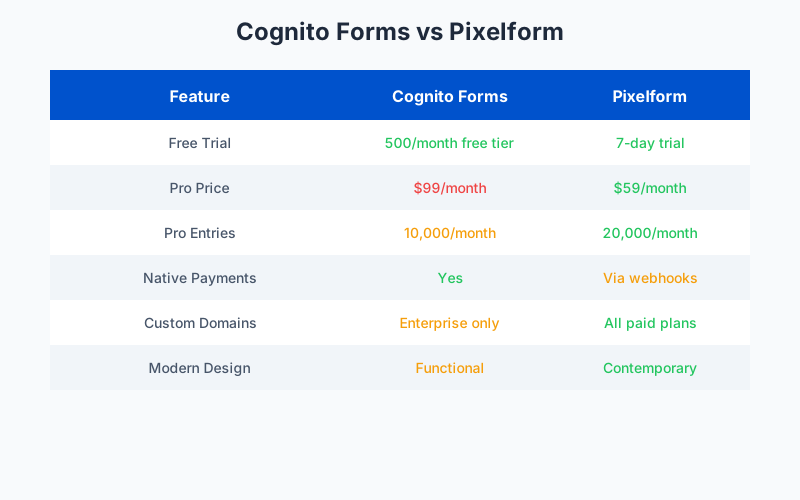
Pixelform’s modern aesthetic produces forms that look contemporary. Cognito’s forms are functional but don’t stand out visually.
Custom Domain is Important
Pixelform includes custom domains (forms.yourbrand.com) on all paid plans. Cognito restricts this to Enterprise.
Integration Variety Matters
Pixelform provides webhooks that connect to any HTTP endpoint, allowing integration with any system. Use webhooks with automation platforms like Zapier or Make for unlimited app connections.
Predictable Subscription Pricing
Pixelform’s subscription plans ($29/mo Basic, $59/mo Premium, $149/mo Business) offer predictable monthly costs with flexible scaling as your needs grow.
Migration Guide
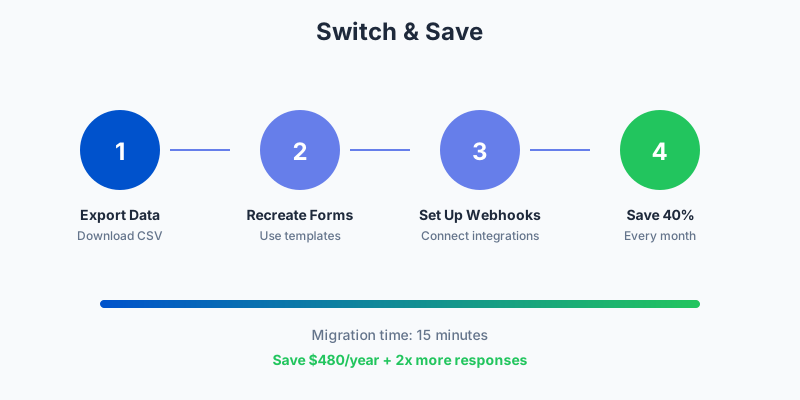
Ready to switch from Cognito Forms? Here’s the process:
Step 1: Export Entry Data
In Cognito Forms, go to Entries for each form and export as CSV or Excel. This preserves all response data.
Step 2: Document Form Logic
Screenshot or document your:
- Calculation formulas
- Conditional logic rules
- Payment configurations
- Email notifications
Step 3: Rebuild in Pixelform
Using Pixelform’s builder:
- Select a template or start blank
- Add fields matching your Cognito form
- Configure calculations (simpler syntax than Cognito)
- Set up conditional logic with visual flowchart
- Connect payment processing if needed
Step 4: Connect Integrations
Set up your integrations in Pixelform. Most connections require just OAuth authorization.
Step 5: Update Embeds
Replace Cognito embed codes with Pixelform embeds on your website.
Step 6: Test Everything
Submit test entries verifying:
- Calculations produce expected results
- Conditional logic works correctly
- Payment processing functions
- Integrations receive data
- Notifications deliver properly
Other Cognito Forms Alternatives
Besides Pixelform, consider these alternatives:
JotForm
Best for: Users needing extensive integrations and widgets
Pricing: $39-199/month
Comparison: More expensive than Cognito, but offers more templates and widgets.
Formstack
Best for: Enterprise users with compliance needs
Pricing: $83-333/month
Comparison: Significantly more expensive but offers HIPAA compliance and advanced workflows.
Paperform
Best for: Design-focused forms
Pricing: $29-159/month
Comparison: Beautiful forms but fewer calculation features than Cognito.
For most users seeking a Cognito alternative, Pixelform offers the best balance of features, design, and value.
Making the Decision
Consider these questions:
-
Do you need complex calculations?
- Yes, with nested formulas → Stay with Cognito
- Standard totals and quotes → Pixelform works fine
-
What’s your monthly entry volume?
- Under 10,000 → Pixelform Premium offers great value
- Over 50,000 → Cognito Enterprise may be more economical
-
Is form design important?
- Yes → Pixelform offers more polished output
- No → Cognito’s functional design suffices
-
Do you prefer flexible subscription plans?
- Yes → Pixelform offers three tiers ($29, $59, $149/mo) to match your needs
- No → Both offer reasonable monthly pricing
Start Your Evaluation
The best way to decide is to try both. Cognito Forms offers a generous free tier, and Pixelform offers a 7-day free trial on the Premium plan.
Build the same form in both platforms. Compare:
- Building experience
- Form appearance
- Feature availability
- Pricing for your volume
For most businesses in the 5,000-10,000 monthly response range, Pixelform delivers more value with modern design and inclusive pricing.
Start your free trial and see how it compares to your current Cognito Forms setup.
FAQ
Does Pixelform support Cognito’s calculation formulas?
Pixelform supports calculations for common use cases like order totals, quote generation, and conditional values. However, Cognito’s formula engine is more extensive. If you rely on complex nested calculations, test thoroughly before migrating.
Can I use repeating sections in Pixelform like in Cognito?
Yes, Pixelform supports repeating sections for use cases like order line items, attendee lists, and similar needs. The implementation covers typical requirements though Cognito offers more configuration options.
What about Cognito’s free plan?
Cognito’s free plan (500 entries/month) is genuinely generous for low-volume users. Pixelform offers a free trial but requires a paid plan for ongoing use. If you need fewer than 500 entries monthly and can accept Cognito branding, their free plan remains attractive.
How does signature capture compare?
Both platforms offer signature fields that work on desktop and mobile. Cognito includes signatures on all plans including free. Pixelform includes signatures on all paid plans. Both produce legally acceptable electronic signatures.
Is Pixelform HIPAA compliant like Cognito?
Cognito Forms offers HIPAA compliance on Enterprise plans. Pixelform is GDPR compliant but does not currently offer HIPAA compliance. Healthcare organizations collecting protected health information should stay with Cognito or consider alternatives like Formstack.