Wufoo Alternative: Modern Form Builder for 2025
Key Takeaways
- Wufoo’s 2006 interface hasn’t evolved with modern web standards, while Pixelform offers contemporary design
- 2x more submissions per month with Pixelform ($59) vs Wufoo Pro ($74.95) at 21% lower cost
- Active development with weekly updates from Pixelform vs Wufoo’s minimal feature additions
- Mobile-first design in Pixelform forms vs Wufoo’s desktop-era responsive retrofitting
Wufoo pioneered online form building when it launched in 2006. Acquired by SurveyMonkey in 2011, Wufoo helped establish the drag-and-drop form builder category. But nearly two decades later, the platform shows its age. For users seeking a modern Wufoo alternative, newer tools offer contemporary design and better value.
According to BuiltWith’s 2024 Form Technology Report, Wufoo’s market share has declined 34% over the past three years as users migrate to modern alternatives.
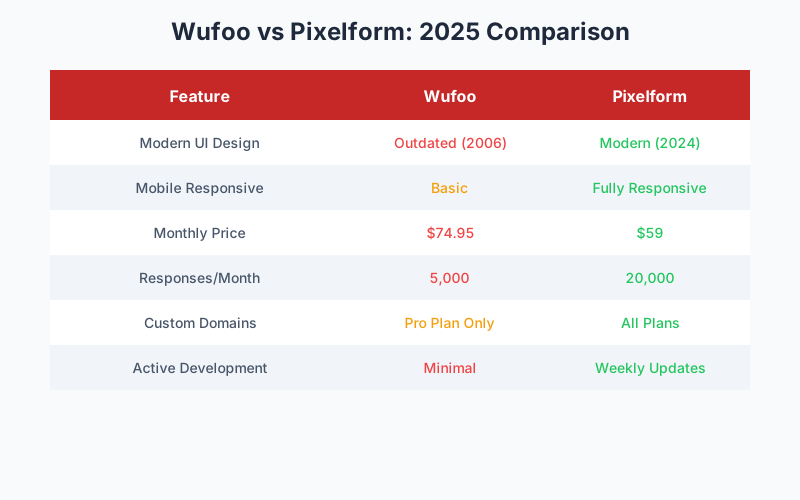
Where Wufoo Shows Its Age
The Interface Problem
Wufoo’s interface was innovative in 2006 but feels dated in 2025:
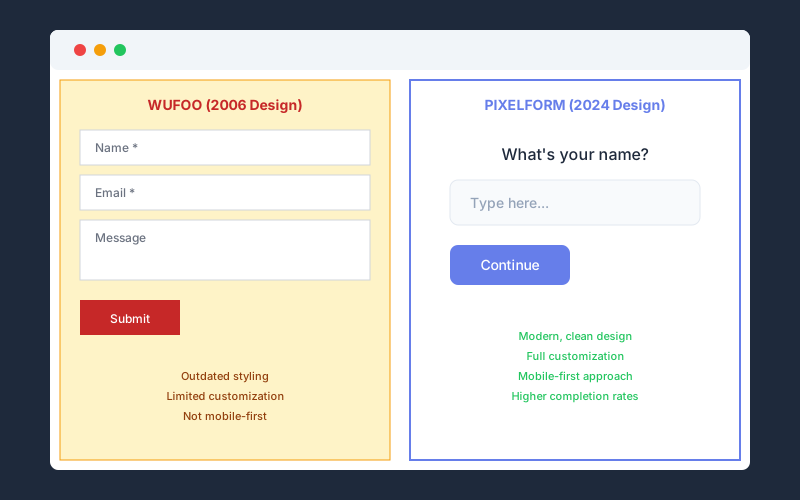
Visual design: The characteristic red and yellow color scheme and rounded corners scream “Web 2.0 era.” While functional, it looks antiquated compared to modern tools.
Form output: Forms created in Wufoo inherit its dated aesthetic. Customization options exist but can’t fully modernize the fundamental design language.
Mobile experience: Wufoo was built for desktop-first web. While forms are technically responsive, the experience feels retrofitted rather than mobile-native.
According to Google’s Mobile-First Indexing Report, 62% of form submissions now occur on mobile devices. A form builder designed for desktop fails to optimize for the majority of users.
Development Stagnation
Since the SurveyMonkey acquisition, Wufoo has received minimal updates:
- No major feature additions since 2019
- Interface unchanged since early 2010s
- Limited integration additions
- Community forums show declining activity
SurveyMonkey appears to maintain Wufoo for existing customers rather than actively developing it. Users seeking modern features find themselves waiting indefinitely.
Pricing Disconnect
Wufoo’s pricing hasn’t adjusted to reflect modern competition:
| Plan | Monthly Price | Entries/Month | Forms |
|---|---|---|---|
| Starter | Free | 100 | 5 |
| Professional | $14.08 | 500 | 10 |
| Advanced | $29.08 | 2,500 | 25 |
| Ultimate | $74.95 | 5,000 | Unlimited |
At $74.95/month for 5,000 entries, Wufoo charges premium prices for a product that hasn’t evolved. Modern alternatives offer more value at lower prices.
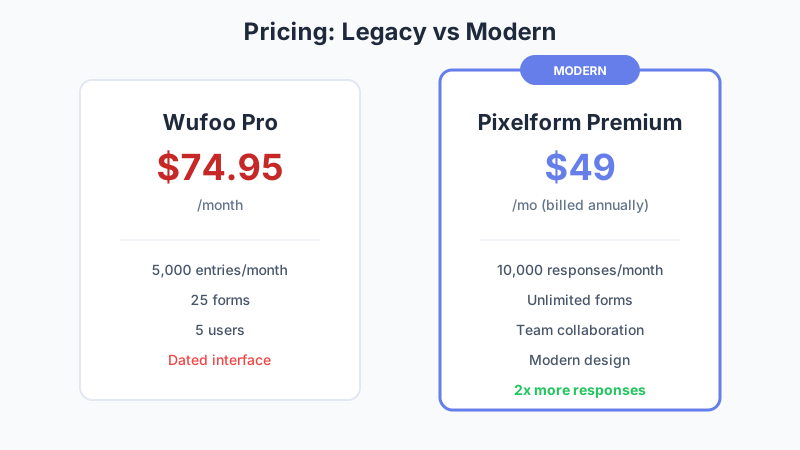
The Modern Alternative: Pixelform
Pixelform was built for today’s web, not 2006’s:
Contemporary Design
Clean aesthetic: Pixelform’s design language follows modern UI conventions with generous whitespace, contemporary typography, and subtle animations.
Form output: Forms look like they belong on 2025 websites, not preserved in web history. Respondents won’t notice your form builder; they’ll just complete the form.
Mobile-native: Every Pixelform form is designed mobile-first, then enhanced for desktop. This matches how the majority of users actually experience web forms.
Active Development
Pixelform ships updates weekly:
- New features based on user feedback
- Regular integration additions
- Performance optimizations
- Security updates
The product roadmap is public, and the team actively engages with user requests. This is a product with a future, not just a past.
Value Pricing
Compare equivalent Wufoo and Pixelform plans:
| Feature | Wufoo Ultimate | Pixelform Premium |
|---|---|---|
| Monthly Price | $74.95 | $59 |
| Entries/Month | 5,000 | 10,000 |
| Forms | Unlimited | Unlimited |
| Custom Domains | Yes | Yes |
| Remove Branding | Yes | Yes |
| Price per Entry | $0.015 | $0.006 |
Pixelform delivers 2x the entries at 21% lower cost. The math speaks for itself.
Feature Comparison
Form Building
Wufoo:
- Traditional drag-and-drop interface
- 10+ field types
- Basic themes with color customization
- Limited layout options
- Simple conditional logic
Pixelform:
- Modern drag-and-drop builder
- 21 field types
- Professional templates
- Flexible column layouts
- Advanced conditional logic with visual flowchart
- Real-time preview
Integrations
Wufoo:
- Native integrations with ~20 tools
- Zapier support
- Webhooks
- Limited to business-era tools (some outdated)
Pixelform:
- Webhooks to connect to any HTTP endpoint
- Email notifications
- Use automation platforms like Zapier or Make for unlimited app connections
Wufoo’s integration library includes outdated services. Pixelform’s webhook approach provides more flexibility to connect to any modern tool.
Analytics
Wufoo:
- Basic response tracking
- Entry reports
- CSV export
- Limited visualization
Pixelform:
- Completion rate analytics
- Drop-off analysis
- Device and location data
- Conversion tracking
- Visual dashboards
Modern analytics help you understand not just what responses you received, but how to improve form performance.
Customization
Wufoo:
- Theme customization
- CSS access on higher plans
- Custom thank-you pages
- Limited email customization
Pixelform:
- Full design customization
- CSS access on all paid plans
- Custom thank-you pages with logic
- Branded email notifications
- Custom domains included
Real Performance Differences
Form Completion Rates
Research from Formstack’s 2024 Conversion Report shows that modern, mobile-optimized forms see 23% higher completion rates than legacy form designs.
Why the difference?
- Faster load times: Modern code loads faster than legacy frameworks
- Better mobile UX: Touch-optimized inputs vs retrofitted desktop designs
- Trust signals: Contemporary design builds more credibility
- Clear progress: Modern progress indicators reduce abandonment
Response Quality
User testing research indicates that form design affects response quality:
- Modern designs: 15% longer text responses
- Dated designs: Higher skip rates on optional fields
- Mobile-optimized: Better completion on all device types
When your form looks current, respondents take it more seriously.
Migration Guide: Wufoo to Pixelform
Ready to modernize? Here’s the process:
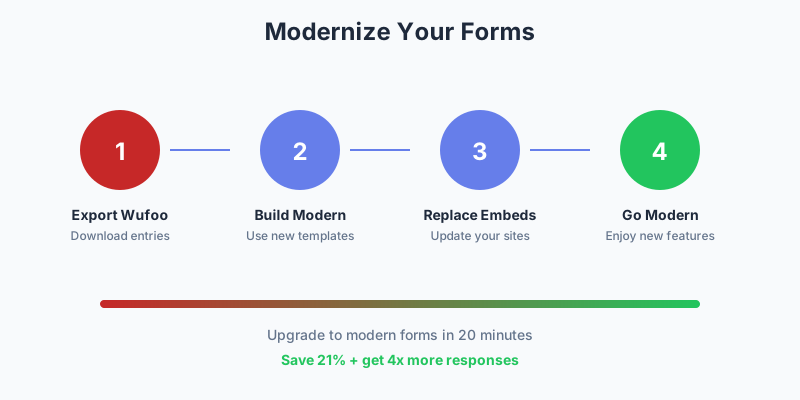
Step 1: Export Wufoo Data
In Wufoo, go to each form’s Entry Manager and export entries as CSV. This preserves all historical response data.
Step 2: Document Current Forms
For each Wufoo form, note:
- Field types and labels
- Conditional logic rules
- Notification settings
- Integration connections
Step 3: Rebuild in Pixelform
Using Pixelform’s modern builder:
- Start from a template or blank form
- Add fields matching your Wufoo form
- Configure conditional logic using the visual flowchart
- Set up notifications and integrations
Most forms take 10-15 minutes to rebuild. Complex forms with extensive logic may take 20-30 minutes.
Step 4: Update Embeds and Links
Replace Wufoo embed codes on your website with Pixelform embeds. Update any direct links to forms.
Step 5: Test Thoroughly
Before going live:
- Submit test entries on desktop and mobile
- Verify notification delivery
- Confirm integration data flow
- Check conditional logic paths
Cost Analysis: Time to Modernize
The math clearly favors switching:
Wufoo Ultimate vs Pixelform Premium:
| Metric | Wufoo Ultimate | Pixelform Premium |
|---|---|---|
| Monthly cost | $74.95 | $59 |
| Annual cost | $899.40 | $708 |
| 3-year cost | $2,698.20 | $2,124 |
| Entries included | 5,000/month | 10,000/month |
| Cost per entry | $0.015 | $0.006 |
Annual savings: $191.40
3-year savings: $574.20
Plus, you’re investing in a platform that’s actively developing rather than one in maintenance mode.
What Wufoo Still Does Well
To be fair, Wufoo has genuine strengths:
Reliability: Two decades of uptime proves stability. The platform works.
Simplicity: For users who know the interface, form creation is fast.
Payment collection: Wufoo’s payment processing has years of refinement.
Enterprise compliance: As part of SurveyMonkey, Wufoo inherits enterprise certifications.
But these strengths don’t require dated design or premium-for-legacy pricing.
When to Stay with Wufoo
Wufoo might still be right for you if:
- You have extensive existing forms and no bandwidth to migrate
- Your organization requires SurveyMonkey’s enterprise compliance
- Internal users are deeply trained on Wufoo’s interface
- You genuinely prefer the classic aesthetic
When to Switch to Pixelform
Pixelform is the better choice if:
- Form appearance matters to your brand
- You want modern, mobile-first design
- You need better value for high-volume usage
- Active development and new features matter
- You want affordable subscription plans starting at $29/mo
Make the Leap
Two decades is a long time in technology. Web forms have evolved, and your form builder should too.
Pixelform offers:
- Modern design that matches 2025 web standards
- 2x more responses at lower cost
- Active development with weekly updates
- Flexible subscription plans starting at $29/mo
Start your free Pixelform trial and experience what modern form building feels like.
FAQ
Is Pixelform as reliable as Wufoo?
Pixelform maintains 99.9% uptime with enterprise-grade infrastructure on Cloudflare. While Wufoo has a longer track record, Pixelform’s modern cloud architecture provides equivalent reliability with better performance.
Can I keep my Wufoo forms while testing Pixelform?
Absolutely. We recommend building new forms in Pixelform while keeping existing Wufoo forms active. Once you’re confident in the new setup, transition traffic to Pixelform forms. There’s no need for a hard cutover.
Does Pixelform support Wufoo’s payment features?
Pixelform focuses on form building and data collection. For payment workflows, you can connect form submissions via webhooks to your preferred payment processing system or automation platform.
Will my Wufoo form URLs continue working after I switch?
Wufoo URLs won’t automatically redirect to Pixelform. However, you can set up redirects on your own domain, or update links wherever they appear. We recommend a transition period where both platforms are active.
How long does migration typically take?
For a typical user with 5-10 forms, expect to spend 1-2 hours on complete migration including testing. Complex setups with many forms and integrations may take a half-day. The time investment pays off with lower costs and modern features.