Event Registration Forms: The Complete Guide to Creating High-Converting RSVPs
Whether you’re organizing a corporate conference, community workshop, or virtual webinar, your event registration form is the gateway between interested visitors and confirmed attendees. A well-designed registration form doesn’t just collect names—it sets expectations, qualifies attendees, and begins the engagement journey that culminates in event day.
With 57% of webinar registrants actually attending and registration-to-attendance rates varying dramatically based on form design and follow-up sequences, the stakes for getting your registration process right have never been higher. This comprehensive guide covers everything you need to know about creating event registration forms that convert visitors into engaged attendees.
Why Event Registration Forms Matter More Than Ever
The events industry has transformed dramatically. Virtual and hybrid events have become mainstream, attendee expectations have shifted, and competition for attention has intensified. Your registration form is often the first meaningful interaction potential attendees have with your event brand.
The Registration-to-Attendance Gap
One of the most significant challenges event organizers face is the gap between registrations and actual attendance. Research shows that:
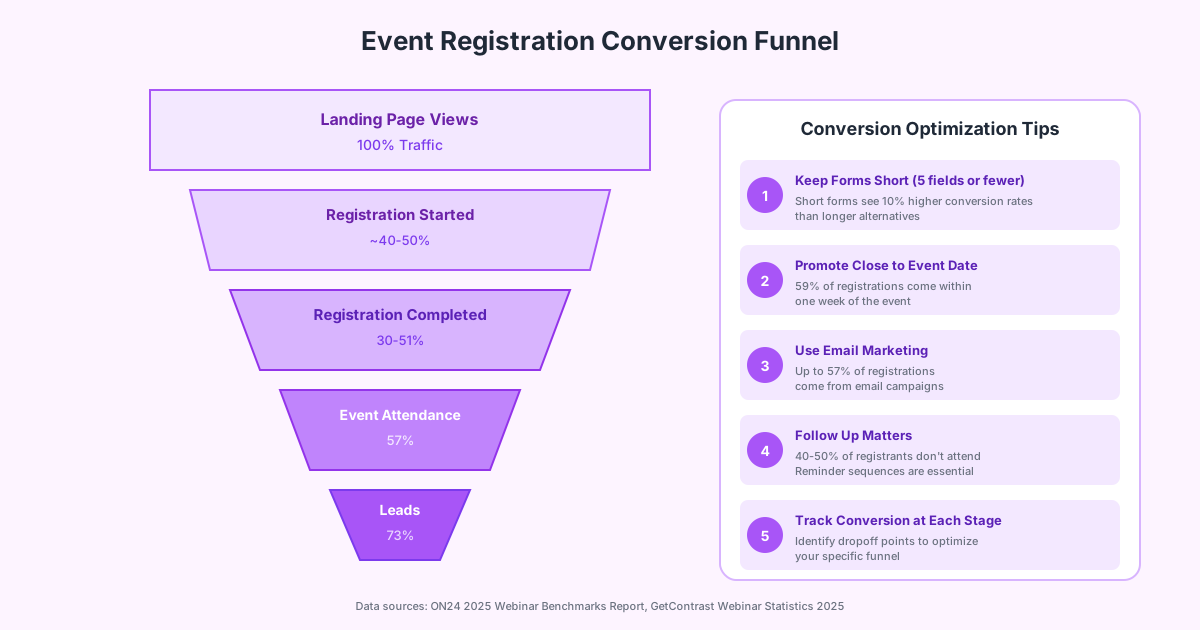
- 40-50% of registrants don’t attend free events
- Virtual events see lower show rates than in-person events
- 73% of webinar attendees become qualified leads, making attendance crucial for ROI
- 59% of registrations happen within one week of the event date
Understanding these patterns helps you design registration forms and follow-up sequences that maximize actual attendance, not just registration numbers.
The Impact of Form Design on Conversions
Your registration form’s design directly impacts how many visitors complete the signup process. According to industry benchmarks:
- Landing page conversion rates range from 30-51% for event registrations
- Short forms (5 fields or fewer) see approximately 10% higher conversion rates
- Mobile-optimized forms are essential as over 50% of registrations now happen on mobile devices
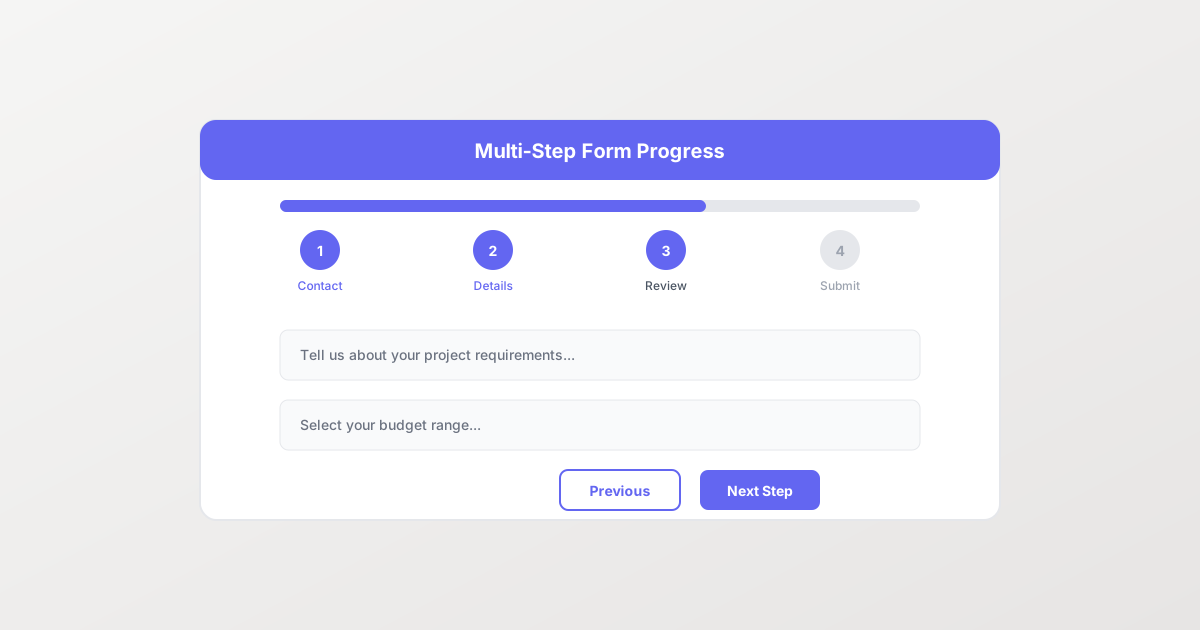
- Multi-step forms can increase completion rates for complex registrations
Essential Fields for Every Event Registration Form
The fields you include depend on your event type, but certain information is universally important. The key is balancing data collection needs with conversion optimization—every additional field creates friction that can cause abandonment.
Must-Have Fields
Contact Information:
- Full name (or first/last name separately)
- Email address (critical for confirmations and reminders)
- Phone number (optional but valuable for SMS reminders)
Event-Specific Details:
- Ticket type or session selection
- Attendance preferences (in-person vs. virtual for hybrid events)
- Dietary restrictions (for events with meals)
- Accessibility accommodation needs
Optional Fields to Consider
Depending on your goals, you might include:
- Company name and job title (for B2B events)
- How did you hear about us? (marketing attribution)
- Questions for speakers (engagement and content planning)
- Networking interests (for matchmaking features)
- T-shirt size (for events with swag)
Fields That Kill Conversions
Avoid asking for:
- Information you don’t actually need
- Sensitive data without clear justification
- Repetitive information (like asking for email twice)
- Open-ended questions that require significant thought
Registration Forms by Event Type
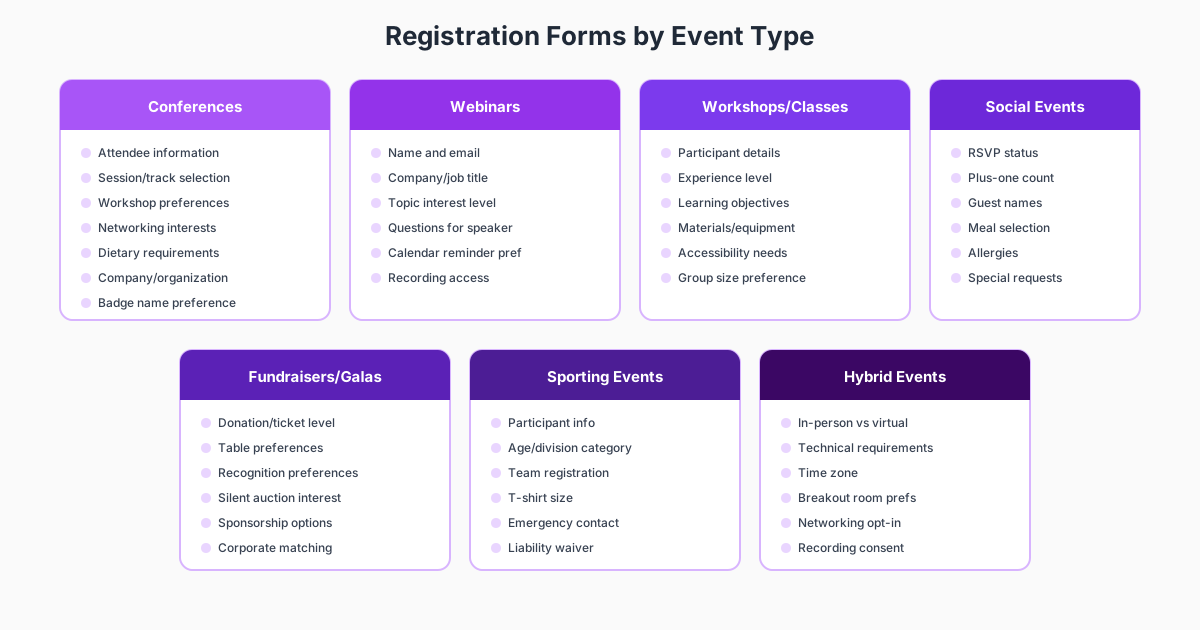
Different events require different registration approaches. Here’s how to tailor your forms for maximum effectiveness.
Conference and Summit Registration
Large-scale conferences typically need more comprehensive registration forms because they involve:
Session and Track Selection: Allow attendees to build their personalized agenda by selecting:
- Keynote sessions
- Breakout tracks
- Workshop sessions
- Networking events
- Optional activities
Logistical Information:
- Arrival and departure dates
- Hotel accommodation preferences
- Transportation needs
- Visa letter requirements (for international attendees)
Professional Details:
- Industry and company size
- Job function and seniority
- Specific interests or challenges
Pro Tip: Use conditional logic to show relevant questions based on ticket type. VIP ticket holders might see questions about speaker dinner preferences, while general admission attendees don’t need those fields.
Webinar and Virtual Event Registration
Virtual events can afford shorter forms because there’s no physical logistics to manage:
Keep It Simple:
- Name and email (minimum viable registration)
- Company and job title (for lead qualification)
- Topic-specific question (shows engagement)
Technical Considerations:
- Time zone selection (crucial for global audiences)
- Calendar integration preferences
- Recording access consent
Engagement Boosters:
- Pre-event survey questions
- Questions for Q&A submission
- Interest in related content
Workshop and Training Registration
Hands-on events need information to ensure a good experience:
Preparation Requirements:
- Experience level assessment
- Prerequisites completed
- Software/tools access
- Learning objectives
Logistics:
- Equipment or materials needed
- Group size preferences
- Accessibility accommodations
Social Events and Galas
Social events focus on guest experience:
Guest Management:
- RSVP status (attending, not attending, maybe)
- Plus-one count and names
- Meal selections and dietary restrictions
- Seating preferences
Special Requests:
- Accessibility needs
- Parking requirements
- Special occasion recognition
Accessibility and ADA Compliance
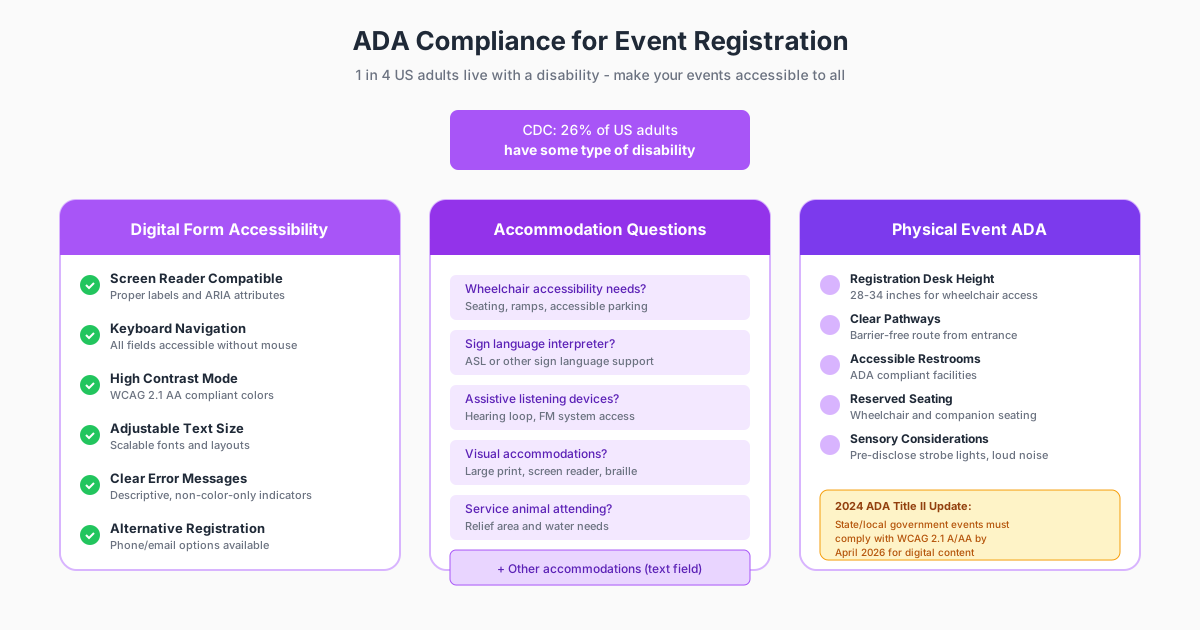
Making your event registration accessible isn’t just good practice—it’s often legally required. The Americans with Disabilities Act (ADA) and similar regulations worldwide mandate accessible experiences for people with disabilities.
Digital Form Accessibility (WCAG 2.1 Compliance)
Your online registration form should meet Web Content Accessibility Guidelines:
Screen Reader Compatibility:
- Proper form labels associated with inputs
- ARIA attributes for complex interactions
- Logical tab order through form fields
- Error messages that are announced to screen readers
Visual Accessibility:
- Sufficient color contrast (4.5:1 minimum for text)
- Don’t rely on color alone to convey information
- Resizable text without breaking layout
- Clear focus indicators for keyboard navigation
Motor Accessibility:
- Large click/tap targets (minimum 44x44 pixels)
- Adequate spacing between interactive elements
- Keyboard-only navigation support
- No time limits without extensions
Accommodation Questions to Include
Proactively asking about accommodation needs shows inclusivity and helps you prepare:
Physical Accommodations:
- Wheelchair accessibility requirements
- Reserved seating needs
- Service animal attendance
- Accessible parking requests
Communication Accommodations:
- Sign language interpreter requests (ASL, BSL, etc.)
- Assistive listening device needs
- Real-time captioning requirements
- Large print materials
Sensory Considerations:
- Sensitivity to strobe lights or loud sounds
- Quiet room needs
- Dietary restrictions and allergies
Regulatory Considerations
The 2024 ADA Title II update requires state and local government events to comply with WCAG 2.1 Level AA standards for digital content by April 2026. Private events should follow these standards as best practice and to avoid potential liability under Title III.
Payment and Ticketing Integration
For paid events, seamless payment processing is essential. A clunky checkout experience can tank your conversion rates at the final, critical moment.
Ticket Type Configuration
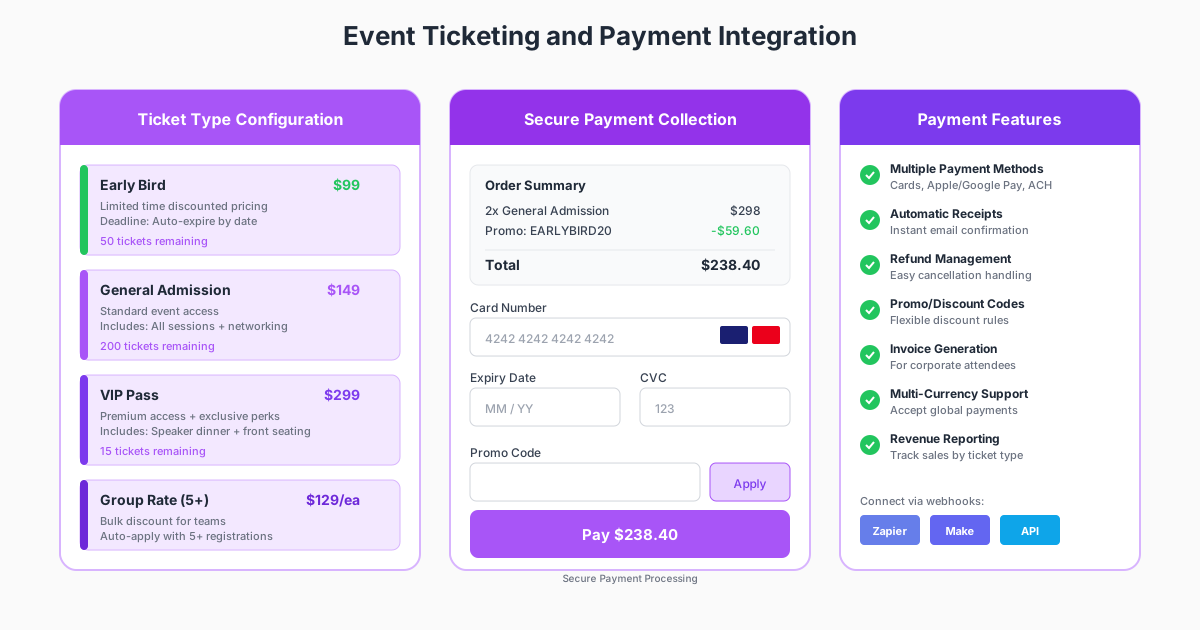
Most events benefit from multiple ticket tiers:
Early Bird Pricing:
- Time-limited discounted rates
- Creates urgency and rewards early commitment
- Typically 15-25% below standard pricing
Standard Admission:
- Your baseline ticket offering
- Available for the longest period
- Most straightforward pricing
VIP/Premium Tiers:
- Enhanced experience options
- Speaker access, premium seating, exclusive sessions
- Higher margin opportunity
Group Rates:
- Bulk discounts for teams
- Minimum quantity requirements (usually 5+)
- Simplified invoicing for corporate buyers
Payment Processing Best Practices
Multiple Payment Methods:
- Credit/debit cards (Visa, Mastercard, Amex)
- Digital wallets (Apple Pay, Google Pay)
- ACH/bank transfer for enterprise buyers
- Invoice options for corporate accounts
Security Requirements:
- PCI DSS compliance for card processing
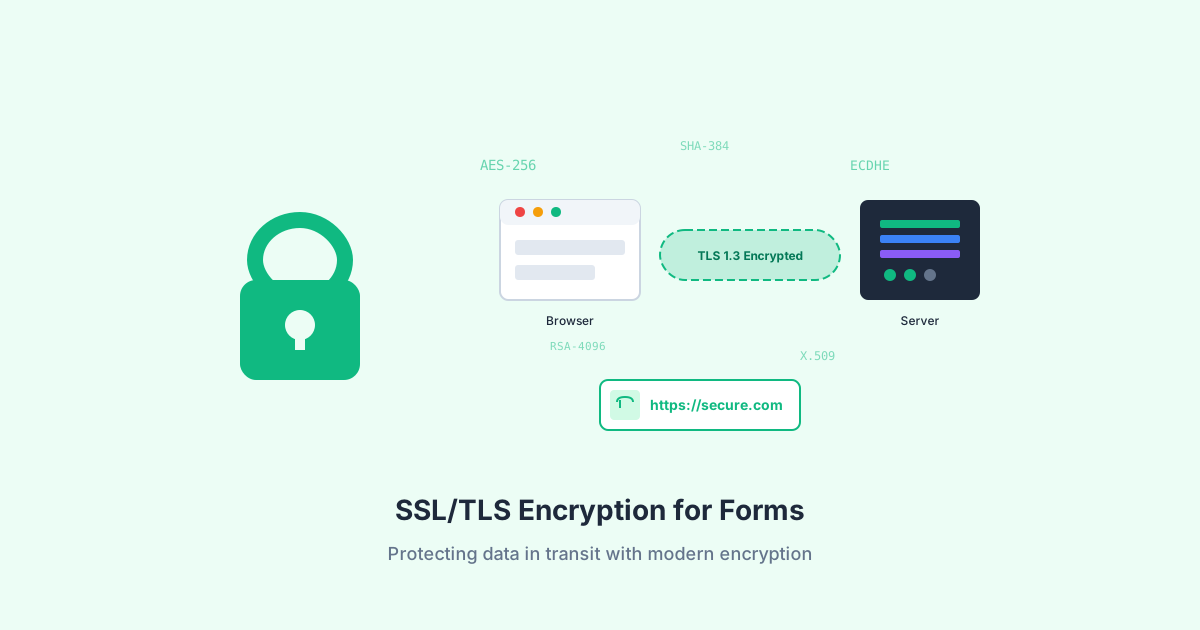
- SSL encryption for all form submissions
- Secure payment gateway integration (Stripe, PayPal)
- No storage of complete card numbers
User Experience:
- Clear order summary before payment
- Transparent pricing (including fees)
- Easy promo code application
- Instant confirmation after successful payment
Refund and Cancellation Policies
Clearly communicate your policies during registration:
- Cancellation deadlines and refund amounts
- Transfer policies (can tickets be given to others?)
- Event cancellation or postponement procedures
- Contact information for refund requests
Automation and Workflow Integration
Modern event registration goes far beyond collecting names. Automated workflows ensure every registrant receives timely, relevant communication without manual effort.
Immediate Post-Registration Automation
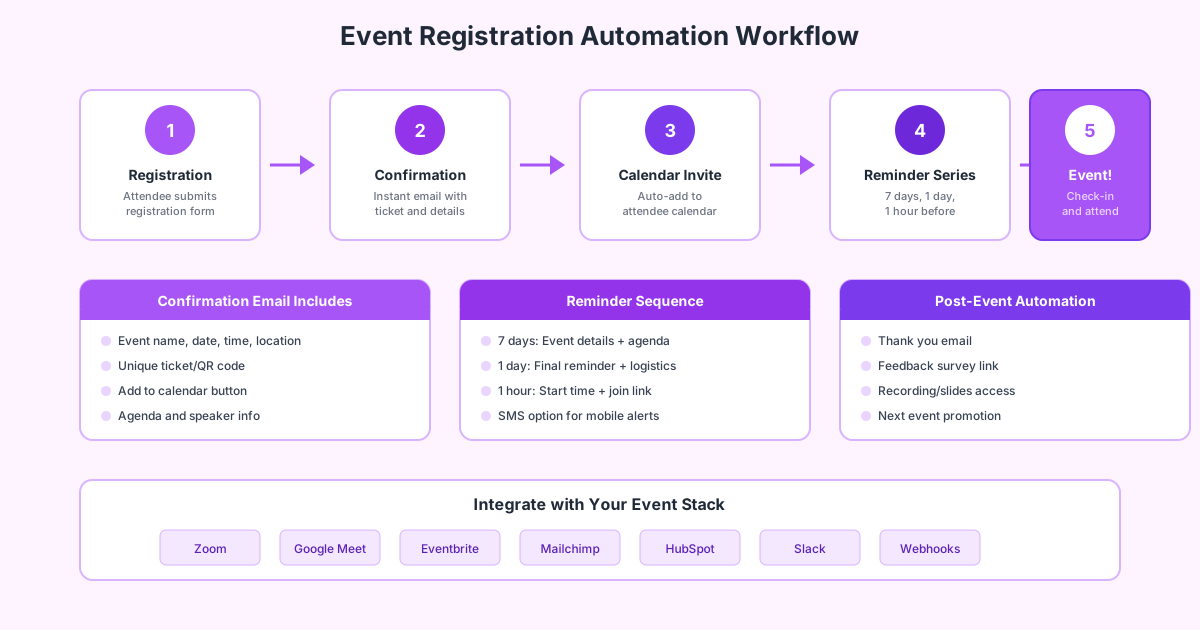
Confirmation Email: Sent instantly after registration, including:
- Event name, date, time, and location
- Unique ticket or confirmation number
- QR code for check-in (if applicable)
- Add-to-calendar button
- Relevant preparation information
Welcome Sequence: For events with longer lead times:
- Speaker and agenda highlights
- Preparation checklists
- Community or networking opportunities
- Social sharing encouragement
Pre-Event Reminder Sequence
A well-timed reminder sequence dramatically improves attendance:
7 Days Before:
- Full agenda and speaker lineup
- Preparation requirements
- Logistical information (parking, directions, virtual login)
1 Day Before:
- Final reminder with key details
- Last-minute tips and what to bring
- Contact information for questions
1 Hour Before:
- Quick reminder for virtual events
- Join link and technical instructions
- Mobile-optimized format
Post-Event Automation
The registration relationship continues after the event:
Thank You Email:
- Appreciation message
- Event highlights and photos
- Recording or materials access
Feedback Survey:
- Event satisfaction questions
- Speaker ratings
- Suggestions for improvement
- Net Promoter Score (NPS)
Follow-Up Content:
- Related resources and next steps
- Future event announcements
- Community engagement opportunities
CRM and Marketing Integration
Connect your registration forms to your broader marketing stack:
CRM Sync:
- Automatic contact creation/update
- Registration history tracking
- Lead scoring based on event engagement
Marketing Automation:
- Segment contacts by event attendance
- Trigger nurture sequences
- Personalize future communications
Analytics Integration:
- Track registration sources
- Measure conversion by campaign
- Calculate event ROI
Conversion Optimization Strategies
Getting more registrations from the same traffic directly impacts your event’s success. Here are proven strategies to optimize your registration funnel.
Form Design Optimization
Reduce Field Count: Every field you remove can increase conversions. Ask yourself:
- Do we actually use this data?
- Can we collect this later (at check-in, post-event)?
- Is it worth the conversion cost?
Progressive Profiling: For returning registrants, don’t ask for information you already have. Pre-fill known fields and only request new information.
Smart Defaults: Pre-select the most common options:
- Default to the most popular ticket type
- Pre-check common add-ons
- Set sensible defaults for optional fields
Landing Page Optimization
Your registration page context matters as much as the form itself:
Clear Value Proposition:
- Headline that communicates event benefit
- Speaker/content highlights
- Social proof (past attendee quotes, company logos)
Urgency and Scarcity:
- Countdown timers (use authentically)
- Limited ticket availability indicators
- Early bird deadline reminders
Trust Signals:
- Organizer credentials
- Past event success metrics
- Secure payment badges
Mobile Optimization
With over half of registrations happening on mobile:
Touch-Friendly Design:
- Large input fields and buttons
- Adequate spacing between elements
- Simplified navigation
Streamlined Flow:
- Minimize typing requirements
- Use dropdowns and selectors
- Enable autofill for common fields
Fast Loading:
- Optimize images and assets
- Minimize form complexity
- Test on real mobile devices
A/B Testing Ideas
Continuously improve through testing:
- Long form vs. multi-step form
- Field labels above vs. beside inputs
- Button text variations
- Social login options
- Payment timing (form before vs. after payment)
Measuring Registration Success
Track these metrics to understand and improve your registration performance:
Conversion Metrics
Registration Rate: Registrations divided by landing page visitors. Benchmark: 30-51% for well-optimized pages.
Form Completion Rate: Completed registrations divided by form starts. Identifies abandonment issues.
Registration-to-Attendance Rate: Actual attendees divided by registrations. Benchmark: 50-60% for free events, higher for paid.
Engagement Metrics
Time to Register: Average time from page load to completion. Shorter is generally better.
Field Drop-Off: Which fields cause the most abandonment? Use analytics to identify friction points.
Device Performance: Compare conversion rates across desktop, mobile, and tablet. Address underperforming segments.
Revenue Metrics
Revenue Per Registration: Total revenue divided by registrations. Track by ticket type and source.
Cost Per Registration: Marketing spend divided by registrations. Calculate by channel.
Customer Lifetime Value: For recurring events, track long-term attendee value.
Common Registration Form Mistakes to Avoid
Learn from others’ mistakes:
Asking for Too Much, Too Soon
The Problem: Long forms with irrelevant questions kill conversions.
The Solution: Start with minimum viable information. Collect additional details through pre-event surveys or at check-in.
Ignoring Mobile Users
The Problem: Forms designed for desktop that are frustrating on mobile.
The Solution: Design mobile-first. Test on actual devices. Use responsive form builders.
Unclear Pricing
The Problem: Hidden fees or confusing ticket options cause abandonment.
The Solution: Show total price early. Explain ticket differences clearly. Be transparent about processing fees.
No Follow-Up System
The Problem: Collecting registrations but not engaging registrants before the event.
The Solution: Implement automated reminder sequences. Keep registrants excited and informed.
Ignoring Accessibility
The Problem: Forms that exclude people with disabilities.
The Solution: Follow WCAG guidelines. Test with screen readers. Include accommodation questions.
Building Your Event Registration Form: A Checklist
Use this checklist when creating your next event registration form:
Planning:
- Define registration goals and required data
- Map the complete attendee journey
- Plan integration requirements (CRM, payment, email)
- Establish accessibility requirements
Form Design:
- Include only essential fields
- Use clear, descriptive labels
- Implement logical field order
- Add helpful placeholder text and instructions
- Design for mobile first
Functionality:
- Set up conditional logic for relevant questions
- Configure payment processing (if applicable)
- Enable confirmation emails
- Test form thoroughly before launch
Accessibility:
- Verify keyboard navigation
- Test with screen reader
- Check color contrast
- Include accommodation questions
Automation:
- Configure confirmation email content
- Set up reminder sequence
- Connect to CRM/marketing tools
- Plan post-event follow-up
Analytics:
- Set up conversion tracking
- Configure form analytics
- Plan A/B tests
- Establish success metrics
Frequently Asked Questions
How many fields should an event registration form have?
Aim for 5-7 fields for standard events. Research shows that forms with fewer than 5 fields see approximately 10% higher conversion rates than longer alternatives. Only include fields for information you’ll actually use—every additional field adds friction. For complex events like conferences, use multi-step forms or progressive profiling to collect additional information without overwhelming registrants upfront.
What’s a good registration-to-attendance rate for events?
For free events, expect 50-60% of registrants to actually attend. Paid events typically see higher attendance rates (70-80%+) because financial commitment increases follow-through. Virtual events often have lower attendance than in-person events. The key to improving attendance is a strong reminder sequence—emails sent 7 days, 1 day, and 1 hour before the event can significantly boost show rates.
Should I require payment during registration or after?
For paid events, collecting payment during registration is generally recommended. It confirms commitment, reduces no-shows, and simplifies your operations. However, for B2B events with enterprise buyers who need invoicing options, offering “register now, pay later” with invoice generation can increase conversions. Always clearly communicate cancellation and refund policies upfront.
How do I make my event registration form accessible?
Follow WCAG 2.1 Level AA guidelines: ensure proper form labels for screen readers, maintain 4.5:1 color contrast ratios, support keyboard-only navigation, and provide clear error messages. Include questions about accommodation needs (wheelchair access, sign language interpreters, assistive listening devices). Test your form with actual assistive technologies before launch.
What’s the best time to send registration reminder emails?
The most effective reminder sequence is: 7 days before (full details and agenda), 1 day before (logistics and final prep), and 1 hour before (especially for virtual events). For webinars, the 1-hour reminder is crucial—many registrants add it to their calendar and need that final prompt. Consider SMS reminders for high-value events, as text messages have significantly higher open rates than email.
How can I reduce registration form abandonment?
Key strategies include: keeping forms short (5 fields or fewer when possible), optimizing for mobile, using progress indicators for multi-step forms, saving partial entries so users can return, offering social login options, and ensuring fast page load times. Monitor your analytics to identify specific fields where users drop off, then either remove those fields or make them optional.
Should I use a single-page or multi-step registration form?
Multi-step forms work well for complex registrations (conferences, paid events) because they break the process into manageable chunks and can show progress. Single-page forms are better for simple registrations (webinars, free events) where speed is the priority. Test both approaches with your specific audience—the best choice depends on your event type and required information.
Ready to create event registration forms that convert visitors into engaged attendees? Pixelform makes it easy to build professional registration forms with conditional logic, automated email confirmations, and powerful analytics.