Form Data Encryption and SSL: The Complete Guide to Secure Form Submissions
Every time a user submits a form on your website, sensitive data travels across the internet. Without proper encryption, that data is vulnerable to interception, theft, and manipulation. Understanding how SSL/TLS encryption works and implementing it correctly is fundamental to protecting your users and your business.
This comprehensive guide explains everything you need to know about form data encryption, from the basics of SSL/TLS to advanced implementation strategies that ensure your forms are truly secure.
What Is SSL/TLS Encryption?
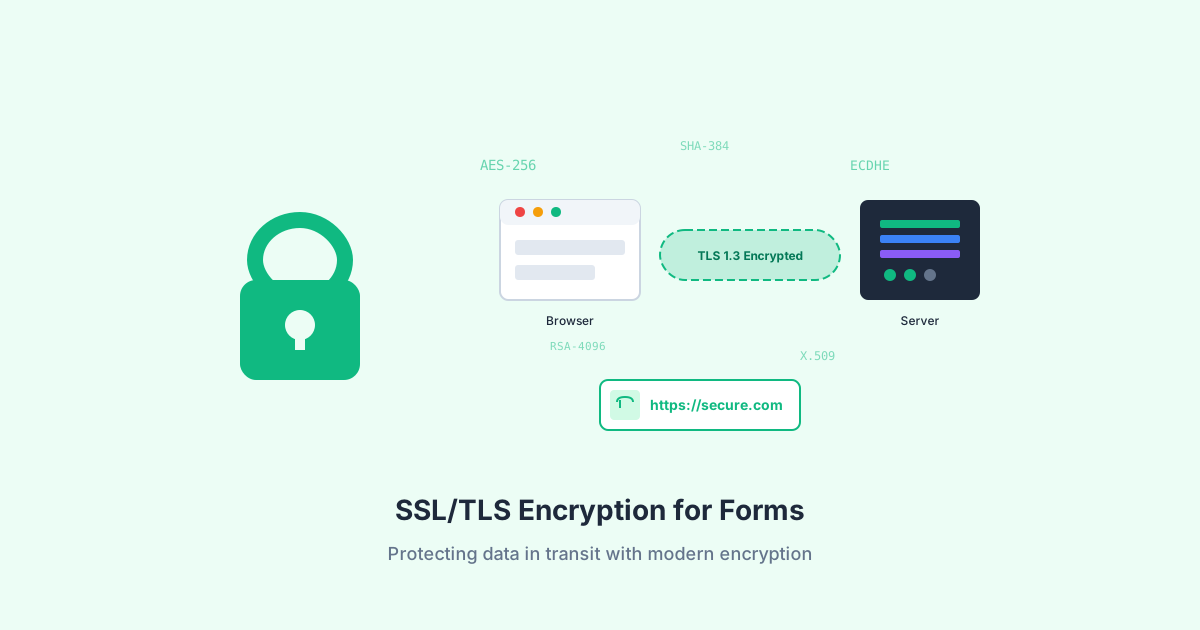
SSL (Secure Sockets Layer) and its successor TLS (Transport Layer Security) are cryptographic protocols that provide secure communication over networks. When you see “HTTPS” in a URL or a padlock icon in your browser, that connection is protected by TLS encryption.
The Evolution from SSL to TLS
SSL was originally developed by Netscape in the 1990s. After several versions and security improvements, it evolved into TLS:
- SSL 2.0 (1995): First public release, now deprecated due to serious vulnerabilities
- SSL 3.0 (1996): Improved security, but still vulnerable to POODLE attacks
- TLS 1.0 (1999): First TLS version, largely similar to SSL 3.0
- TLS 1.1 (2006): Added protection against cipher block chaining attacks
- TLS 1.2 (2008): Major improvements, still widely used today
- TLS 1.3 (2018): Current standard with simplified handshake and better security
Today, TLS 1.2 and TLS 1.3 are the only versions considered secure. All earlier versions should be disabled on your servers.
How TLS Protects Your Data
TLS provides three essential security services:
- Encryption: Data is encrypted so only the intended recipient can read it
- Authentication: Certificates verify you’re connecting to the legitimate server
- Integrity: Any tampering with data in transit is detected
HTTP vs HTTPS: Why Encryption Matters for Forms
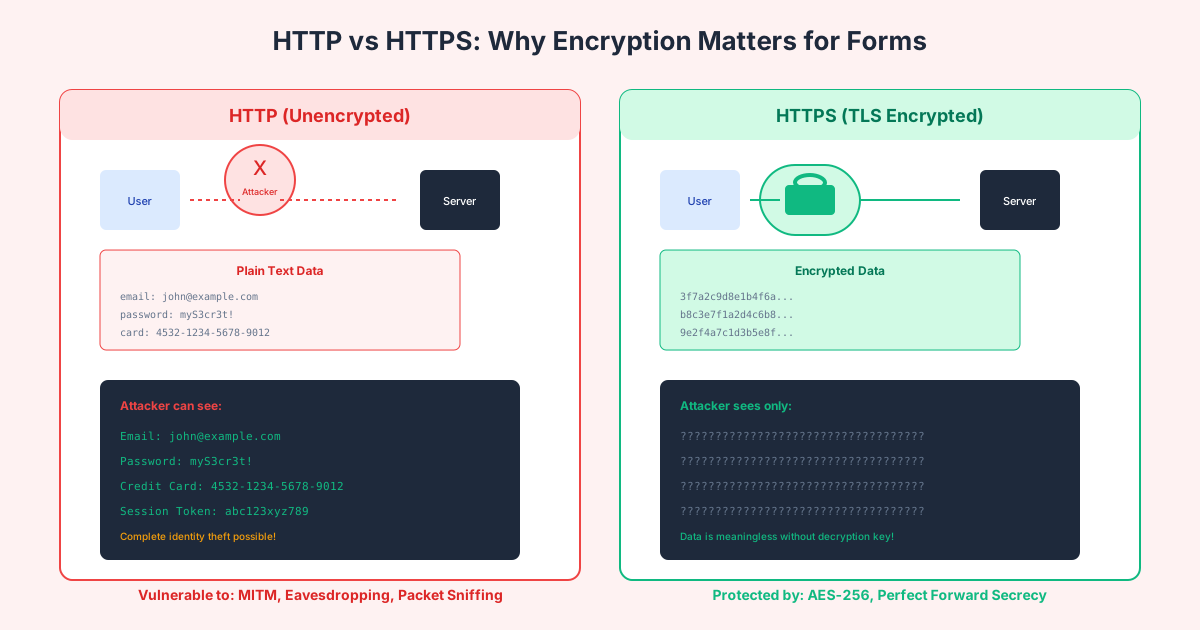
The difference between HTTP and HTTPS is literally the difference between broadcasting your users’ passwords in plain text and keeping them secure.
What Happens Without Encryption
When a form is submitted over HTTP (unencrypted), the data travels in plain text. Anyone positioned between the user and your server can:
- Read all form data: Usernames, passwords, credit card numbers, personal information
- Modify data in transit: Change form values, inject malicious content
- Steal session tokens: Hijack user accounts
- Perform replay attacks: Re-submit captured form data
This isn’t a theoretical risk. Public WiFi networks at coffee shops, airports, and hotels are common attack vectors. Network administrators, ISPs, and government agencies can all potentially see unencrypted traffic.
How HTTPS Protects Form Submissions
With HTTPS, all data between the browser and server is encrypted using algorithms like AES-256-GCM. Even if an attacker intercepts the traffic, they see only meaningless encrypted data.
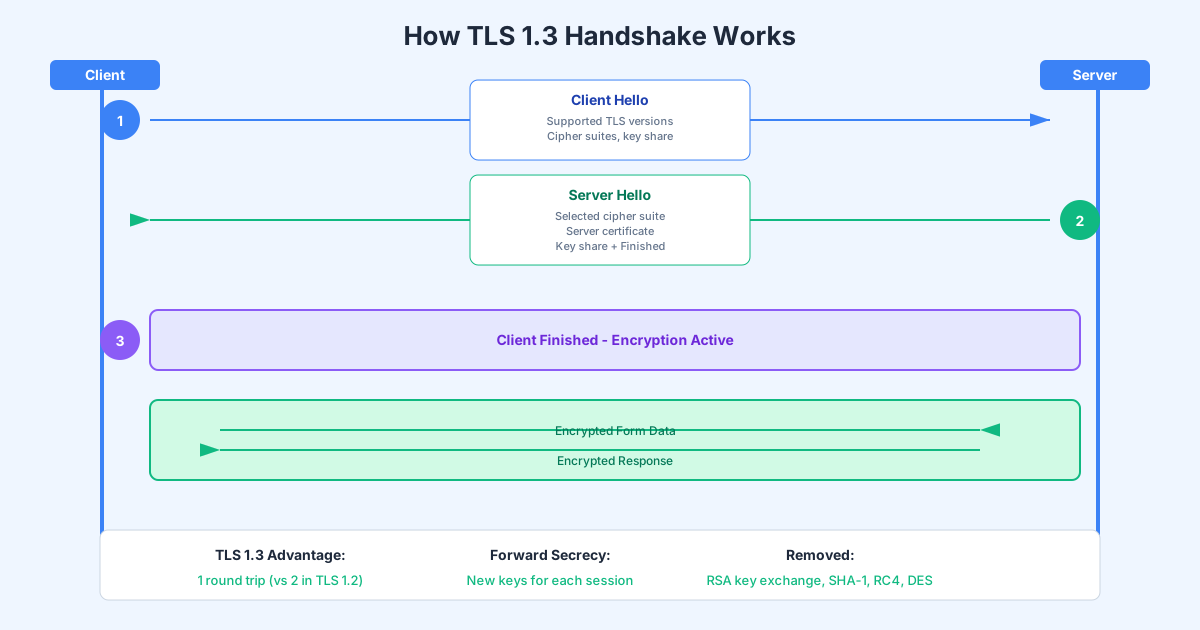
The encryption is established through a process called the TLS handshake:
- Browser requests secure connection
- Server sends its SSL certificate
- Browser verifies the certificate is valid and trusted
- Both parties agree on encryption algorithms
- Symmetric encryption keys are exchanged
- All subsequent communication is encrypted
Browser Warnings and User Trust
Modern browsers actively discourage HTTP usage:
- Chrome labels HTTP sites as “Not Secure” in the address bar
- Firefox shows a crossed-out padlock for HTTP connections
- Safari displays “Not Secure” warnings
- Many browsers block form submissions from HTTP pages to HTTPS endpoints
According to Google’s transparency report, over 95% of web traffic in Chrome is now encrypted. Users have learned to look for the padlock, and many will abandon forms on sites without HTTPS.
Types of Encryption for Form Data
Form data needs protection at multiple stages. Understanding the different types of encryption helps you implement comprehensive security.
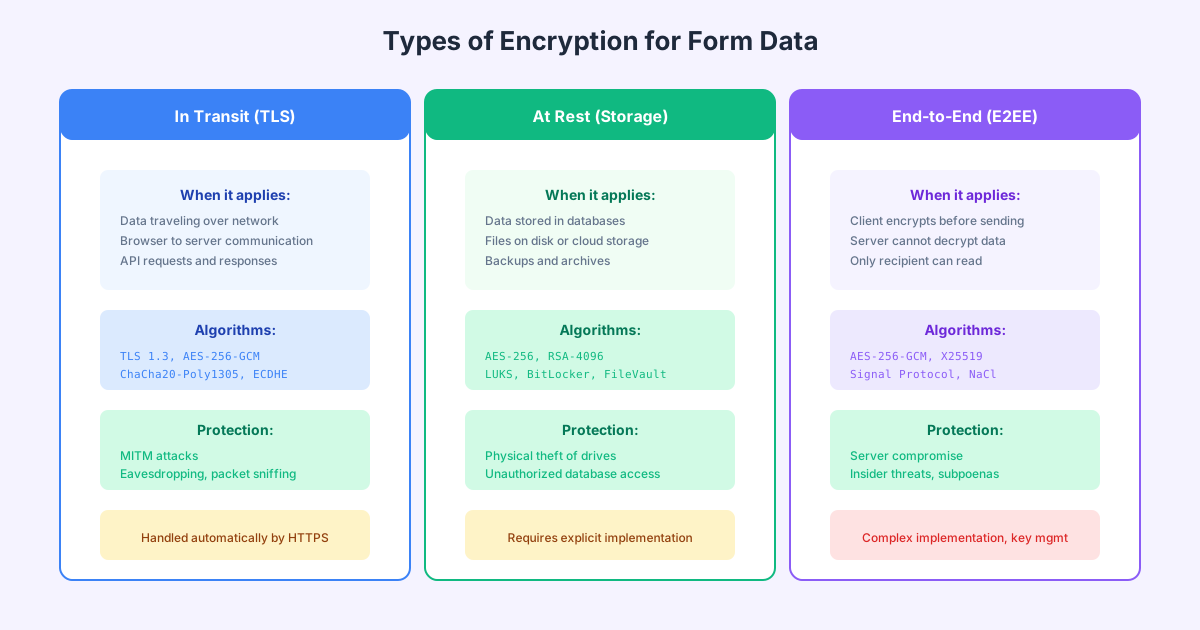
Encryption in Transit (TLS)
This protects data as it travels between the browser and your server. It’s automatically handled by HTTPS and is the most fundamental form of protection.
When it applies:
- Form submissions from browser to server
- API requests between services
- Database connections
- Email transmission (with STARTTLS)
Key algorithms:
- AES-256-GCM for symmetric encryption
- ChaCha20-Poly1305 as an alternative
- ECDHE for key exchange (provides Perfect Forward Secrecy)
Encryption at Rest
This protects data stored in databases, file systems, and backups. Even if an attacker gains access to your storage systems, encrypted data remains unreadable without the decryption keys.
When it applies:
- Data stored in databases
- Files on disk or cloud storage
- Backup archives
- Log files containing sensitive information
Key algorithms:
- AES-256 for database encryption
- LUKS for Linux disk encryption
- BitLocker for Windows
- FileVault for macOS
End-to-End Encryption (E2EE)
This is the strongest form of protection. Data is encrypted on the client before transmission and can only be decrypted by the intended recipient—not even your servers can read it.
When it applies:
- Highly sensitive form data (medical, legal, financial)
- Zero-knowledge applications
- Privacy-focused services
Key algorithms:
- X25519 for key exchange
- Signal Protocol for messaging
- NaCl/libsodium for general cryptography
SSL Certificate Types and Validation Levels
Not all SSL certificates are equal. Understanding the different types helps you choose the right certificate for your needs.
Domain Validation (DV) Certificates
DV certificates are the simplest and most common type. The Certificate Authority (CA) only verifies that you control the domain—no organization identity is validated.
Characteristics:
- Issued in minutes (automated)
- Lowest cost (often free)
- Shows padlock in browser
- No organization information in certificate
Best for:
- Personal websites and blogs
- Small business sites
- Basic contact forms
- Development and staging environments
Providers:
- Let’s Encrypt (free, automated)
- Cloudflare (free with their service)
- Commercial CAs ($0-100/year)
Organization Validation (OV) Certificates
OV certificates require the CA to verify your organization’s identity in addition to domain ownership. The organization name appears in the certificate details.
Characteristics:
- Takes 1-3 business days to issue
- Moderate cost ($50-200/year)
- Organization name in certificate
- Manual verification process
Best for:
- Business websites
- Corporate applications
- Forms collecting business information
- When you need to show organizational legitimacy
Extended Validation (EV) Certificates
EV certificates require extensive validation of your organization’s legal identity, physical address, and operational existence. They represent the highest level of trust.
Characteristics:
- Takes 1-2 weeks to issue
- Highest cost ($100-500/year)
- Extensive legal verification
- Organization name prominently displayed
Best for:
- E-commerce websites
- Banking and financial services
- Payment processing forms
- High-value transactions
Note: Modern browsers no longer show the green address bar for EV certificates, but the extended validation is still visible in certificate details.

Wildcard vs Single Domain Certificates
Beyond validation levels, certificates differ in how many domains they cover:
Single Domain: Covers exactly one domain (example.com)
Wildcard: Covers a domain and all its subdomains (*.example.com)
- More convenient for multiple subdomains
- Single certificate to manage
- Cannot cover multiple levels (..example.com)
Multi-Domain (SAN): Covers multiple specific domains
- List up to 100+ domains on one certificate
- Mix of different domains allowed
- Useful for related properties
Implementing SSL/TLS: A Complete Checklist
Proper implementation goes beyond just installing a certificate. Follow this comprehensive checklist to ensure your forms are truly secure.
Server Configuration
Protocol versions:
- Enable TLS 1.2 and TLS 1.3 only
- Disable SSL 2.0, SSL 3.0, TLS 1.0, and TLS 1.1
- Test your configuration at SSL Labs (ssllabs.com/ssltest)
Cipher suites:
- Use only strong cipher suites
- Prefer ECDHE for key exchange (Perfect Forward Secrecy)
- Avoid RC4, DES, 3DES, and export ciphers
- Order ciphers by strength (server preference)
Example Nginx configuration:
ssl_protocols TLSv1.2 TLSv1.3;
ssl_prefer_server_ciphers on;
ssl_ciphers ECDHE-ECDSA-AES128-GCM-SHA256:ECDHE-RSA-AES128-GCM-SHA256:ECDHE-ECDSA-AES256-GCM-SHA384:ECDHE-RSA-AES256-GCM-SHA384;
ssl_session_timeout 1d;
ssl_session_cache shared:SSL:50m;
ssl_stapling on;
ssl_stapling_verify on;
Certificate management:
- Set up automatic renewal (certbot for Let’s Encrypt)
- Monitor certificate expiration
- Enable OCSP Stapling for faster validation
Security Headers
HSTS (HTTP Strict Transport Security):
Strict-Transport-Security: max-age=31536000; includeSubDomains; preloadThis header tells browsers to only connect via HTTPS, preventing downgrade attacks. The preload directive allows submission to browser preload lists.
Content Security Policy:
Content-Security-Policy: default-src 'self'; form-action 'self' https://api.yourdomain.comRestricts where forms can submit data, preventing form hijacking.
Additional headers:
X-Content-Type-Options: nosniffX-Frame-Options: DENYReferrer-Policy: strict-origin-when-cross-origin
Form-Specific Security
Ensure forms only appear on HTTPS pages:
- Redirect all HTTP traffic to HTTPS
- Use relative URLs or explicit HTTPS in form actions
- Test for mixed content warnings
Form action security:
<!-- Always use HTTPS for form actions -->
<form action="https://api.yourdomain.com/submit" method="POST">
Secure cookie attributes:
Set-Cookie: session=abc123; Secure; HttpOnly; SameSite=Strict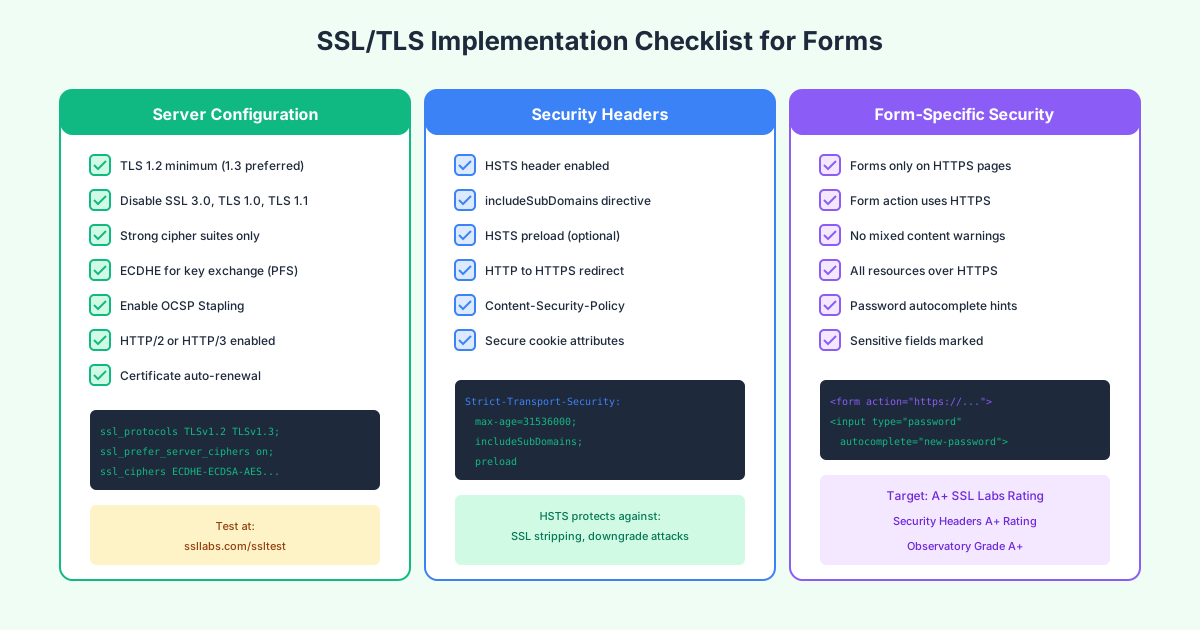
Encrypting Form Data at Rest
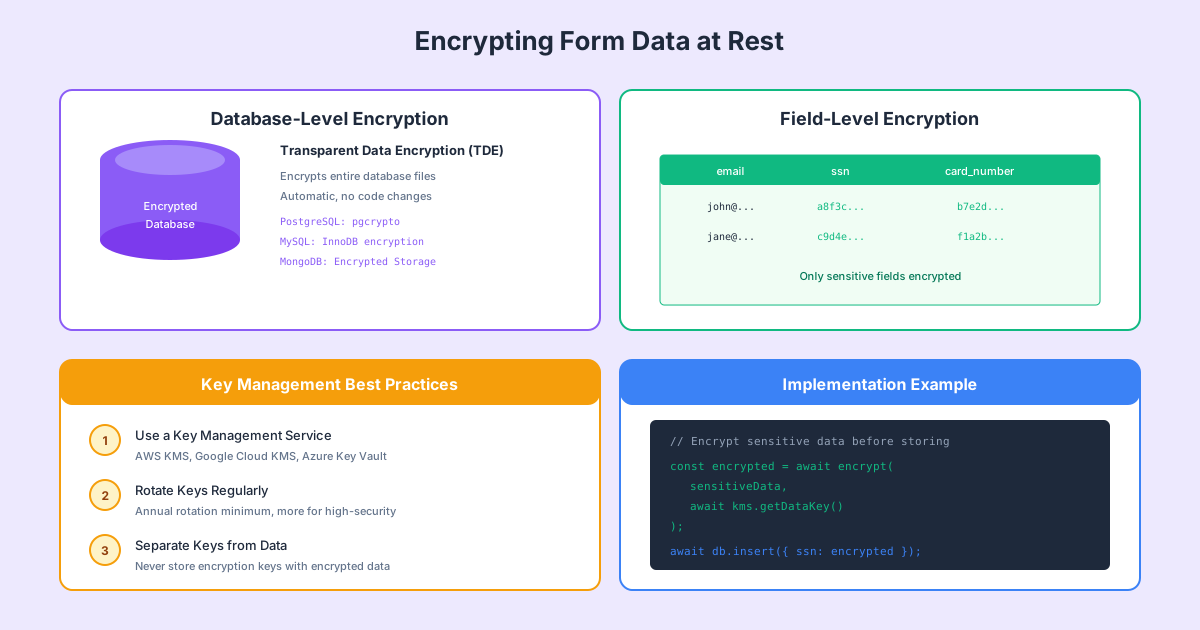
HTTPS protects data in transit, but what about after it reaches your server? Encryption at rest ensures data remains protected in storage.
Database-Level Encryption
Most modern databases support transparent data encryption (TDE), which encrypts the entire database without code changes.
PostgreSQL:
- Use pgcrypto extension for column-level encryption
- Full disk encryption for the database server
- Encrypt backups separately
MySQL/MariaDB:
- InnoDB tablespace encryption
- Binary log encryption
- Encrypt connections with SSL
MongoDB:
- Encrypted Storage Engine
- Field-level encryption (Client-Side Field Level Encryption)
- Encryption at rest with WiredTiger
Field-Level Encryption
For sensitive fields like Social Security numbers or credit card data, consider encrypting individual fields before storing:
// Encrypt sensitive data before storing
const encrypted = await encrypt(
  sensitiveData,
  await kms.getDataKey()
);
await db.insert({ ssn: encrypted });
Benefits:
- Granular control over what’s encrypted
- Different keys for different data types
- Encrypted fields remain encrypted in logs and backups
- Supports regulatory requirements (PCI DSS, HIPAA)
Key Management Best Practices
Use a Key Management Service:
- AWS KMS
- Google Cloud KMS
- Azure Key Vault
- HashiCorp Vault
Key rotation:
- Rotate encryption keys annually at minimum
- More frequent rotation for high-security data
- Maintain ability to decrypt data with old keys
Separation:
- Never store encryption keys with encrypted data
- Use envelope encryption (data key encrypted by master key)
- Implement least-privilege access to keys
Testing Your SSL Implementation
Regular testing ensures your encryption remains effective as standards evolve.
Online Testing Tools
SSL Labs Server Test (ssllabs.com/ssltest):
- Comprehensive analysis of your TLS configuration
- Grades from A+ to F
- Detailed vulnerability assessment
- Protocol and cipher suite analysis
- Target: A+ rating
Security Headers (securityheaders.com):
- Analyzes HTTP security headers
- Grades your header implementation
- Specific recommendations for improvement
- Target: A+ rating
Mozilla Observatory (observatory.mozilla.org):
- Comprehensive security scan
- Includes TLS, headers, and more
- Industry benchmark comparisons
- Target: A+ grade
Command-Line Testing
OpenSSL testing:
# Test TLS connection
openssl s_client -connect yourdomain.com:443 -tls1_2

# Check certificate details
openssl s_client -connect yourdomain.com:443 </dev/null 2>/dev/null | openssl x509 -text

# Test specific cipher
openssl s_client -connect yourdomain.com:443 -cipher ECDHE-RSA-AES256-GCM-SHA384
Nmap SSL scan:
nmap --script ssl-enum-ciphers -p 443 yourdomain.comContinuous Monitoring
Set up automated monitoring for:
- Certificate expiration (alert 30 days before)
- SSL configuration changes
- Security header modifications
- New vulnerabilities (subscribe to security mailing lists)
Common SSL/TLS Mistakes to Avoid
Mixed Content
Loading any resources over HTTP on an HTTPS page creates a mixed content warning and can compromise security.
Common culprits:
- Images loaded from HTTP URLs
- External scripts without HTTPS
- Font files from insecure CDNs
- Legacy embeds and iframes
Solution: Use protocol-relative URLs (//example.com/resource) or always specify HTTPS.
Certificate Errors
Expired certificates: Set up automated renewal and monitoring
Hostname mismatch: Ensure certificate covers all domains (including www and non-www)
Incomplete chain: Include intermediate certificates in your configuration
Self-signed certificates: Never use in production; they provide encryption but no authentication
Configuration Weaknesses
Supporting legacy protocols: Disable TLS 1.0 and 1.1 despite potential compatibility concerns
Weak cipher suites: Remove any cipher suites using RC4, DES, or export-grade encryption
Missing HSTS: Without HSTS, users can still be downgraded to HTTP
Short HSTS max-age: Use at least one year (31536000 seconds)
Mobile and API Considerations
Mobile App Security
Mobile apps require additional considerations:
Certificate pinning: Bind your app to specific certificates to prevent MITM attacks, even with compromised CAs
Network Security Config (Android):
<network-security-config>
    <domain-config cleartextTrafficPermitted="false">
        <domain includeSubdomains="true">yourdomain.com</domain>
    </domain-config>
</network-security-config>
App Transport Security (iOS):
<key>NSAppTransportSecurity</key>
<dict>
    <key>NSAllowsArbitraryLoads</key>
    <false/>
</dict>
API Security
For forms that submit to APIs:
- Always use HTTPS for API endpoints
- Implement mutual TLS (mTLS) for server-to-server communication
- Use short-lived tokens rather than long-lived API keys
- Validate TLS certificates in API clients
Regulatory Compliance and Encryption
Different regulations have specific encryption requirements:
PCI DSS
Payment Card Industry Data Security Standard requires:
- TLS 1.2 or higher for cardholder data transmission
- Strong cryptography for stored cardholder data
- Proper key management procedures
HIPAA
Health Insurance Portability and Accountability Act requires:
- Encryption for electronic Protected Health Information (ePHI)
- Both in-transit and at-rest encryption recommended
- Risk analysis to determine appropriate encryption
GDPR
General Data Protection Regulation requires:
- “Appropriate technical measures” including encryption
- Pseudonymization and encryption specifically mentioned as safeguards
- Encryption can reduce breach notification requirements
SOC 2
Service Organization Control 2 requires:
- Encryption of data in transit
- Encryption of data at rest
- Documentation of encryption practices
How Pixelform Handles Encryption
Pixelform implements enterprise-grade encryption for all form submissions:
In Transit:
- TLS 1.3 with fallback to TLS 1.2
- Perfect Forward Secrecy with ECDHE
- A+ SSL Labs rating
- HSTS with preloading
At Rest:
- AES-256 encryption for stored submissions
- Field-level encryption for sensitive data
- Encrypted backups with separate keys
- Geographic data residency options
Key Management:
- Hardware Security Modules (HSMs) for key storage
- Automatic key rotation
- Audit logging for all key access
- Compliance with PCI DSS, HIPAA, and GDPR requirements
Frequently Asked Questions
Is HTTPS enough to secure my forms?
HTTPS is essential but not sufficient on its own. You also need server-side validation, CSRF protection, secure session management, and proper data handling. HTTPS protects data in transit—you still need to protect it everywhere else.
Do I need an EV certificate for forms?
For most forms, a DV certificate from Let’s Encrypt provides adequate security. EV certificates are worth considering for payment forms or high-value transactions where building maximum trust is important. The encryption strength is identical; the difference is in identity verification.
How often should I renew SSL certificates?
Let’s Encrypt certificates last 90 days and should auto-renew. Commercial certificates typically last 1 year (maximum allowed since 2020). Set up automated renewal and monitor expiration dates regardless of certificate type.
Can encrypted form data be hacked?
Properly implemented encryption is extremely secure—breaking AES-256 would take longer than the age of the universe with current technology. However, attackers don’t break encryption; they exploit implementation flaws, steal keys, or target unencrypted points. Security requires encryption plus proper implementation.
What’s the difference between SSL and TLS?
TLS is the successor to SSL. SSL versions are all deprecated and insecure. When people say “SSL certificate” today, they mean a certificate used with TLS. The terms are often used interchangeably, but technically, all modern secure connections use TLS.
Should I encrypt all form fields or just sensitive ones?
At a minimum, use HTTPS for all forms (encrypting everything in transit). For stored data, you can choose between full database encryption and field-level encryption. Field-level encryption of sensitive data (SSN, credit cards, health info) provides defense in depth and helps meet compliance requirements.
How do I know if my SSL is configured correctly?
Use SSL Labs (ssllabs.com/ssltest) to scan your domain. Aim for an A+ rating. Also test with Security Headers (securityheaders.com) and Mozilla Observatory. Address any warnings or recommendations these tools provide.
Does encryption slow down my forms?
Modern TLS implementations have minimal performance impact. TLS 1.3 reduced the handshake to a single round trip. Session resumption eliminates overhead for returning visitors. Any slight latency is far outweighed by the security benefits and user trust.
Conclusion
Form data encryption is not optional—it’s a fundamental requirement for protecting your users and your business. HTTPS with properly configured TLS protects data in transit, while encryption at rest safeguards stored submissions. Together with proper key management and regular testing, these measures create a comprehensive encryption strategy.
Remember these key points:
- Use TLS 1.2 or 1.3 exclusively—disable all older protocols
- Get an A+ rating on SSL Labs and Security Headers
- Enable HSTS to prevent downgrade attacks
- Encrypt sensitive data at rest, not just in transit
- Monitor and test your configuration regularly
With proper encryption in place, you can confidently collect sensitive information through your forms, knowing that user data is protected at every stage of its journey.