Form Spam Prevention Guide: Stop Bots Without CAPTCHA Frustration
Key Takeaways
- Honeypots block most simple bots with zero user friction: A hidden field that humans can’t see but bots fill out catches the majority of automated spam attempts.
- Time-based analysis detects inhuman speeds: Real users take at least 3-5 seconds to complete even simple forms—bots complete them in milliseconds.
- Layered defenses are more effective than single solutions: Combining multiple lightweight techniques blocks 99%+ of spam without resorting to frustrating CAPTCHAs.
- Traditional CAPTCHAs hurt conversion rates: Studies show CAPTCHAs can reduce form completions by up to 30%—invisible protection is better for business.
Form spam isn’t just annoying—it’s expensive. According to Kaspersky’s annual spam report, spam accounts for roughly 45% of all email traffic, and a significant portion originates from compromised web forms. The Imperva Bad Bot Report found that 30% of all internet traffic comes from bad bots, with form-targeting bots among the most common.
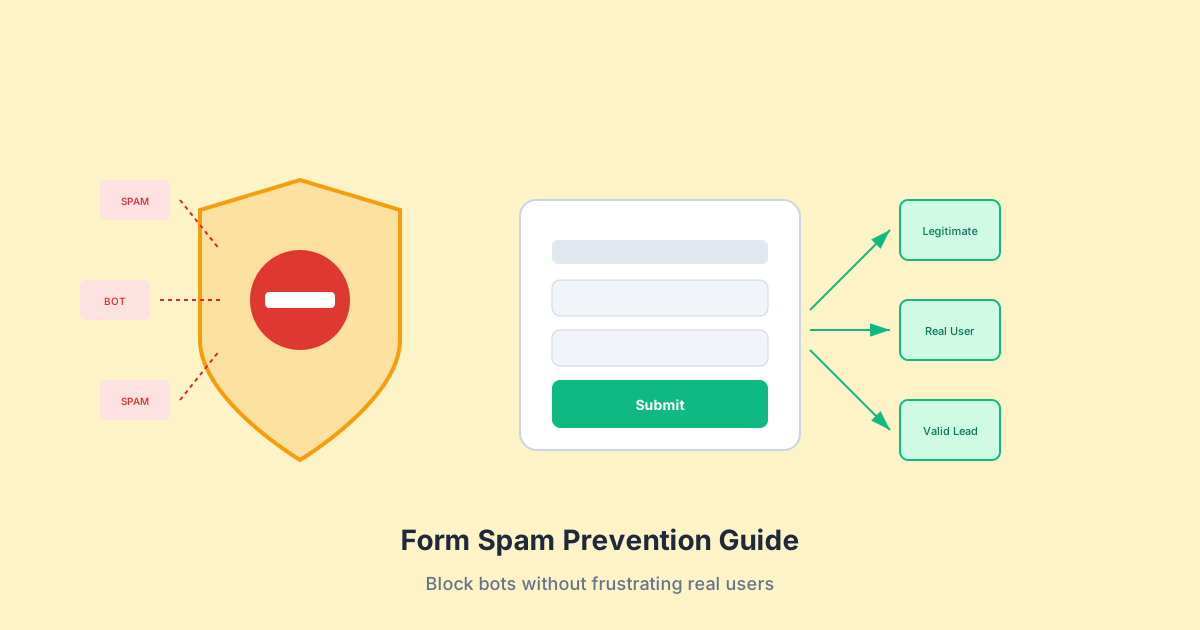
The good news? You can block nearly all spam without making legitimate users jump through hoops. This guide shows you how.
The Real Cost of Form Spam
Before diving into solutions, let’s understand what you’re fighting against. Form spam isn’t just a nuisance—it has measurable business impact.
The Numbers Behind Form Spam
Traffic Analysis:
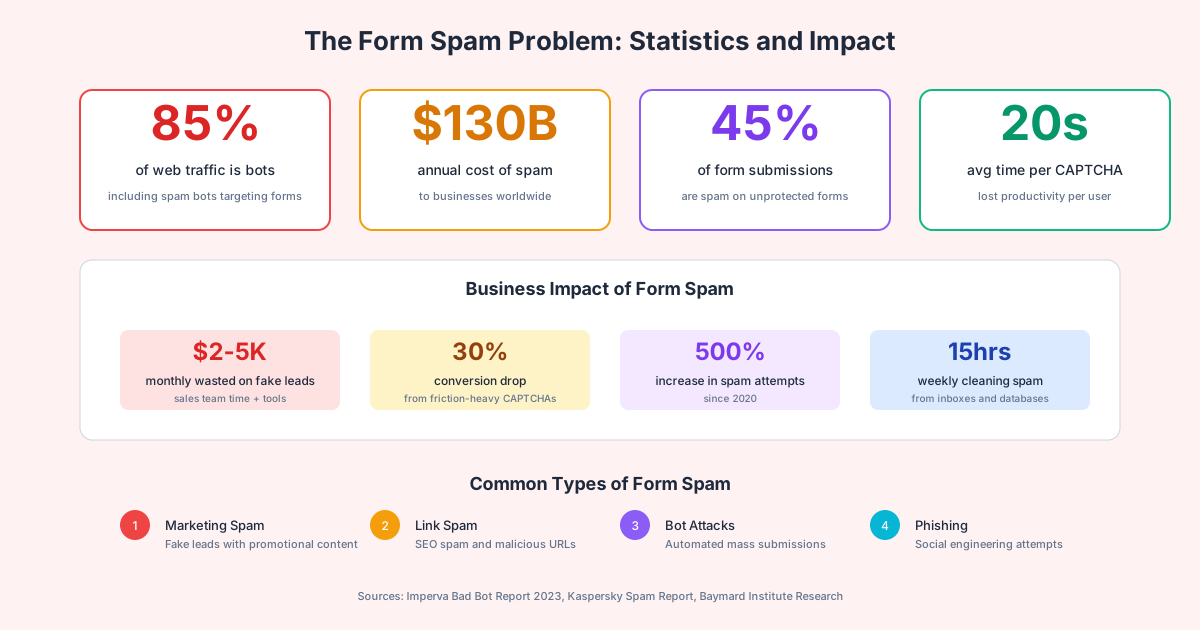
- Up to 85% of web traffic consists of bots (both good and bad)
- 30% of all internet traffic is specifically from bad bots
- Unprotected forms see 45-60% spam submission rates
Business Impact:
- $2,000-5,000/month wasted on fake lead follow-up
- 15+ hours weekly spent cleaning spam from databases
- 30% conversion drop from friction-heavy CAPTCHAs
- Degraded sender reputation from spam-triggered emails
Types of Form Spam:
- Marketing Spam: Fake leads containing promotional content or advertisements
- Link Spam: SEO spam attempting to inject backlinks through form submissions
- Bot Attacks: Automated mass submissions to exhaust resources or exploit vulnerabilities
- Phishing Attempts: Social engineering through contact forms to reach employees
Honeypot Fields: The Invisible Bot Trap
The honeypot technique is elegant in its simplicity: add a form field that humans can’t see or interact with, but bots will automatically fill out.
How Honeypots Work

The Concept:
- Add a form field with an enticing name like “website,” “url,” or “phone2”
- Hide it visually using CSS (not
display: nonealone—more sophisticated hiding) - Make it inaccessible to keyboard navigation (
tabindex="-1") - Disable autocomplete to prevent false positives
- On submission, check if the field has a value—if so, it’s spam
Implementation:
<form method="POST" action="/submit">
  <!-- Visible fields -->
  <label for="name">Name</label>
  <input type="text" id="name" name="name" required>

  <label for="email">Email</label>
  <input type="email" id="email" name="email" required>

  <!-- Honeypot field - hidden from humans -->
  <div class="hp-field" aria-hidden="true">
    <label for="website">Website (leave blank)</label>
    <input
      type="text"
      id="website"
      name="website"
      tabindex="-1"
      autocomplete="off"
    >
  </div>

  <button type="submit">Submit</button>
</form>

<style>
.hp-field {
  position: absolute;
  left: -9999px;
  width: 1px;
  height: 1px;
  overflow: hidden;
}
</style>
Server-Side Validation:
function validateSubmission(formData) {
  // If honeypot is filled, silently reject as spam
  if (formData.website && formData.website.trim() !== '') {
    // Log for monitoring but don't alert the bot
    console.log('Honeypot triggered - spam blocked');
    return { success: false, isSpam: true };
  }

  // Process legitimate submission
  return processForm(formData);
}
Honeypot Best Practices
Do:
- Use field names that look attractive to bots (website, url, phone2, fax)
- Hide with CSS positioning rather than
display: none(bots know to skip hidden fields) - Return a normal “success” response to spam—don’t reveal detection
- Log blocked submissions for analysis
- Combine with other techniques for layered defense
Don’t:
- Name the field “honeypot” or anything obvious
- Show error messages when honeypot is triggered
- Rely solely on honeypots—sophisticated bots may avoid them
Honeypot Limitations
According to WP Mail SMTP research, honeypots have become less effective as bots have evolved. Modern bots may:
- Detect and skip hidden fields
- Use headless browsers that render CSS
- Analyze page structure to identify traps
However, honeypots still catch the majority of simple automated spam with zero user friction, making them an essential first layer of defense.
Time-Based Analysis: Detecting Bot Speed
Humans take time to read, think, and type. Bots don’t. Time-based analysis exploits this fundamental difference.
How Time Analysis Works
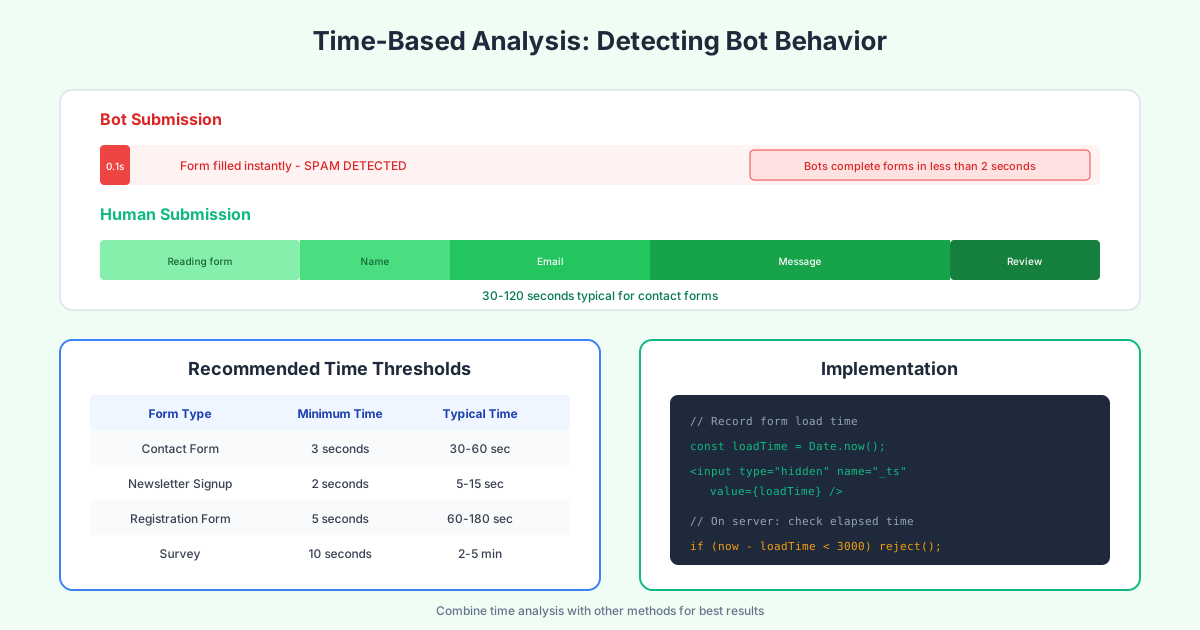
Human Behavior:
- Reading the form: 5-10 seconds
- Filling name field: 2-4 seconds
- Filling email field: 3-5 seconds
- Writing a message: 30-120 seconds
- Reviewing before submit: 3-10 seconds
- Total: 30-150 seconds typically
Bot Behavior:
- Fill all fields: 0.01-0.5 seconds
- Submit: 0.001 seconds
- Total: Under 1 second
Implementation:
// On form load - record timestamp
const formLoadTime = Date.now();
document.getElementById('form-timestamp').value = formLoadTime;

// HTML
<input type="hidden" id="form-timestamp" name="_timestamp">
Server-Side Validation:
function validateTiming(formData) {
  const loadTime = parseInt(formData._timestamp, 10);
  const submitTime = Date.now();
  const elapsedSeconds = (submitTime - loadTime) / 1000;

  // Minimum thresholds by form type
  const MIN_TIME_CONTACT = 3;   // 3 seconds minimum
  const MIN_TIME_REGISTER = 5;  // 5 seconds minimum
  const MIN_TIME_SURVEY = 10;   // 10 seconds minimum

  if (elapsedSeconds < MIN_TIME_CONTACT) {
    return { valid: false, reason: 'submission_too_fast' };
  }

  // Also check for maximum (forms submitted after hours might be replays)
  const MAX_TIME_HOURS = 24;
  if (elapsedSeconds > MAX_TIME_HOURS * 3600) {
    return { valid: false, reason: 'form_expired' };
  }

  return { valid: true };
}
Time Thresholds by Form Type
| Form Type | Minimum Time | Typical Time |
|---|---|---|
| Newsletter signup | 2 seconds | 5-15 seconds |
| Contact form | 3 seconds | 30-60 seconds |
| Registration | 5 seconds | 60-180 seconds |
| Application | 10 seconds | 5-15 minutes |
| Survey | 10 seconds | 2-10 minutes |
Advanced: Field-Level Timing
For stronger protection, track time between field interactions:
const fieldTimings = {};
let lastFieldTime = Date.now();

document.querySelectorAll('input, textarea').forEach(field => {
  field.addEventListener('focus', () => {
    const now = Date.now();
    fieldTimings[field.name] = {
      focusTime: now,
      timeSinceLastField: now - lastFieldTime
    };
    lastFieldTime = now;
  });

  field.addEventListener('blur', () => {
    if (fieldTimings[field.name]) {
      fieldTimings[field.name].timeInField =
        Date.now() - fieldTimings[field.name].focusTime;
    }
  });
});
Bots typically have uniform timing between fields, while humans show natural variation.
CAPTCHA Alternatives: Balancing Security and UX
Traditional CAPTCHAs are effective but frustrating. Every time a user solves a CAPTCHA, they lose 10-30 seconds. For high-traffic forms, this translates directly to lost conversions.
Comparing Protection Options
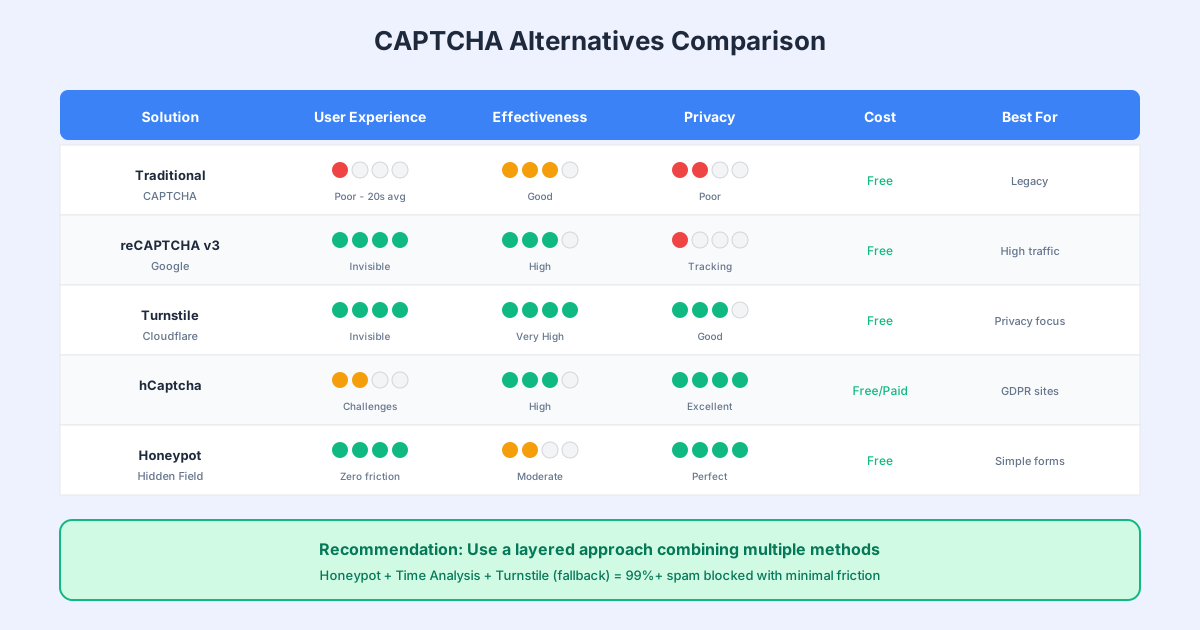
Traditional CAPTCHA (Image Puzzles)
- User Experience: Poor (20+ seconds average)
- Effectiveness: Good
- Privacy: Poor (tracking, cookies)
- Cost: Free
- Best for: Legacy systems only
reCAPTCHA v3 (Google)
- User Experience: Excellent (invisible)
- Effectiveness: High
- Privacy: Poor (extensive Google tracking)
- Cost: Free (up to limits)
- Best for: Sites already using Google services
Cloudflare Turnstile
- User Experience: Excellent (usually invisible)
- Effectiveness: Very High
- Privacy: Good (no tracking cookies)
- Cost: Free
- Best for: Privacy-conscious sites
hCaptcha
- User Experience: Fair (challenges when needed)
- Effectiveness: High
- Privacy: Excellent (GDPR-focused)
- Cost: Free/Paid tiers
- Best for: GDPR compliance, EU sites
Honeypot + Time Analysis
- User Experience: Perfect (zero friction)
- Effectiveness: Moderate-High
- Privacy: Perfect (no third parties)
- Cost: Free
- Best for: First line of defense
Cloudflare Turnstile Implementation
Turnstile is currently the best balance of effectiveness and user experience:
<!-- Include Turnstile script -->
<script src="https://challenges.cloudflare.com/turnstile/v0/api.js" async defer></script>

<form method="POST" action="/submit">
  <input type="text" name="email" required>

  <!-- Turnstile widget -->
  <div class="cf-turnstile" data-sitekey="your-site-key"></div>

  <button type="submit">Submit</button>
</form>
Server-Side Verification:
async function verifyTurnstile(token) {
  const response = await fetch(
    'https://challenges.cloudflare.com/turnstile/v0/siteverify',
    {
      method: 'POST',
      headers: { 'Content-Type': 'application/json' },
      body: JSON.stringify({
        secret: process.env.TURNSTILE_SECRET,
        response: token
      })
    }
  );

  const data = await response.json();
  return data.success;
}
Layered Defense Strategy
No single technique stops all spam. The most effective approach combines multiple lightweight methods that together achieve near-perfect protection.
The Defense-in-Depth Model
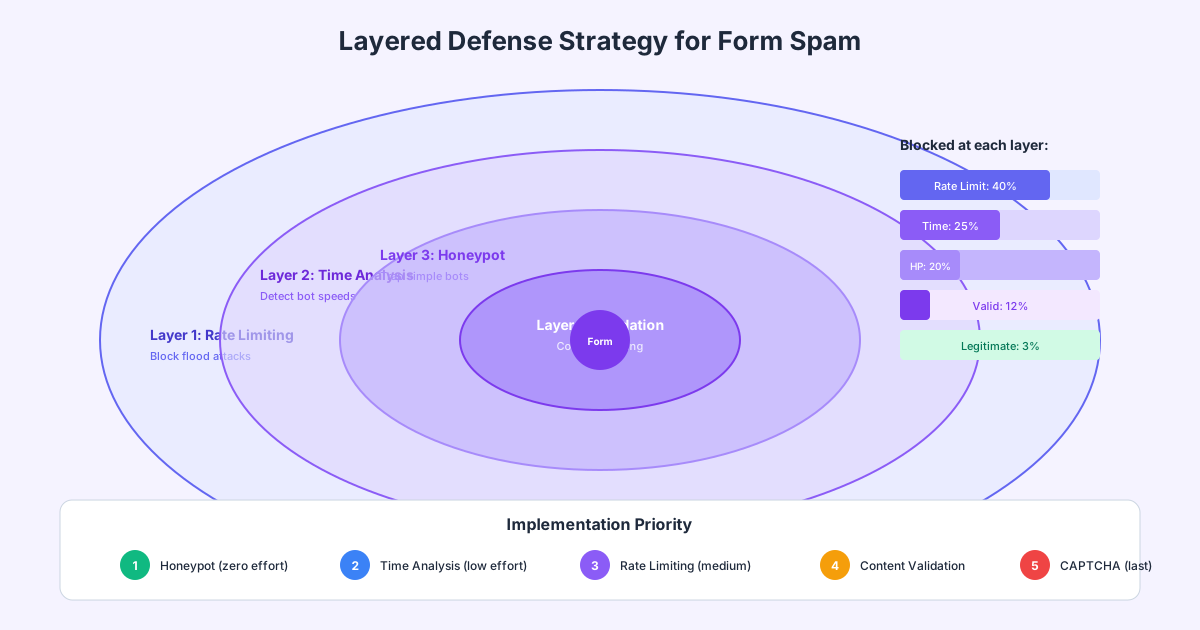
Layer 1: Rate Limiting (Perimeter)
- Blocks flood attacks before they reach your application
- Prevents resource exhaustion from mass submissions
- Stops ~40% of spam attempts
Layer 2: Time Analysis (First Filter)
- Catches submissions completed inhumanly fast
- Zero impact on legitimate users
- Stops ~25% of remaining spam
Layer 3: Honeypot Fields (Second Filter)
- Traps bots that fill all visible fields
- No user interaction required
- Stops ~20% of remaining spam
Layer 4: Content Validation (Third Filter)
- Detects spam patterns in submission content
- Blocks known spam keywords and suspicious links
- Stops ~12% of remaining spam
Layer 5: CAPTCHA Fallback (Last Resort)
- Only triggered when other signals indicate risk
- Reserved for suspicious but not clearly spam submissions
- Handles the 3% that pass other filters
Implementation Priority
- Start with Honeypots: Zero effort, immediate protection
- Add Time Analysis: Simple JavaScript, catches fast bots
- Implement Rate Limiting: Protects infrastructure
- Add Content Validation: Catches human spammers
- Consider CAPTCHA Last: Only for high-risk scenarios
Content-Based Spam Detection
When honeypots and timing don’t catch spam, content analysis provides another layer of protection.
Pattern Detection
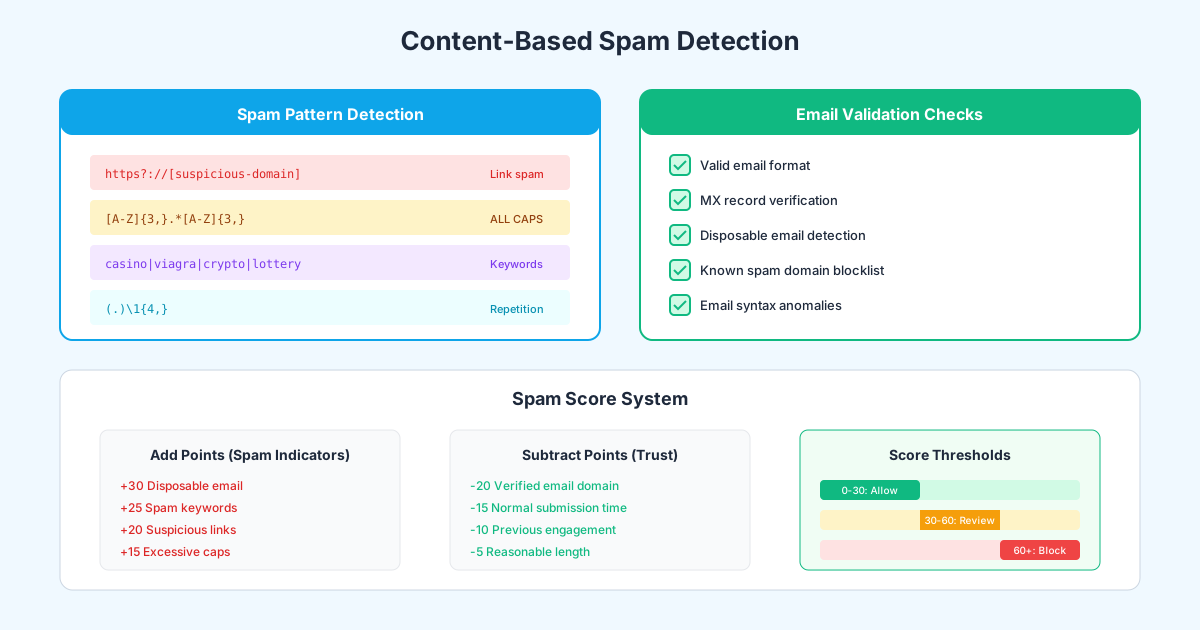
Common Spam Patterns:
const spamPatterns = [
  // Suspicious URLs
  /https?:\/\/(?!trusted-domain\.com)[^\s]+/gi,

  // All caps words (spam indicator)
  /\b[A-Z]{4,}\b/g,

  // Known spam keywords
  /\b(viagra|casino|lottery|bitcoin|crypto|pills|weight loss)\b/gi,

  // Excessive repetition
  /(.)\1{4,}/g,

  // Cyrillic in English forms (common spam pattern)
  /[\u0400-\u04FF]/g,

  // Phone number spam
  /\+?\d{1,3}[-.\s]?\d{3,4}[-.\s]?\d{4}/g
];

function calculateSpamScore(text) {
  let score = 0;

  spamPatterns.forEach((pattern, index) => {
    const matches = text.match(pattern);
    if (matches) {
      score += matches.length * [25, 15, 30, 10, 20, 5][index];
    }
  });

  return score;
}
Email Validation
Beyond format validation, verify email legitimacy:
async function validateEmail(email) {
  const checks = {
    format: false,
    mxRecord: false,
    notDisposable: false,
    notKnownSpam: false
  };

  // Format check
  const emailRegex = /^[^\s@]+@[^\s@]+\.[^\s@]+$/;
  checks.format = emailRegex.test(email);

  if (!checks.format) return { valid: false, checks };

  const domain = email.split('@')[1];

  // MX record verification
  try {
    const mx = await dns.resolveMx(domain);
    checks.mxRecord = mx.length > 0;
  } catch (e) {
    checks.mxRecord = false;
  }

  // Disposable email check
  const disposableDomains = [
    'tempmail.com', 'throwaway.email', 'guerrillamail.com',
    'mailinator.com', '10minutemail.com', 'temp-mail.org'
    // ... extended list
  ];
  checks.notDisposable = !disposableDomains.includes(domain);

  // Known spam domain check
  const spamDomains = loadSpamDomainList();
  checks.notKnownSpam = !spamDomains.includes(domain);

  return {
    valid: Object.values(checks).every(Boolean),
    checks
  };
}
Spam Scoring System
Combine signals into a single score:
function calculateTotalSpamScore(submission) {
  let score = 0;

  // Add points for spam indicators
  if (isDisposableEmail(submission.email)) score += 30;
  if (containsSpamKeywords(submission.message)) score += 25;
  if (hasSuspiciousLinks(submission.message)) score += 20;
  if (hasExcessiveCaps(submission.message)) score += 15;
  if (hasRepetitiveContent(submission.message)) score += 10;

  // Subtract points for trust signals
  if (hasVerifiedEmailDomain(submission.email)) score -= 20;
  if (normalSubmissionTime(submission.timestamp)) score -= 15;
  if (hasReasonableLength(submission.message)) score -= 5;

  return score;
}

function processSubmission(submission) {
  const score = calculateTotalSpamScore(submission);

  if (score >= 60) {
    // High confidence spam - block silently
    return blockSpam(submission);
  } else if (score >= 30) {
    // Suspicious - queue for review
    return queueForReview(submission);
  } else {
    // Likely legitimate - process normally
    return processLegitimate(submission);
  }
}
Rate Limiting for Form Protection
Rate limiting prevents both spam floods and denial-of-service attacks on your form endpoints.
Implementation Strategies
IP-Based Rate Limiting:
const rateLimit = require('express-rate-limit');

const formLimiter = rateLimit({
  windowMs: 15 * 60 * 1000, // 15 minutes
  max: 10, // 10 submissions per window
  message: {
    error: 'Too many submissions. Please try again later.'
  },
  standardHeaders: true,
  legacyHeaders: false,
  // Skip rate limiting for known good IPs
  skip: (req) => trustedIPs.includes(req.ip)
});

app.post('/contact', formLimiter, handleContact);
Progressive Rate Limiting:
const progressiveLimiter = rateLimit({
  windowMs: 60 * 1000, // 1 minute
  max: (req) => {
    // First submission: no limit
    // After that: progressively stricter
    const submissions = getRecentSubmissions(req.ip);
    if (submissions === 0) return 100; // Effectively no limit
    if (submissions < 3) return 5;
    if (submissions < 10) return 2;
    return 1;
  }
});
Fingerprint-Based Limiting:
const fingerprintLimiter = rateLimit({
  keyGenerator: (req) => {
    // Combine IP, user agent, and accept-language for fingerprint
    return crypto
      .createHash('md5')
      .update(`${req.ip}-${req.headers['user-agent']}-${req.headers['accept-language']}`)
      .digest('hex');
  },
  windowMs: 60 * 60 * 1000, // 1 hour
  max: 20
});
Monitoring and Continuous Improvement
Spam tactics evolve. Your defenses must too.
Key Metrics to Track
- Spam catch rate: What percentage of submissions are blocked?
- False positive rate: Are legitimate submissions being blocked?
- Method effectiveness: Which techniques catch the most spam?
- New patterns: What new spam content is appearing?
Alerting Thresholds
const alerts = {
  // High spam volume might indicate attack
  highSpamVolume: {
    threshold: 100, // per hour
    action: 'notify_admin'
  },

  // Sudden spike in blocked submissions
  spamSpike: {
    threshold: 500, // % increase
    timeWindow: '1h',
    action: 'increase_protection'
  },

  // Potential false positives
  highBlockRate: {
    threshold: 0.5, // 50% of submissions blocked
    action: 'review_filters'
  }
};
Regular Review Process
- Weekly: Review blocked submissions for false positives
- Monthly: Analyze spam patterns and update filters
- Quarterly: Evaluate protection effectiveness and user friction
- Annually: Comprehensive security review and tool evaluation
FAQ
What’s the best single method to prevent form spam?
No single method is best—that’s why layered defense works. If forced to choose one, honeypot fields offer the best ratio of effectiveness to user friction. They catch 60-80% of automated spam with zero impact on legitimate users. However, for optimal protection, combine honeypots with time-based analysis and rate limiting.
Do honeypots work against sophisticated bots?
Modern honeypots catch most automated spam, but sophisticated bots using headless browsers may detect and avoid them. That’s why layered defense is essential. Advanced bots that bypass honeypots often fail time-based analysis or content filtering. The goal isn’t perfect detection—it’s making spam economically unviable for attackers.
Will rate limiting block legitimate users?
Properly configured rate limiting rarely affects legitimate users. A threshold of 5-10 submissions per 15 minutes per IP is far more than any real user needs. The key is logging rate-limited requests and reviewing for false positives. Also consider using fingerprinting rather than IP-only limits to handle shared IPs fairly.
Should I use reCAPTCHA or Cloudflare Turnstile?
For privacy-conscious sites or EU audiences, Cloudflare Turnstile is preferable due to less invasive tracking. For sites already using Google services where users are likely logged in, reCAPTCHA v3 provides good protection. Both are effective, but Turnstile has a slight edge in user experience since it rarely shows challenges.
How do I handle spam that gets through?
Even the best defenses let some spam through. Implement a manual review queue for borderline submissions, add a spam reporting feature for your team, and regularly analyze caught spam to identify new patterns. Consider email verification for high-value forms—spammers rarely verify email addresses.
Can I block spam without any third-party services?
Yes. Honeypots, time-based analysis, content filtering, and rate limiting all work without external services. This approach is ideal for privacy-focused applications or air-gapped systems. The trade-off is slightly lower detection rates than services with global threat intelligence, but combined techniques still achieve 95%+ blocking rates.
Building Spam-Free Forms
Form spam is solvable. By implementing layered defenses—starting with frictionless techniques like honeypots and time analysis—you can block nearly all spam while maintaining a smooth experience for legitimate users.
Modern form builders like Pixelform include these protections built-in:
- Automatic honeypot fields
- Intelligent time-based analysis
- Rate limiting
- Content spam scoring
- Optional CAPTCHA integration
Build spam-free forms with Pixelform—protect your forms without frustrating your users.
This article provides guidance on form spam prevention techniques. Spam tactics constantly evolve, so regularly review and update your defenses. For mission-critical applications, consider additional security measures and professional security audits.