Form Prefill and Hidden Fields: The Complete Guide to Better UX and Tracking
Key Takeaways
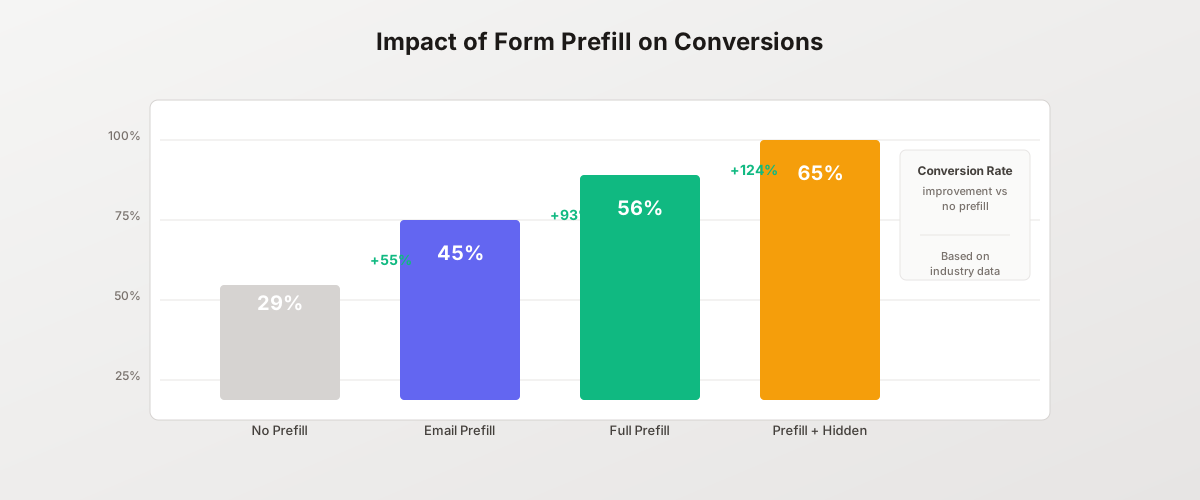
- Prefilling known user data can boost form completion rates by 55% or more compared to empty forms
- Hidden fields capture essential tracking data without cluttering the user experience
- URL parameters enable seamless integration between marketing campaigns and form submissions
- Proper implementation requires attention to privacy, security, and data validation
- Combined prefill and hidden field strategies can increase conversions by up to 124%
Forms are often the critical conversion point in your marketing funnel. Every additional field users must complete reduces the likelihood they will finish. Every piece of missing attribution data makes it harder to measure campaign effectiveness.
Prefilled fields and hidden fields solve both problems simultaneously. They streamline the user experience while capturing complete tracking data behind the scenes.
This guide covers everything you need to implement prefill and hidden field strategies that improve conversions and give you full visibility into your marketing performance.
What Are Prefilled Form Fields?
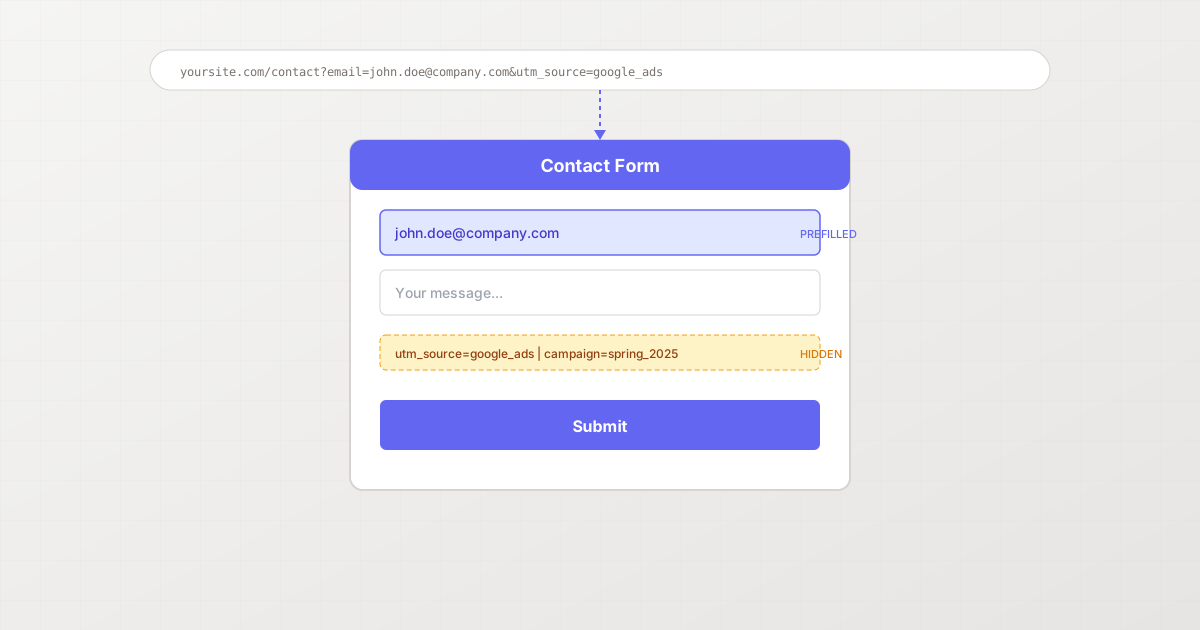
Prefilled fields are form inputs that already contain data when the user arrives. Instead of facing an empty form, users see their information already populated.
Common prefill sources:
- URL parameters passed from email campaigns
- CRM data for known contacts
- Browser autofill from previous submissions
- Session data from logged-in users
- Data enrichment services
When implemented correctly, prefilling transforms a friction-heavy form into a simple confirmation step.
The Conversion Impact of Prefilling
The data on prefilling is compelling. According to Feathery’s research on online form statistics, form abandonment occurs for multiple reasons, but form length accounts for 27% of abandonment. Prefilling directly addresses this by reducing the perceived effort required.
Consider these benchmark improvements:
| Prefill Strategy | Conversion Rate Increase |
|---|---|
| Email address prefilled | +55% |
| Full contact info prefilled | +93% |
| Prefill + hidden tracking | +124% |
Expedia famously earned an extra $12 million annually by removing just one optional field. Prefilling takes this principle further: you get the data without asking users to type it.
What Are Hidden Form Fields?
Hidden fields collect data without displaying anything to the user. They exist in the form’s HTML but are invisible in the interface.
Hidden fields capture:
- UTM parameters for campaign tracking
- Referrer URLs for traffic source attribution
- User IDs for logged-in visitors
- Page context like product IDs or pricing tiers
- Timestamps and session data
- A/B test variant information
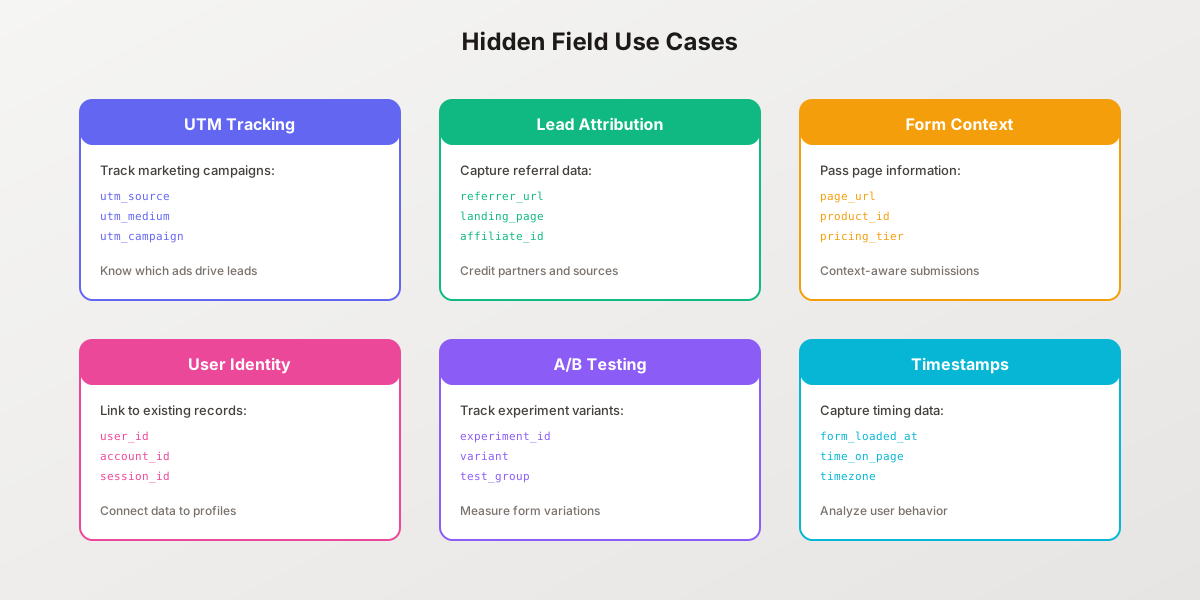
Hidden fields bridge the gap between marketing and sales. When a lead submits a form, your CRM receives not just their contact information, but complete context about how they found you.
URL Parameters: The Foundation of Form Prefill
URL parameters are the most common method for prefilling forms. They pass data through the URL itself.
Basic structure:
https://yoursite.com/contact?email=john@company.com&name=John&utm_source=google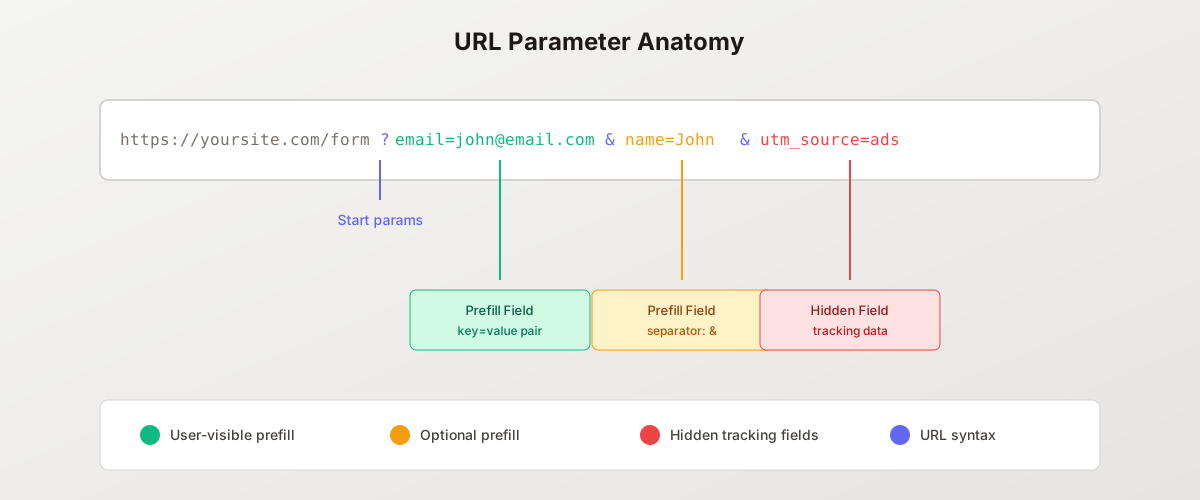
URL Parameter Syntax
Understanding the syntax helps you build reliable prefill URLs:
| Component | Symbol | Purpose |
|---|---|---|
| Query start | ? | Separates URL from parameters |
| Key-value pair | = | Assigns value to parameter |
| Parameter separator | & | Joins multiple parameters |
| URL encoding | %20 etc. | Handles special characters |
Example with encoded values:
?email=john%40company.com&company=Acme%20Corp&message=Hello%20thereThe @ symbol becomes %40, and spaces become %20. Always URL-encode parameter values to prevent parsing errors.
Building Prefill URLs for Marketing Campaigns
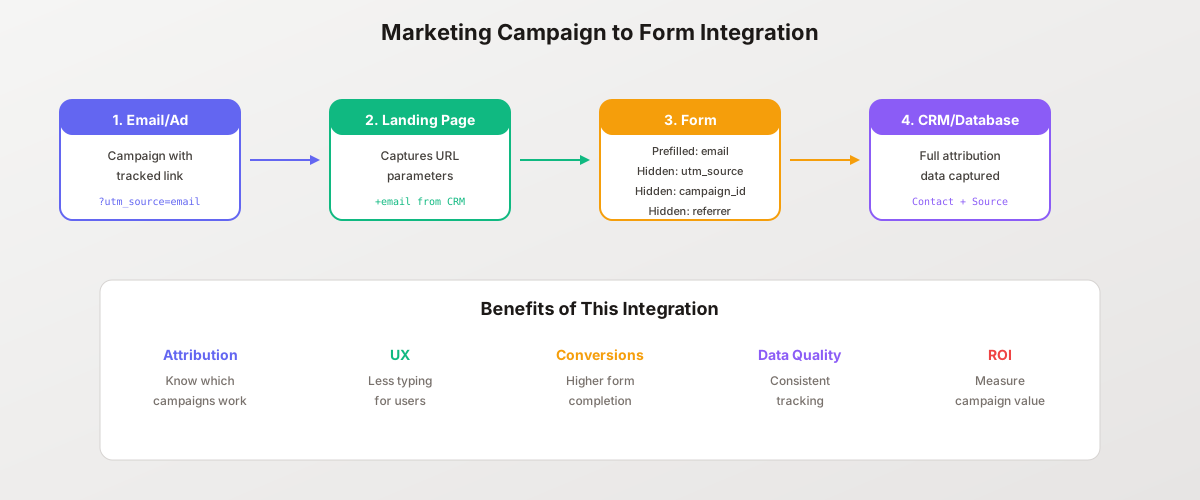
Every email, ad, and link becomes an opportunity to prefill forms:
Email campaign example:
https://yoursite.com/demo-request?
  email={{contact.email}}
  &name={{contact.first_name}}
  &company={{contact.company}}
  &utm_source=email
  &utm_campaign=spring-launch
  &utm_medium=newsletter
Your email platform replaces the template variables with actual contact data. When recipients click, they arrive at a form that already knows who they are.
Implementing Prefilled Fields
Method 1: URL Parameter Mapping
The most common approach maps URL parameters directly to form field names.
JavaScript implementation:
// Parse URL parameters
const urlParams = new URLSearchParams(window.location.search);

// Map parameters to form fields
const fieldMappings = {
  'email': 'email',
  'name': 'full_name',
  'company': 'company_name',
  'phone': 'phone_number'
};

// Prefill each mapped field
Object.entries(fieldMappings).forEach(([param, fieldName]) => {
  const value = urlParams.get(param);
  const field = document.querySelector(`[name="${fieldName}"]`);

  if (value && field) {
    field.value = decodeURIComponent(value);
  }
});
Method 2: Form Builder Configuration
Modern form builders like Pixelform handle prefill mapping through configuration:
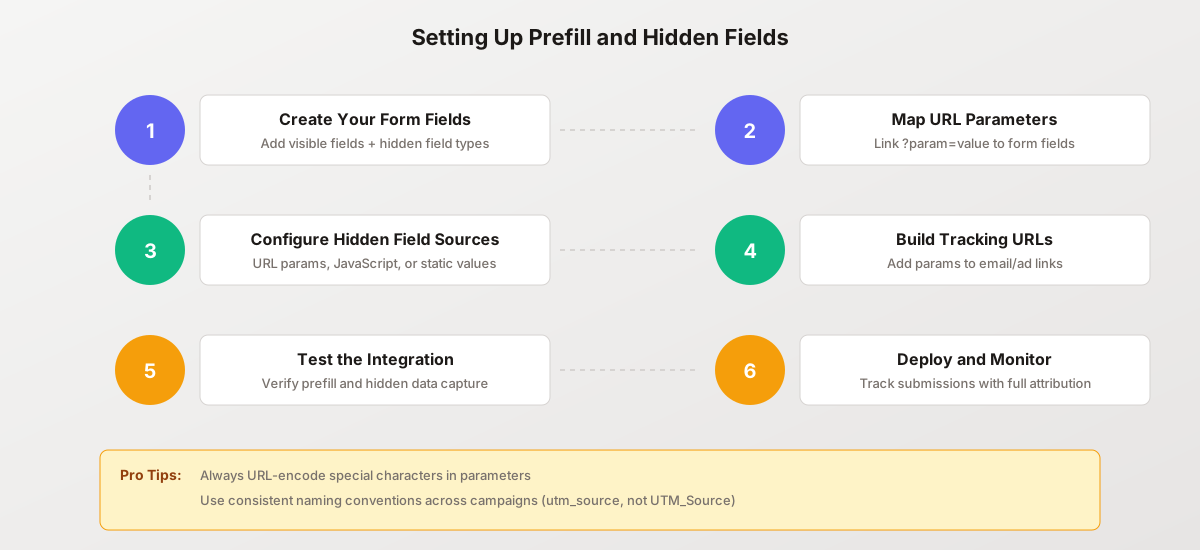
- Create your form with the desired fields
- In field settings, enable “Prefill from URL parameter”
- Specify the parameter name to map to each field
- The form automatically captures and displays the values
This no-code approach eliminates JavaScript complexity while providing the same functionality.
Method 3: Data Enrichment
For known contacts, prefill from your database rather than URL parameters:
async function prefillFromCRM(email) {
  // Fetch contact data from your API
  const response = await fetch(`/api/contacts?email=${email}`);
  const contact = await response.json();

  if (contact) {
    document.querySelector('[name="name"]').value = contact.name;
    document.querySelector('[name="company"]').value = contact.company;
    document.querySelector('[name="phone"]').value = contact.phone;
  }
}

// Trigger on email field blur
emailField.addEventListener('blur', (e) => {
  if (isValidEmail(e.target.value)) {
    prefillFromCRM(e.target.value);
  }
});
This approach uses just the email to populate remaining fields automatically.
Implementing Hidden Fields
Capturing UTM Parameters
UTM parameters are essential for marketing attribution. Hidden fields preserve them through form submission:
// Get all UTM parameters
const utmParams = ['utm_source', 'utm_medium', 'utm_campaign', 'utm_term', 'utm_content'];
const urlParams = new URLSearchParams(window.location.search);

utmParams.forEach(param => {
  const value = urlParams.get(param);
  if (value) {
    // Create or update hidden field
    let field = document.querySelector(`input[name="${param}"]`);
    if (!field) {
      field = document.createElement('input');
      field.type = 'hidden';
      field.name = param;
      document.querySelector('form').appendChild(field);
    }
    field.value = value;
  }
});
Session-Based Hidden Fields
Some data should persist across page navigations:
// Store UTMs on first visit
if (!sessionStorage.getItem('first_touch_utm')) {
  const utmData = {
    source: urlParams.get('utm_source'),
    medium: urlParams.get('utm_medium'),
    campaign: urlParams.get('utm_campaign'),
    landing_page: window.location.pathname,
    timestamp: new Date().toISOString()
  };
  sessionStorage.setItem('first_touch_utm', JSON.stringify(utmData));
}

// Apply stored data to form
const storedUtm = JSON.parse(sessionStorage.getItem('first_touch_utm'));
if (storedUtm) {
  Object.entries(storedUtm).forEach(([key, value]) => {
    const field = document.querySelector(`input[name="first_${key}"]`);
    if (field && value) {
      field.value = value;
    }
  });
}
This captures first-touch attribution even if users navigate to multiple pages before converting.
Dynamic Hidden Field Values
Some hidden fields need computed values:
// Capture page context
document.querySelector('input[name="page_url"]').value = window.location.href;
document.querySelector('input[name="referrer"]').value = document.referrer;
document.querySelector('input[name="form_loaded_at"]').value = new Date().toISOString();

// Capture time on page when form is submitted
form.addEventListener('submit', () => {
  const timeOnPage = Math.round((Date.now() - pageLoadTime) / 1000);
  document.querySelector('input[name="time_on_page"]').value = timeOnPage;
});

// Capture scroll depth
let maxScroll = 0;
window.addEventListener('scroll', () => {
  const scrollPercent = Math.round(
    (window.scrollY / (document.body.scrollHeight - window.innerHeight)) * 100
  );
  maxScroll = Math.max(maxScroll, scrollPercent);
});

form.addEventListener('submit', () => {
  document.querySelector('input[name="scroll_depth"]').value = maxScroll;
});
Conversion Impact and Best Practices
Form Optimization Data
Research consistently shows that reducing form friction improves conversions:
- One study found that phone number fields decrease conversion by 48%
- HubSpot’s research found that increasing text areas from one to five dropped conversion rates from 20% to below 10%
- Imagescape boosted conversions by 120% by cutting their form from 11 fields to 4
Prefilling addresses this without sacrificing data collection. Users see fewer empty fields while you capture the same or more information through prefill and hidden fields.
Best Practice: Progressive Profiling
Instead of asking for everything upfront, collect information across multiple interactions:
First form (minimal):
- Email (required)
- Hidden: UTM parameters, referrer
Second form (after email engagement):
- Name (prefilled if known)
- Company (required)
- Hidden: Previous submission ID
Third form (sales-ready):
- Phone (prefilled if known)
- Budget range
- Timeline
- Hidden: Engagement score, previous forms
Each form feels lightweight while you build a complete lead profile over time.
Best Practice: Validate Prefilled Data
Prefilled values can be outdated or incorrect. Always allow users to edit:
// Highlight prefilled fields so users notice them
document.querySelectorAll('input[value]:not([type="hidden"])').forEach(field => {
  if (field.value) {
    field.classList.add('prefilled');
    // Add visual indicator
    const label = field.closest('.field-wrapper').querySelector('label');
    if (label) {
      label.innerHTML += ' <span class="prefill-badge">Prefilled</span>';
    }
  }
});
This transparency builds trust and catches errors before submission.
Best Practice: Handle Missing Parameters
Not all users will arrive with prefill data. Design for graceful degradation:
function prefillWithFallback(fieldName, urlParam, defaultValue = '') {
  const field = document.querySelector(`[name="${fieldName}"]`);
  const urlValue = new URLSearchParams(window.location.search).get(urlParam);

  if (field) {
    field.value = urlValue || defaultValue;
    field.placeholder = urlValue ? '' : field.getAttribute('data-placeholder');
  }
}

// Field still works without URL parameter
prefillWithFallback('email', 'email', '');
prefillWithFallback('name', 'name', '');
Privacy and Security Considerations
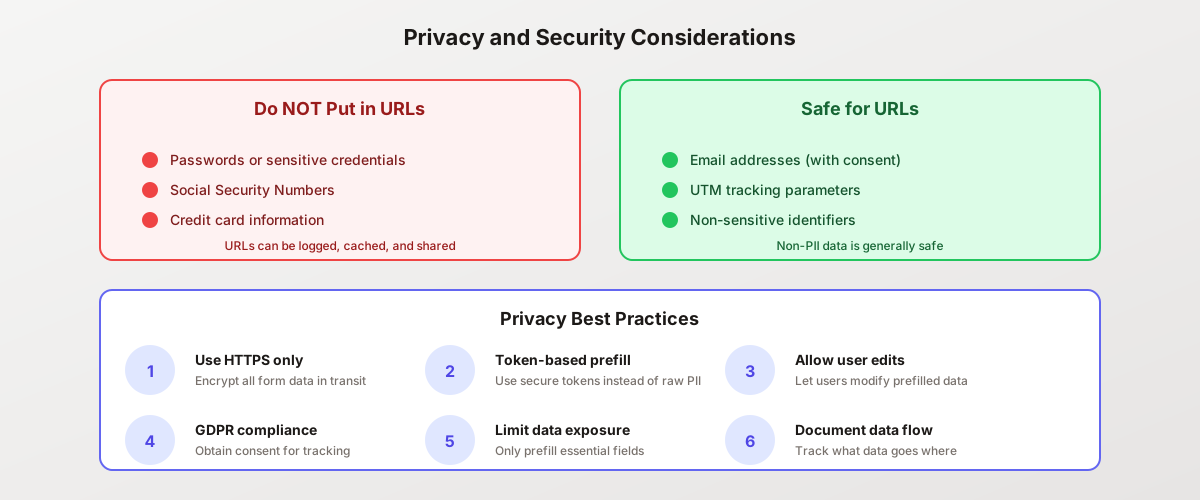
Prefilling and hidden fields handle potentially sensitive data. Implement these safeguards:
What NOT to Put in URL Parameters
URL parameters are visible in:
- Browser history
- Server logs
- Analytics tools
- Shared links
Never include in URLs:
- Passwords or credentials
- Social Security Numbers
- Credit card information
- Health information
- Other highly sensitive PII
According to Microsoft’s Dynamics 365 documentation, using secure prefill tokens rather than raw PII in URLs prevents exposure when emails are forwarded or links are shared.
GDPR and Privacy Compliance
When prefilling with personal data:
- Obtain consent for tracking before setting hidden fields
- Document data flows showing what data goes where
- Allow access so users can see what data you have
- Enable deletion when users request data removal
- Limit data collection to what you actually need
Secure Implementation Checklist
- Use HTTPS for all form pages
- Validate and sanitize all prefill values server-side
- Implement token-based prefill for sensitive data
- Set appropriate token expiration times
- Log prefill activity for audit trails
- Test with various parameter injection attempts
Common Use Cases
Marketing Campaign Tracking
Every campaign should include tracking parameters:
Base URL: https://yoursite.com/ebook-download

Email campaign:
?utm_source=email&utm_medium=newsletter&utm_campaign=ebook-launch-2025

Google Ads:
?utm_source=google&utm_medium=cpc&utm_campaign=ebook-keywords&utm_term={keyword}

LinkedIn Ads:
?utm_source=linkedin&utm_medium=sponsored&utm_campaign=b2b-awareness
Hidden fields capture these parameters, connecting form submissions directly to campaigns.
Partner and Affiliate Tracking
Attribute leads to partners with hidden fields:
https://yoursite.com/signup?
  partner_id=acme-consulting
  &partner_campaign=spring-referral
  &commission_tier=gold
Your CRM receives the partner information with every submission, enabling accurate commission calculations.
Product-Specific Context
When forms appear on product pages, capture the context:
// On product page
const productData = {
  product_id: 'pro-plan',
  pricing_tier: 'annual',
  page_variant: 'pricing-v2',
  viewed_features: ['api', 'webhooks', 'sso']
};

// Set hidden fields
Object.entries(productData).forEach(([key, value]) => {
  const field = document.querySelector(`input[name="${key}"]`);
  if (field) {
    field.value = Array.isArray(value) ? value.join(',') : value;
  }
});
Sales teams receive complete context about what the lead was viewing.
Multi-Touch Attribution
Track the full customer journey:
// Store all touchpoints
const touchpoints = JSON.parse(localStorage.getItem('touchpoints') || '[]');

touchpoints.push({
  page: window.location.pathname,
  source: urlParams.get('utm_source'),
  campaign: urlParams.get('utm_campaign'),
  timestamp: new Date().toISOString()
});

localStorage.setItem('touchpoints', JSON.stringify(touchpoints.slice(-10)));

// On form submission
const journeyField = document.querySelector('input[name="customer_journey"]');
if (journeyField) {
  journeyField.value = JSON.stringify(touchpoints);
}
This captures the full path to conversion, not just the last click.
Testing Your Implementation
Verify Prefill Works
Test with sample URLs:
https://yoursite.com/form?email=test%40example.com&name=Test%20User&utm_source=testConfirm that:
- Visible fields show the prefilled values
- Hidden fields receive the URL parameters
- Submission includes all expected data
- Special characters are handled correctly
Check Hidden Field Capture
Use browser developer tools:
- Open Network tab
- Submit the form
- Inspect the form data payload
- Verify hidden fields are included
Test Edge Cases
- What happens with missing parameters?
- Do encoded characters decode correctly?
- Are very long values handled properly?
- Do duplicate parameters cause issues?
FAQ
How do prefilled form fields improve conversion rates?
Prefilled fields reduce the effort required to complete a form. Instead of typing information, users simply verify and submit. This directly addresses form abandonment, which according to research affects 27% of users due to form length alone. Studies show prefilling can improve completion rates by 55% or more, with combined strategies achieving up to 124% improvement over empty forms.
Are hidden form fields visible to users?
No, hidden fields are not displayed in the form interface. However, they are visible in the page’s HTML source code. Anyone viewing the source can see hidden field names and values. For this reason, never use hidden fields for sensitive information like passwords or security tokens. They are designed for non-sensitive data like tracking parameters and page context.
What is the difference between prefill and autofill?
Prefill refers to pre-populating form fields based on URL parameters, CRM data, or other sources before the user interacts with the form. Autofill is a browser feature that suggests or automatically enters information based on the user’s saved data. Both reduce friction, but prefill gives you control over the data source while autofill depends on what users have saved in their browsers.
How do I pass form data through URL parameters?
Construct URLs with query parameters following the format: ?key=value. Separate multiple parameters with &. URL-encode special characters (spaces become %20, @ becomes %40). Then configure your form to read these parameters and populate the corresponding fields. Most form builders offer built-in URL parameter mapping, or you can implement it with JavaScript.
Can hidden fields be modified by users?
Technically yes. Users with basic technical knowledge can modify hidden fields using browser developer tools before submitting. Never rely on hidden fields for security-critical data. Validate all hidden field values server-side and treat them as potentially modified. Hidden fields are appropriate for tracking and context data, not for access control or sensitive operations.
What happens if URL parameters contain invalid data?
Your form should validate prefilled values just like user-entered data. Implement server-side validation that rejects invalid email formats, too-long strings, or inappropriate characters. On the client side, you can validate prefilled values on page load and clear any that do not pass validation, falling back to empty fields that users must complete manually.
How do I track UTM parameters across multiple pages?
Store UTM parameters in sessionStorage or a cookie when users first arrive. Then populate hidden fields from storage rather than the current URL. This preserves first-touch attribution even when users navigate to different pages before converting. Be sure to also capture last-touch attribution for comparison, using hidden fields for both.
Are prefilled forms GDPR compliant?
Prefilling itself is not inherently non-compliant, but you must handle personal data appropriately. Ensure you have a legal basis for processing the data (consent or legitimate interest). Be transparent about data collection in your privacy policy. Allow users to modify prefilled data. With proper implementation, prefilled forms can actually improve compliance by reducing data entry errors.
Transform Your Forms with Intelligent Prefill
Prefilled and hidden fields represent a significant opportunity to improve both user experience and marketing intelligence. Users complete forms faster while you capture complete attribution data.
Start with your highest-traffic forms:
- Add hidden fields for UTM parameters
- Configure prefill from URL parameters
- Build tracking URLs for your campaigns
- Test the complete flow
- Monitor conversion improvements
Create your first form with Pixelform and enable URL parameter prefill with just a few clicks. Built-in hidden field support makes attribution tracking automatic.