Paperform Alternative: Beautiful Forms Without the Cost in 2025
Key Takeaways
- Competitive pricing with flexible subscription plans starting at $29/mo
- Equally beautiful forms with modern templates and full design customization
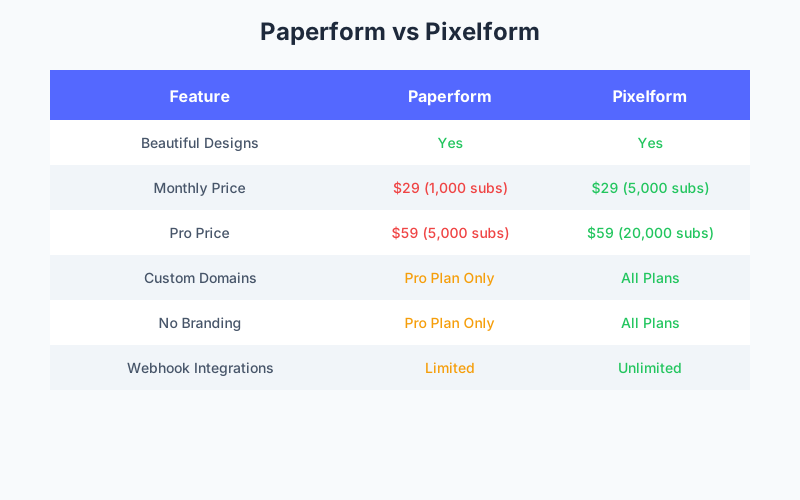
- Custom domains included on all paid plans vs Paperform’s Pro-only restriction
- Three subscription tiers - Basic ($29/mo), Premium ($59/mo), and Business ($149/mo)
Paperform earned its reputation by proving that forms don’t have to be ugly. Their document-style approach produces genuinely beautiful forms that feel more like landing pages than traditional data collection. But beauty comes at a cost, and Paperform’s response limits can be restrictive for growing businesses.
According to HubSpot’s 2024 Design Impact Study, professionally designed forms convert 27% better than generic alternatives. But you shouldn’t have to choose between design quality and affordability.
Paperform’s Design-First Approach
Before discussing alternatives, let’s acknowledge what Paperform does well:
Document-Style Forms
Paperform pioneered the content-embedded form approach. Instead of isolated form fields, questions flow within designed content blocks. This creates forms that feel like curated experiences.
Beautiful Themes
The platform offers polished themes with thoughtful typography, spacing, and visual hierarchy. Forms look professional with minimal customization effort.
Brand Consistency
Custom colors, fonts, and imagery help forms match brand identity. The result looks intentional, not templated.
Conversion Focus
Design choices prioritize completion rates: progress indicators, inline validation, and smooth transitions reduce abandonment.
The Paperform Pricing Reality
Beautiful forms have a price:
| Plan | Monthly Price | Submissions/Month | Key Limits |
|---|---|---|---|
| Essentials | $29 | 1,000 | Paperform branding |
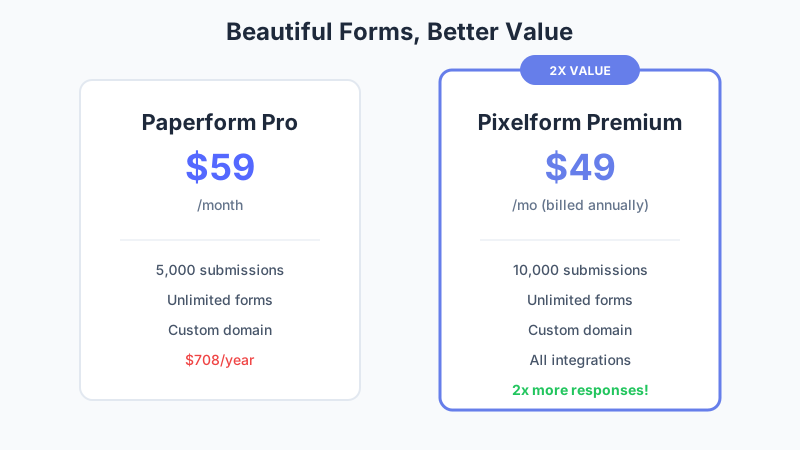
| Pro | $59 | 5,000 | Custom domain, no branding |
| Agency | $159 | 50,000 | Team features |
At $59/month (Pro), you get 5,000 submissions. Compare to Pixelform:
| Plan | Monthly Price | Submissions/Month | Key Limits |
|---|---|---|---|
| Basic | $29 | 1,000 | Custom domain, no branding |
| Premium | $59 | 10,000 | All features (Most popular) |
| Business | $149 | 50,000 | High-volume needs |
At the same $59/month:
- Paperform Pro: 5,000 submissions
- Pixelform Premium: 10,000 submissions
- Difference: 2x more responses with Pixelform at the same price
For growing businesses, this gap compounds monthly.
Pixelform: Beautiful Forms, Better Value
Pixelform matches Paperform’s design quality while offering superior value:
Modern Design System
Pixelform’s forms use contemporary design principles:
- Clean typography with web-optimized fonts
- Generous whitespace for visual breathing room
- Subtle animations that guide without distracting
- Mobile-first layouts that work on any device
The visual quality rivals Paperform while feeling distinctly modern rather than document-mimicking.
Template Library
50+ professionally designed templates cover common use cases:
- Contact and inquiry forms
- Survey and feedback collection
- Registration and signup
- Order and payment forms
- Quiz and assessment tools
- Lead generation and capture
Each template is conversion-optimized based on form analytics research.
Full Customization
Design control matches or exceeds Paperform:
- Custom colors including gradients
- Typography selection from premium web fonts
- Background images with overlay controls
- Custom CSS for pixel-perfect matching
- Button styling beyond preset options
White-Label on All Plans
Unlike Paperform (which restricts branding removal to Pro), Pixelform includes:
- No Pixelform branding on all paid plans
- Custom domains (forms.yourbrand.com) included
- Custom email sender for notifications
Your forms look entirely yours from the Starter plan.

Feature Comparison
Form Building Experience
Paperform:
- Document-style editor
- Content blocks + form fields
- Rich text formatting
- Image and video embedding
- Unique creative approach
Pixelform:
- Drag-and-drop builder
- Field-focused approach
- Flexible layouts
- Real-time preview
- Faster form creation
Verdict: Paperform’s approach is more creative; Pixelform’s is more efficient. Both produce beautiful results.
Conditional Logic
Paperform:
- Field visibility conditions
- Page branching
- Calculation-based conditions
- Skip logic
Pixelform:
- Visual flowchart builder
- Field and page conditions
- Value-based logic
- AND/OR combinations
Verdict: Both offer robust conditional logic. Pixelform’s visual approach is more intuitive for complex paths.
Integrations
Paperform:
- 30+ native integrations
- Zapier support
- Webhooks
- API access
Pixelform:
- Webhooks to connect to any system
- Zapier support
- Webhooks
- API access
Verdict: Pixelform offers more native connections. Both cover major tools.
Analytics
Paperform:
- Submission tracking
- Conversion rates
- Partial submissions
- Basic visualizations
Pixelform:
- Completion analytics
- Drop-off analysis
- Device and location data
- Conversion funnels
- A/B testing data
Verdict: Pixelform offers deeper analytics for optimization.
Payment Collection
Paperform:
- Stripe integration
- Calculation-based pricing
- Product selection
- Subscription support
Pixelform:
- No native payment collection
- Connect form submissions via webhooks to payment systems
Verdict: Paperform wins for native payment collection.
Cost Analysis
For Mid-Volume Users (5,000 responses/month)
Paperform Pro: $59/month exactly at limit
- Risk of overage or upgrade pressure
- No room for growth
Pixelform Premium: $59/month with headroom
- Same price, 2x the responses (10,000/mo)
- All features included
- Room to grow
Annual difference: $0, but Pixelform offers 2x more responses
For Growing Businesses (10,000 responses/month)
Paperform Pro: $59/month = over limit, need Agency
- Requires upgrade to Agency at $159/month
Pixelform Premium: $59/month = exactly at limit
- Perfect fit for this volume
- All features included
Annual savings with Pixelform: $1,200 ($159 - $59 = $100/month x 12)
For Established Businesses (15,000 responses/month)
Paperform Agency: $159/month
- Required for 50,000 limit
- Significant jump from Pro
Pixelform Business: $149/month
- 50,000 limit covers needs with room to grow
- All features included
Annual savings with Pixelform: $120
For High-Volume Businesses (40,000 responses/month)
Paperform Agency: $159/month
- 50,000 limit covers needs
Pixelform Business: $149/month
- 50,000 limit covers needs
Annual savings with Pixelform: $120
Design Quality Comparison
Does Pixelform actually match Paperform’s design quality? Let’s examine key design elements:
Typography
Paperform: Excellent font selection with proper hierarchy. The document approach allows creative text integration.
Pixelform: Modern font library with automatic hierarchy. Less creative freedom but consistent professional results.
Layout
Paperform: Freeform content blocks enable unique compositions. More artistic flexibility.
Pixelform: Grid-based system with flexible columns. More predictable but always polished.
Visual Polish
Paperform: Subtle shadows, smooth animations, refined details. Clearly designer-influenced.
Pixelform: Clean aesthetic with intentional minimalism. Modern without being trendy.
Mobile Experience
Paperform: Responsive adaptation of document layouts. Generally good but complex layouts can suffer.
Pixelform: Mobile-first design that scales up. Consistently excellent on all devices.
Overall verdict: Paperform offers more creative flexibility for unique designs. Pixelform offers more consistent results with less effort. Both produce forms you’d be proud to embed on your website.
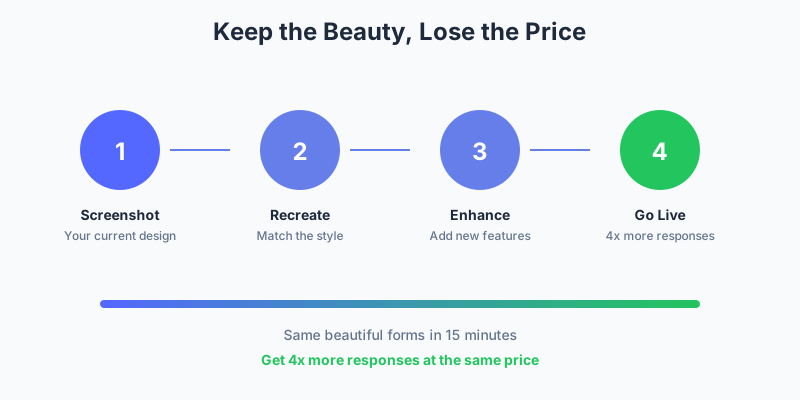
Migration Guide
Ready to get more value without sacrificing design? Here’s how to switch:
Step 1: Document Your Current Design
Screenshot your Paperform forms to reference:
- Color palette
- Font choices
- Layout patterns
- Image usage
Step 2: Export Response Data
In Paperform, export submissions for each form as CSV. Store for historical reference.
Step 3: Select Matching Templates
Browse Pixelform’s template library for starting points matching your aesthetic. You can customize further.
Step 4: Rebuild with Customization
Using the template as a base:
- Match your brand colors
- Select similar fonts
- Adjust layouts to match Paperform design
- Add custom CSS if needed for exact matching
Most forms take 15-20 minutes to achieve equivalent design quality.
Step 5: Test Thoroughly
Submit test entries verifying:
- Design renders correctly on desktop and mobile
- Conditional logic works
- Integrations receive data
- Payment processing functions
Step 6: Swap Embeds
Replace Paperform embed codes with Pixelform embeds. Update direct links.
When Paperform Still Wins
Paperform remains the right choice for:
Unique Creative Requirements
If your forms need to look completely unique with creative layouts that break conventions, Paperform’s document approach offers more flexibility.
Content-Heavy Forms
Forms with extensive explanatory text, images, and videos embedded throughout benefit from Paperform’s document-style editor.
Existing Design Investment
If you’ve invested significant time in Paperform designs and they work well, migration cost may exceed savings.
When Pixelform Wins
Pixelform is the better choice when:
Volume Matters
Above 5,000 monthly responses, Pixelform’s pricing becomes significantly more attractive.
Efficiency Counts
Faster form creation with the drag-and-drop builder saves time for busy teams.
Budget is Constrained
Pixelform’s subscription plans offer competitive pricing with flexible options to match your budget.
Custom Domains are Required
Pixelform includes custom domains on Basic ($29) while Paperform requires Pro ($59).
Analytics Matter
Pixelform’s deeper analytics help optimize form performance over time.
Making the Decision
Consider these questions:
-
How creative do your forms need to be?
- Highly unique → Paperform’s flexibility helps
- Professional standard → Either works
-
What’s your monthly response volume?
- Under 1,000 → Either works at $29
- 1,000-5,000 → Pixelform saves money
- 5,000+ → Pixelform saves significantly
-
Do you need a custom domain?
- Yes → Pixelform includes it on Basic ($29/mo)
- No → Either works
-
Do you prefer flexible subscription plans?
- Yes → Pixelform offers three tiers ($29, $59, $149/mo)
- No → Both have reasonable monthly pricing
-
How much time can you invest in design?
- Minimal → Pixelform’s templates are faster
- Extensive → Paperform allows more creativity
Start Your Beautiful Journey
You shouldn’t have to choose between beautiful forms and fair pricing. Pixelform delivers both:
- Modern, polished design that matches professional standards
- 2x more responses at the same price as Paperform Pro
- Custom domains included from the Basic plan
- Flexible subscription plans ($29/mo, $59/mo, $149/mo) to match your needs
Start your free Pixelform trial and see how beautiful forms can be affordable.
FAQ
Can Pixelform really match Paperform’s design quality?
For most use cases, yes. Pixelform’s modern design system produces equally professional results. Where Paperform excels is in highly creative, content-heavy forms that benefit from its document-style approach. For standard business forms, both platforms produce excellent results.
What about Paperform’s document-style approach?
Pixelform uses a traditional drag-and-drop builder rather than Paperform’s document style. This means faster form creation but less creative freedom for unique layouts. Most users find the trade-off worthwhile for efficiency and value.
Can I import my Paperform designs?
Direct import isn’t available, but with screenshots of your current forms, you can recreate the design in Pixelform. Most forms take 15-20 minutes to match visual quality using Pixelform’s customization options.
How do response limits affect overage charges?
Paperform doesn’t charge overages; forms stop accepting submissions at the limit. Pixelform similarly doesn’t charge overages but provides warnings as you approach limits. Both handle limits transparently without surprise charges.
Is Pixelform suitable for agencies like Paperform?
Yes, Pixelform supports agency use cases with team features on the Pro plan. You can manage multiple client forms from a single account, and white-labeling is included. For agencies with high volume across many clients, the value proposition is particularly strong.