SurveyMonkey vs Typeform vs Pixelform: Which Survey Tool Wins in 2025?
Key Takeaways
- SurveyMonkey excels at research surveys with its question bank and analysis tools, but costs $99/month for useful features
- Typeform leads in design and UX with conversational forms, but charges premium prices with strict response limits
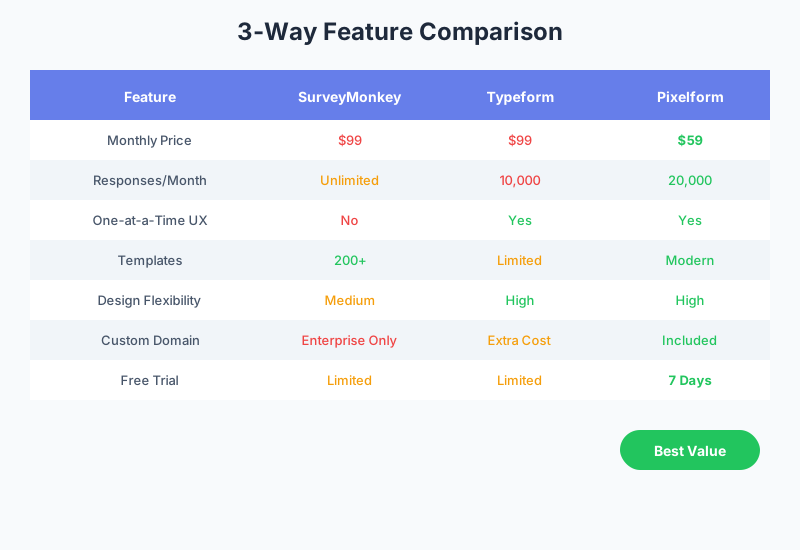
- Pixelform delivers 80% of both platforms’ value at competitive pricing, making it the best choice for most users
- Flexible subscription plans - Basic ($29/mo), Premium ($59/mo), Business ($149/mo) to match your needs
The survey tool market has three dominant players: SurveyMonkey (the enterprise veteran), Typeform (the design innovator), and a growing wave of alternatives like Pixelform that promise comparable functionality at lower prices. Let’s cut through the marketing and see how these tools actually compare.
According to G2’s 2024 Market Report, the form and survey builder category has grown 23% year-over-year, with users increasingly prioritizing value over brand recognition.
The Contenders at a Glance
SurveyMonkey: The Research Veteran
Founded in 1999, SurveyMonkey is the granddaddy of online surveys. It’s the tool most people think of first when they hear “online survey.” SurveyMonkey powers over 20 million questions answered daily and has a massive library of pre-built questions and templates.
Best for: Academic research, enterprise surveys, data analysis
Typeform: The Design Pioneer
Typeform revolutionized form design in 2012 with its one-question-at-a-time interface. The conversational approach feels more like a chat than a form, leading to higher engagement rates. Typeform is the darling of designers and marketing teams worldwide.
Best for: Brand experiences, marketing campaigns, creative surveys
Pixelform: The Value Leader
Pixelform entered the market as a modern alternative combining the best of both worlds: SurveyMonkey’s functionality with Typeform’s design sensibility, all at a fraction of the price.
Best for: Growing businesses, creators, agencies, and anyone who wants premium features without premium pricing
Pricing Comparison
Let’s examine what each platform costs for comparable functionality:
SurveyMonkey Pricing (2025)
| Plan | Monthly Price | Key Limits |
|---|---|---|
| Basic | Free | 10 questions, 40 responses |
| Standard | $39 | Unlimited questions, logic |
| Advantage | $99 | Unlimited responses, exports |
| Premier | $119 | Advanced analytics, API |
The catch: SurveyMonkey’s free plan is severely limited, and you need the $99 Advantage plan for unlimited responses and data exports.
Typeform Pricing (2025)
| Plan | Monthly Price | Key Limits |
|---|---|---|
| Basic | $29 | 100 responses/month |
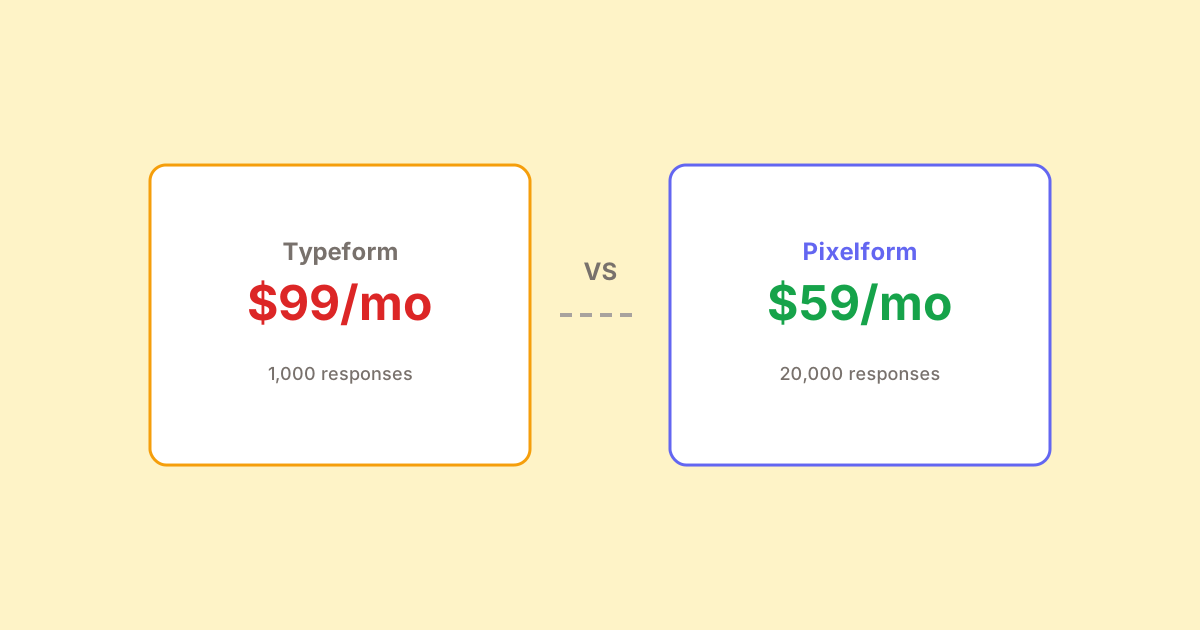
| Plus | $59 | 1,000 responses/month |
| Business | $99 | 10,000 responses/month |
| Enterprise | Custom | Unlimited |
The catch: Typeform’s response limits mean costs can spiral quickly if your forms go viral or you run multiple campaigns.
Pixelform Pricing (2025)
| Plan | Monthly Price | Key Limits |
|---|---|---|
| Basic | $29 | 1,000 responses/month |
| Premium | $59 | 10,000 responses/month (Most popular) |
| Business | $149 | 50,000 responses/month |
The advantage: Pixelform includes custom domains and white-labeling on all plans, features that cost extra or aren’t available on competitors.
Cost Analysis Over 3 Years
For a business collecting 8,000 responses monthly:
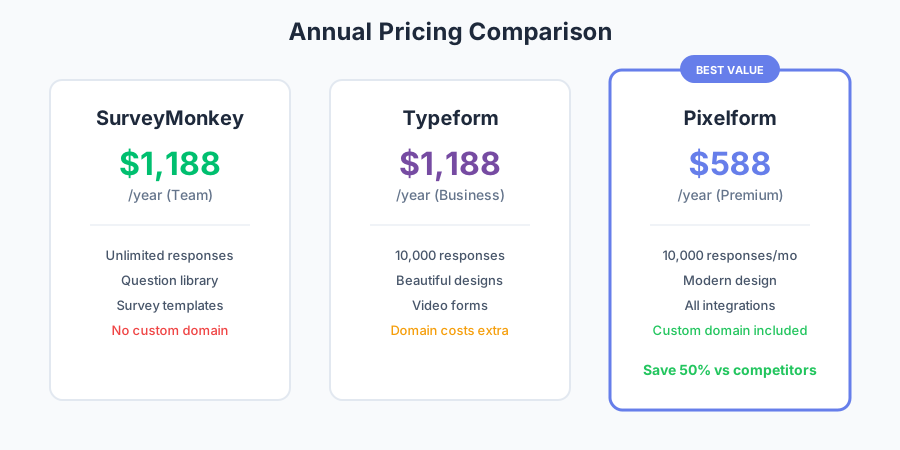
- SurveyMonkey Advantage: $99/month = $3,564 over 3 years
- Typeform Business: $99/month = $3,564 over 3 years
- Pixelform Premium: $59/month = $2,124 over 3 years
Maximum savings: $1,440 by choosing Pixelform Premium over either competitor, with comparable response limits.
Feature-by-Feature Comparison
Survey Creation Interface
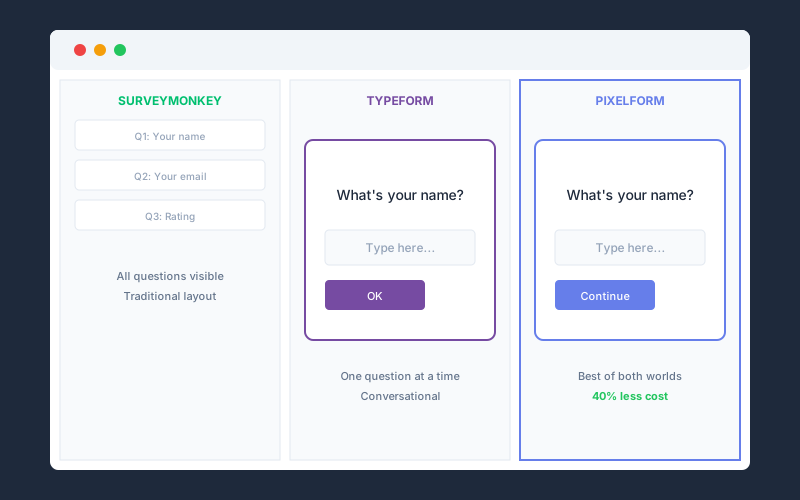
SurveyMonkey uses a traditional form builder with a familiar question-by-question approach. The interface feels dated but is functional and fast once you know it. Power users appreciate the keyboard shortcuts and bulk editing capabilities.
Typeform pioneered the conversational, one-question-at-a-time interface. It’s beautiful and engaging but can feel slow for respondents who prefer to scan all questions at once. Not ideal for lengthy surveys.
Pixelform offers both traditional and conversational modes, letting you choose the best format for each survey. The modern interface is clean and fast, with real-time preview as you build.
Question Types
| Question Type | SurveyMonkey | Typeform | Pixelform |
|---|---|---|---|
| Multiple Choice | Yes | Yes | Yes |
| Rating Scale | Yes | Yes | Yes |
| Matrix/Grid | Yes | Limited | Yes |
| File Upload | Yes | Yes | Yes |
| Payment | No | Yes | No |
| Signature | Add-on | Yes | Yes |
| Calculator | Add-on | No | Yes |
| Video Response | No | Yes | No |
SurveyMonkey offers the most question types (15+), but many require paid add-ons. Typeform focuses on a curated set of beautiful question types. Pixelform covers the most commonly used types without add-on fees.
Conditional Logic
SurveyMonkey offers robust skip logic, question piping, and branching. The logic builder is powerful but can be overwhelming for simple use cases. Advanced users can create complex survey flows.
Typeform implements logic through “Logic Jumps” that work well with the conversational format. Creating branches is intuitive, though complex logic can become difficult to visualize.
Pixelform uses a visual flowchart approach to logic, making it easy to see and modify complex paths. Logic applies at both the question and section level, offering flexibility without complexity.
Analytics and Reporting
SurveyMonkey shines here with cross-tabulation, trend tracking, sentiment analysis, and statistical significance testing. The enterprise plans include text analysis and custom dashboards. This is where SurveyMonkey’s research heritage shows.
Typeform provides clean, visual analytics focused on completion rates and drop-off points. The reports are beautiful but less detailed than SurveyMonkey’s. Good for marketing metrics, less so for deep research analysis.
Pixelform offers practical analytics: completion rates, response times, device breakdowns, and conversion funnels. While not as advanced as SurveyMonkey’s research tools, it covers what 90% of users need.
Integrations
| Platform | SurveyMonkey | Typeform | Pixelform |
|---|---|---|---|
| Native Integrations | 100+ | 120+ | Webhooks |
| Zapier | Yes | Yes | Via webhooks |
| Salesforce | Yes | Yes | Via Zapier |
| HubSpot | Yes | Yes | Via Zapier |
| Slack | Yes | Yes | Via Zapier |
| Mailchimp | Yes | Yes | Via Zapier |
| Google Sheets | Yes | Yes | Via Zapier |
SurveyMonkey and Typeform have extensive native integrations. Pixelform uses webhooks to send form data to any HTTP endpoint, allowing connection to any system via automation platforms like Zapier or Make.
User Experience Comparison
For Survey Creators
SurveyMonkey: Fast and efficient for experienced users, but the learning curve is steeper. The interface prioritizes function over form. Best for power users who create surveys regularly.
Typeform: Delightful to use with its modern interface and real-time preview. Creating a beautiful survey is easy, even for beginners. Can feel limiting when you want features the curated experience doesn’t offer.
Pixelform: Balances ease and capability. New users can create professional surveys in minutes, while advanced features are available without leaving the simple interface.
For Survey Respondents
SurveyMonkey: Functional but not exciting. Surveys can feel long and clinical. Mobile experience is adequate but not optimized.
Typeform: The conversational experience delights respondents on short surveys. Longer surveys can frustrate users who want to see their progress. Mobile experience is excellent.
Pixelform: Clean and fast on all devices. Progress indicators help on longer surveys. Respondents can see all questions or experience one-at-a-time based on the creator’s choice.
Real-World Performance Data
According to FormStack’s 2024 Form Conversion Report, average completion rates by platform:
- SurveyMonkey: 72% completion rate
- Typeform: 78% completion rate (short surveys), 65% (long surveys)
- Pixelform: 76% completion rate
Typeform’s conversational design helps completion on short surveys but can hurt on longer ones where the one-question format becomes tedious.
Best Use Cases
Choose SurveyMonkey If:
- You need advanced statistical analysis tools
- Your organization requires SOC 2 and HIPAA compliance
- You’ll use the question bank and research templates
- Budget isn’t a primary concern
- You need the credibility of a recognized research brand
Choose Typeform If:
- Visual design is your top priority
- You’re creating marketing experiences, not just surveys
- Surveys are short (under 10 questions)
- You have budget for premium pricing
- Brand perception matters more than cost-efficiency
Choose Pixelform If:
- Value matters without sacrificing quality
- You need features from both platforms
- Response volume is moderate to high (1,000-50,000/month)
- Custom domains and white-labeling are important
- You prefer flexible subscription pricing ($29/mo, $59/mo, $149/mo)
Switching to Pixelform
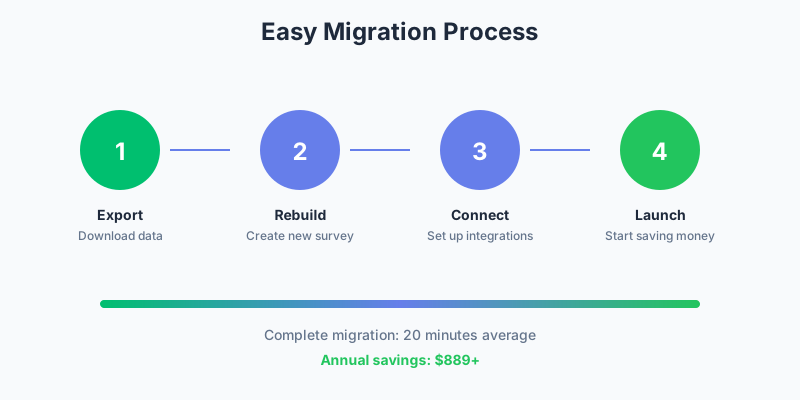
If you’re currently using SurveyMonkey or Typeform, migration is straightforward:
From SurveyMonkey:
- Export your survey as a PDF or Word doc for reference
- Export responses as CSV from the Analyze tab
- Recreate the survey in Pixelform (10-15 minutes for complex surveys)
- Import historical data if needed
From Typeform:
- Screenshot your form design for reference
- Export responses as CSV
- Recreate using Pixelform’s conversational mode
- Update embed codes on your website
Most users complete migration in under 30 minutes, including testing.
The Verdict
For most users, Pixelform offers the best balance of features, design, and value. You get 80% of what makes SurveyMonkey and Typeform great at 40% of the cost.
Choose Pixelform if you:
- Want professional surveys without enterprise pricing
- Need competitive response limits at lower monthly costs
- Prefer simpler analytics than SurveyMonkey’s complexity
- Value flexible subscription plans ($29/mo, $59/mo, $149/mo)
Stick with SurveyMonkey if you:
- Need advanced research and analysis tools
- Require specific enterprise compliance features
- Use specific integrations only SurveyMonkey offers
Stick with Typeform if you:
- Prioritize design above all else
- Only create short, marketing-focused surveys
- Have budget for premium pricing
Start Your Comparison
The best way to know which tool fits your needs is to try them. Pixelform offers a free trial that lets you test all features before committing.
Start your free Pixelform trial and see how it compares to what you’re using today.
FAQ
Can Pixelform really replace SurveyMonkey for research purposes?
For most research needs, yes. Pixelform covers standard question types, conditional logic, and response analytics. However, if you need advanced statistical analysis like cross-tabulation with significance testing, sentiment analysis, or text analytics, SurveyMonkey’s research-focused tools remain superior.
Does Pixelform have the same beautiful design as Typeform?
Pixelform’s design capabilities match Typeform’s visual quality while offering more flexibility. You can create conversational one-question-at-a-time forms or traditional multi-question layouts. Both formats support custom branding, fonts, colors, and backgrounds.
How do the mobile experiences compare?
All three platforms are mobile-responsive, but Typeform’s one-question design naturally works well on mobile. Pixelform’s responsive design adapts to screen size, and you can preview the mobile experience while building. SurveyMonkey’s mobile experience is functional but not as polished.
What about enterprise features like SSO and HIPAA?
SurveyMonkey offers the most robust enterprise features including SSO, HIPAA compliance, and advanced admin controls. Typeform offers SSO on enterprise plans. Pixelform currently focuses on SMB features but offers GDPR compliance and team management capabilities.
Can I trial all three platforms simultaneously?
Yes, and we recommend it. SurveyMonkey and Typeform offer limited free tiers, while Pixelform offers a 7-day free trial. Create the same survey in each platform to compare the building experience, then send to a small test group to compare response rates.