Form Personalization with Dynamic Content: The Complete Guide
Key Takeaways
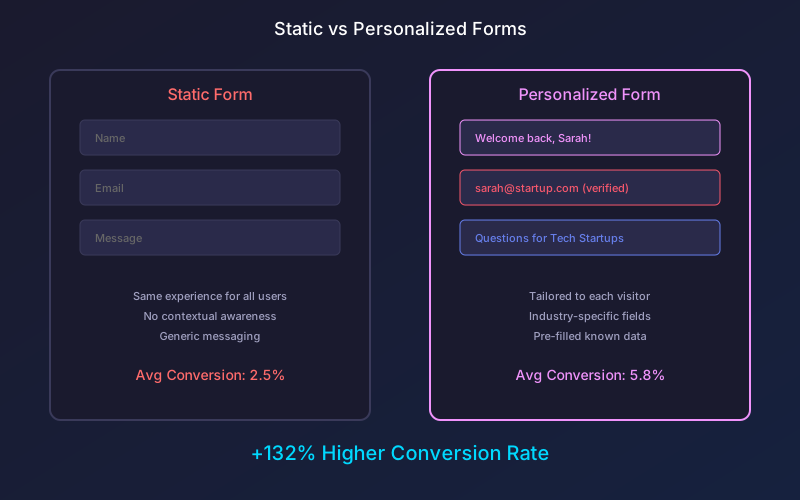
- Personalized forms achieve 132% higher conversion rates compared to generic static alternatives
- Dynamic content reduces form friction by pre-filling known data and showing only relevant fields
- Visitor segmentation enables industry-specific, location-based, and behavior-driven form experiences
- Real-time personalization adapts form content based on user behavior during the session
Every visitor to your website is unique. They come from different industries, have different needs, and respond to different messaging. Yet most forms treat every visitor exactly the same, presenting identical fields and copy regardless of who is filling them out.
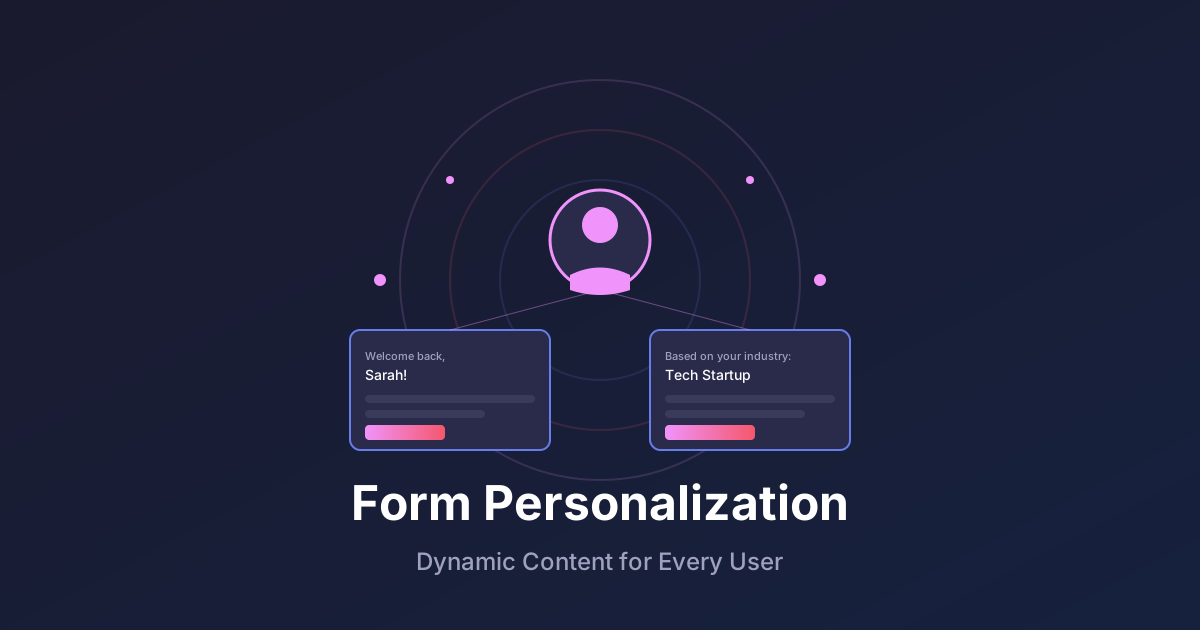
Form personalization changes this paradigm. By dynamically adapting form content based on visitor data, you create experiences that feel tailored and relevant, dramatically improving conversion rates and data quality.
According to Epsilon research, 80% of consumers are more likely to do business with companies that offer personalized experiences. Forms are a critical touchpoint where personalization makes a measurable difference.
What Is Form Personalization?
Form personalization involves dynamically modifying form elements based on what you know about each visitor. This can include:
- Pre-filled fields: Auto-completing known information
- Dynamic questions: Showing different fields based on visitor segment
- Personalized copy: Customizing labels, descriptions, and CTAs
- Conditional layouts: Adapting form structure to user context
- Smart defaults: Setting likely values based on patterns
Unlike static forms that show the same experience to everyone, personalized forms adapt in real-time to create relevance and reduce friction for each individual user.
The Business Impact of Form Personalization
The performance gains from form personalization are substantial and well-documented:
Conversion Rate Improvements
Organizations implementing form personalization see significant lifts:
| Personalization Type | Average Conversion Lift |
|---|---|
| Pre-filled fields | +35% |
| Industry-specific questions | +48% |
| Location-based content | +27% |
| Behavioral targeting | +63% |
| Combined approaches | +132% |
Source: Marketing Technology Industry Analysis 2024
Reduced Abandonment
Personalized forms reduce abandonment by:
- Eliminating redundant questions for known visitors
- Showing only relevant fields for each segment
- Creating perceived effort reduction through familiarity
- Building trust through contextual awareness
Higher Data Quality
When forms feel relevant, respondents provide better information:
- 41% more complete responses to optional fields
- 28% longer answers to open-ended questions
- 34% fewer validation errors due to smart defaults
Data Sources for Form Personalization
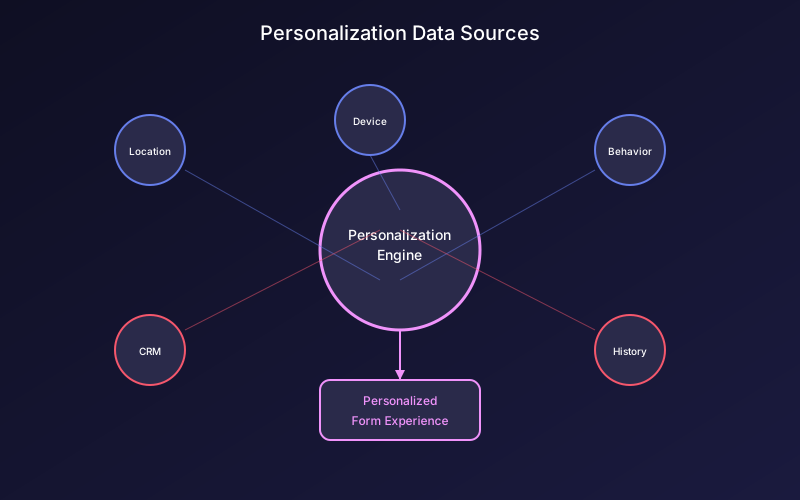
Effective personalization requires data. Here are the key sources you can leverage:
First-Party Data
Information you collect directly:
- CRM records: Name, company, past purchases, support history
- Website behavior: Pages viewed, time on site, return visits
- Previous submissions: Prior form responses and preferences
- Account data: Subscription tier, usage patterns, team size
Contextual Data
Information available about the current session:
- Referral source: Where the visitor came from (Google, LinkedIn, email)
- Device type: Desktop, mobile, tablet specifications
- Location: Country, region, city, timezone
- Time factors: Day of week, time of day, season
Third-Party Enrichment
Data from external sources:
- Company data: Industry, size, revenue, technology stack
- Contact data: Job title, department, seniority level
- Intent signals: Research activity, comparison shopping behavior
Privacy Considerations
Always respect privacy regulations when implementing personalization:
- Obtain proper consent for data collection and use
- Provide transparency about what data drives personalization
- Honor opt-out preferences consistently
- Comply with GDPR, CCPA, and other applicable regulations
Personalization Strategies That Work
Strategy 1: Known Visitor Recognition
When returning visitors arrive, acknowledge them:
Instead of: “Enter your email address” Show: “Welcome back, Sarah! Still using sarah@company.com?”
Pre-fill all known fields and allow one-click confirmation. This reduces friction dramatically for repeat interactions.
Implementation approach:
- Store visitor identifiers in browser storage or cookies
- Query your database for matching records
- Pre-populate fields with known data
- Provide easy correction options for outdated information
Strategy 2: Industry-Specific Forms
Tailor questions based on visitor industry:
Technology Companies:
- “What’s your current tech stack?”
- “How many developers on your team?”
- “Which integrations are most important?”
Healthcare Organizations:
- “What’s your patient volume?”
- “Which EMR system do you use?”
- “Are you HIPAA compliant currently?”
E-commerce Businesses:
- “What’s your monthly order volume?”
- “Which platforms do you sell on?”
- “What’s your average order value?”
Each version feels relevant because it speaks the visitor’s language.
Strategy 3: Company Size Segmentation
Different company sizes have different needs:
Startups (1-10 employees):
- Focus on simplicity and quick setup
- Emphasize pricing and value
- Offer self-service options
Mid-market (11-500 employees):
- Highlight team features and collaboration
- Include security and compliance questions
- Offer demo scheduling options
Enterprise (500+ employees):
- Emphasize customization and integration
- Include procurement process questions
- Route to enterprise sales team
Strategy 4: Behavioral Personalization
Adapt based on on-site behavior:
Visitors from pricing page:
- Pre-select the plan they viewed most
- Include budget-related questions
- Expedite sales follow-up
Visitors from blog content:
- Reference the topics they explored
- Ask about specific challenges
- Offer relevant resources
Returning visitors:
- Show progress if they abandoned before
- Offer simplified re-engagement options
- Acknowledge their return explicitly
Strategy 5: Geographic Personalization
Location-based customization:
Regional preferences:
- Currency and pricing format
- Language and terminology
- Local phone number formats
- Regional compliance requirements (GDPR for EU)
Timezone awareness:
- Schedule demos in visitor’s timezone
- Show relevant business hours
- Adjust urgency messaging appropriately
Strategy 6: Referral Source Personalization
Customize based on where visitors come from:
From Google Ads:
- Mirror ad messaging in form copy
- Focus on the specific offering promoted
- Streamline to reduce bounce
From email campaigns:
- Reference the email content
- Pre-fill email address if available
- Continue the conversation started in email
From partner referrals:
- Acknowledge the partnership
- Apply any special offers
- Route to appropriate team
Technical Implementation Guide
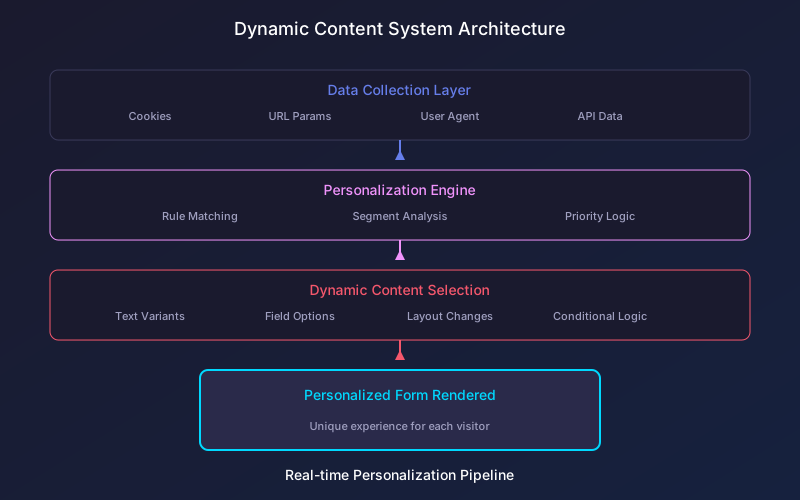
Step 1: Data Collection Infrastructure
Set up reliable data collection:
Visitor arrives
  |
  v
Collect contextual data (device, location, referrer)
  |
  v
Check for existing identifiers (cookies, local storage)
  |
  v
Query internal databases (CRM, marketing automation)
  |
  v
Optional: Enrich with third-party data
  |
  v
Build visitor profile for personalization decisions
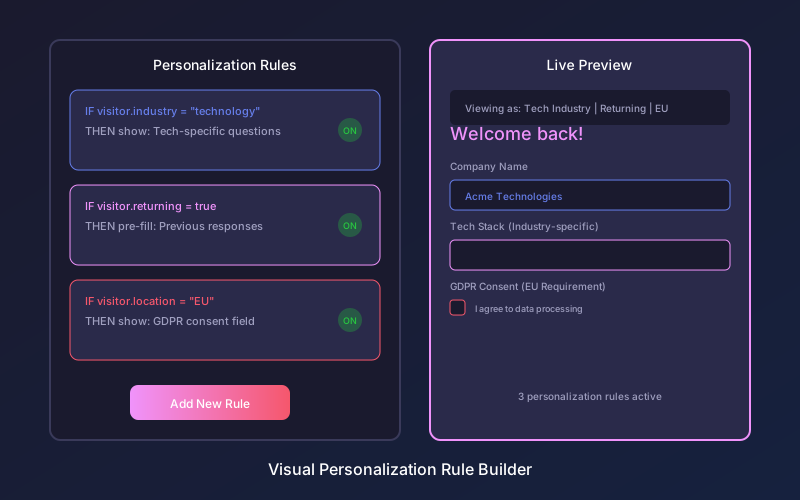
Step 2: Personalization Rules Engine
Define clear rules for content selection:
- IF visitor.industry = “technology” THEN show tech_questions
- IF visitor.company_size > 500 THEN route_to_enterprise = true
- IF visitor.returning = true AND visitor.email_known THEN pre_fill_email
- IF visitor.location.country = “EU” THEN show_gdpr_consent
Step 3: Dynamic Content Rendering
Implement real-time content assembly:
- Load base form template
- Evaluate all personalization rules
- Select appropriate content variants
- Render personalized form
- Track which personalizations were applied
Step 4: Testing and Optimization
Measure personalization effectiveness:
- A/B test personalized vs generic versions
- Track conversion rates by segment
- Identify which personalizations drive the most lift
- Iterate based on performance data
Real-World Personalization Case Studies
Understanding how organizations successfully implement form personalization provides practical guidance for your own efforts.
Case Study: B2B Software Company
Challenge: Generic demo request form had 3.2% conversion rate.
Personalization Applied:
- Industry detection from company domain
- Company size lookup via third-party enrichment
- Referral source-specific messaging
- Pre-populated company name field
Results:
- Conversion rate increased to 7.8% (144% improvement)
- Form completion time reduced by 40%
- Sales team reported higher lead quality
Case Study: E-commerce Retailer
Challenge: High cart abandonment with checkout requiring repetitive data entry.
Personalization Applied:
- Returning customer recognition with one-click checkout
- Shipping address pre-population from previous orders
- Payment method remembered (with consent)
- Personalized product recommendations in checkout
Results:
- Checkout completion improved 31%
- Average order value increased 12% (cross-sell suggestions)
- Customer satisfaction scores improved significantly
Case Study: Healthcare Provider
Challenge: Patient intake forms took too long and frustrated patients.
Personalization Applied:
- Previous patient recognition and data retrieval
- Insurance information pre-populated
- Condition-specific question flows
- Language preference detection
Results:
- Intake time reduced from 15 minutes to 4 minutes
- Patient satisfaction improved 45%
- Staff administrative burden decreased substantially
Common Personalization Pitfalls to Avoid
Over-Personalization
Being too specific can feel intrusive and damage trust:
Too much: “Hi Sarah! We noticed you visited our pricing page 3 times this week and looked at the Enterprise plan for 4 minutes and 23 seconds.”
Just right: “Welcome back! Ready to explore our Enterprise options?”
The goal is helpfulness, not surveillance demonstration. Personalization should feel natural, not creepy.
Inaccurate Data
Wrong personalization is worse than none:
- Validate data quality before using it for personalization
- Provide easy correction options when data is wrong
- Fall back gracefully when data is uncertain
- Test personalization logic thoroughly before deployment
One incorrect name pre-fill or wrong industry assumption can undermine trust entirely.
Inconsistent Experiences
Ensure personalization is consistent across:
- Form and landing page messaging
- Email follow-ups and form content
- Sales team awareness of what visitors saw
- Customer support context when issues arise
Inconsistency confuses users and wastes personalization investment.
Privacy Perception Issues
Even with consent, some personalization feels uncomfortable:
- Use data to help, not to demonstrate surveillance
- Be transparent about what data you use
- Respect sensitivity of different data types
- Provide clear privacy explanations when asked
Measuring Personalization Success
Primary Metrics
- Conversion rate by segment: Compare personalized vs control
- Form completion rate: Track improvement in completions
- Time to completion: Measure efficiency gains
- Lead quality scores: Assess impact on downstream conversion
Secondary Metrics
- Pre-fill acceptance rate: How often is pre-filled data correct?
- Personalization match rate: What percentage of visitors receive personalized experiences?
- Segment performance variance: Which personalizations drive the most value?
Long-Term Metrics
- Customer lifetime value by personalization: Track revenue impact
- Customer satisfaction: Survey recipients about form experience
- Sales team feedback: Gather qualitative insights on lead quality
The Future of Form Personalization
Form personalization continues evolving with advancing technology:
AI-Driven Personalization
Machine learning will enable:
- Automatic segment discovery
- Predictive content selection
- Real-time optimization without rules
- Personalization at the individual level
Cross-Channel Consistency
Personalization will extend beyond forms to create seamless experiences across:
- Email communications
- Chat interactions
- Phone conversations
- In-app experiences
Privacy-Preserving Personalization
New approaches will balance personalization with privacy:
- Edge computing for on-device personalization
- Federated learning for aggregate insights
- Privacy-safe data collaboration
Hyper-Personalization
Individual-level customization including:
- Unique field combinations per visitor
- Personalized form length based on engagement signals
- Real-time adaptation during form completion
FAQ
How much data do I need to start personalizing forms?
You can start with basic personalization using only contextual data like device type, location, and referral source. No historical data required. As you collect more first-party data through form submissions and website behavior, you can implement increasingly sophisticated personalization strategies.
Does form personalization require developer resources?
Modern form personalization platforms offer no-code rule builders that marketing and operations teams can use without developer involvement. Complex integrations with CRMs or custom data sources may require initial technical setup, but ongoing personalization management is typically self-service.
How do I balance personalization with page load speed?
Well-implemented personalization adds minimal latency. Best practices include caching personalization rules at the edge, making asynchronous data lookups, and progressively enhancing forms after initial render. Target under 100ms additional load time for personalization logic.
Can I personalize forms for anonymous visitors?
Yes, anonymous personalization uses contextual and behavioral data without requiring identification. Referral source, device type, pages viewed, and time on site all enable meaningful personalization for first-time visitors with no prior relationship.
What if my personalization data is wrong?
Always provide easy correction options. Design personalized fields with edit capabilities, include “Not you?” links for pre-filled contact information, and fall back to generic experiences when data confidence is low. Wrong personalization damages trust more than no personalization.
Ready to create high-converting forms? Try Pixelform free — build professional forms with conditional logic and smart field validation.