Voice-Enabled Forms: The Intersection of Accessibility and Innovation
Key Takeaways
- Voice-enabled forms complete 3x faster than traditional typing with average speeds of 150 WPM versus 40 WPM
- Speech-to-text form filling dramatically improves accessibility for users with motor impairments or visual disabilities
- Modern voice recognition achieves over 95% accuracy for form-relevant vocabulary and structured data entry
- Multi-modal interfaces combining voice and touch create the most flexible and inclusive form experiences
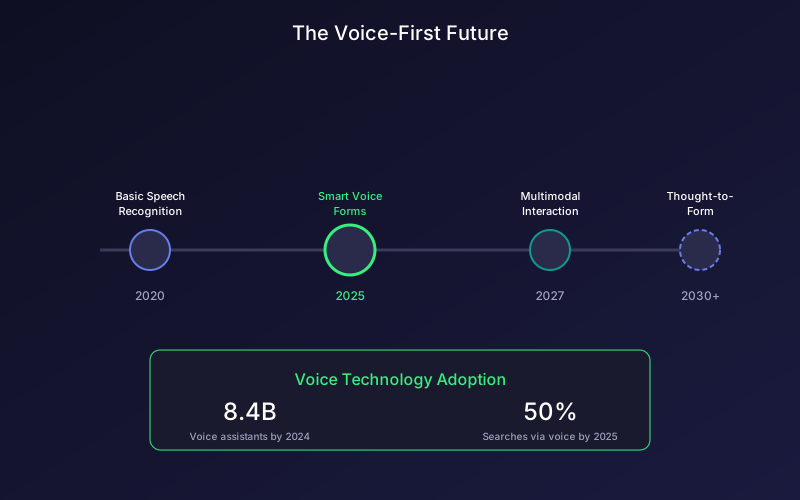
The way we interact with technology is fundamentally changing. Voice assistants have become ubiquitous, with over 8.4 billion voice assistant devices in use globally according to Statista 2024 data. Yet most online forms still require manual typing, creating friction and excluding users who could benefit from voice interaction.
Voice-enabled forms represent a convergence of accessibility requirements and technological innovation. They make forms accessible to users with motor impairments, vision challenges, or situational limitations while simultaneously improving the experience for everyone through faster, more natural input.
Understanding Voice-Enabled Forms
Voice-enabled forms allow users to complete form fields using speech instead of typing. Users speak their responses, and speech-to-text technology converts their words into structured data that populates form fields automatically.
Modern voice form implementations include:
- Speech-to-text input: Converting spoken words to field values
- Voice commands: Navigating between fields and submitting forms
- Audio feedback: Confirming what was captured and prompting for corrections
- Multi-modal interaction: Combining voice with touch or keyboard as needed
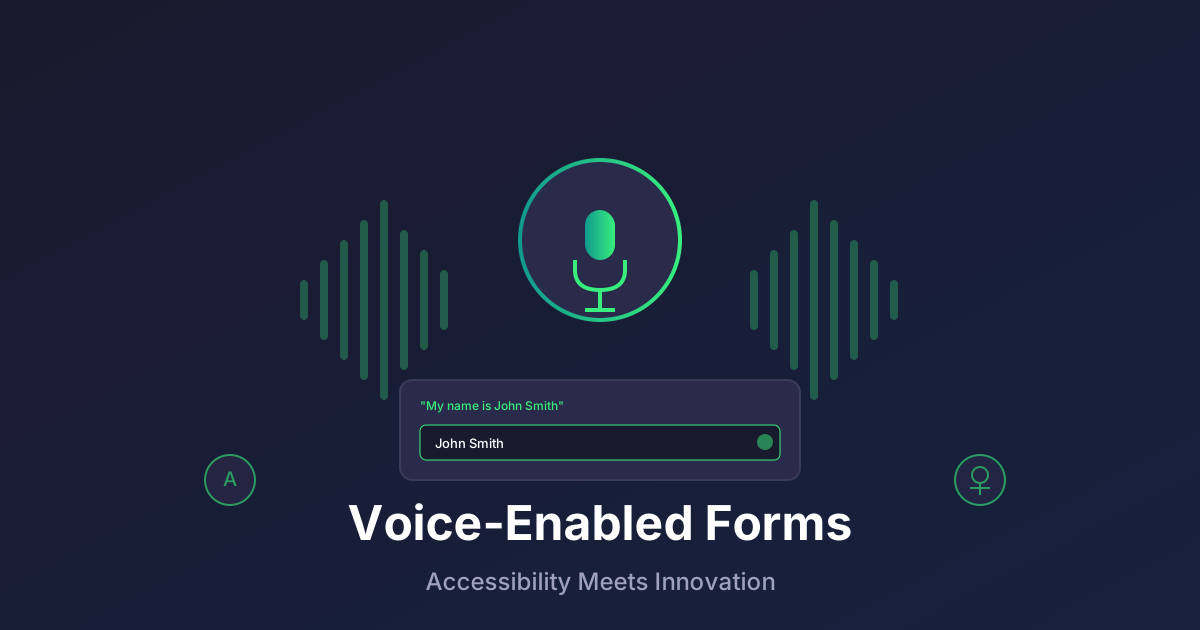
Unlike simple dictation, voice-enabled forms understand context. When you say “My email is john at example dot com,” the form recognizes this as an email address and formats it correctly as john@example.com.
The Accessibility Imperative
Voice forms are not just a convenience feature. For many users, they are essential for digital participation.
Users Who Benefit
People with motor impairments:
- Carpal tunnel syndrome affecting typing ability
- Arthritis making keyboard use painful
- Paralysis or limited hand mobility
- Temporary injuries preventing normal input
People with visual impairments:
- Screen reader users who find form navigation challenging
- Low vision users who struggle with field identification
- Users who benefit from audio confirmation of inputs
People with cognitive differences:
- Dyslexia making typing and spelling difficult
- Processing disorders affecting multi-step interactions
- Attention disorders benefiting from conversational flow
Situational limitations:
- Hands occupied with other tasks
- Driving or commuting situations
- Wearable devices with limited input capabilities
- Noisy environments with on-screen keyboards
Legal and Compliance Considerations
Accessibility is increasingly a legal requirement:
- ADA (Americans with Disabilities Act): Requires accessible digital experiences
- Section 508: Federal accessibility standards
- WCAG 2.1: International accessibility guidelines
- European Accessibility Act: EU-wide requirements by 2025
Voice-enabled forms help organizations meet these requirements while simultaneously improving experiences for all users.
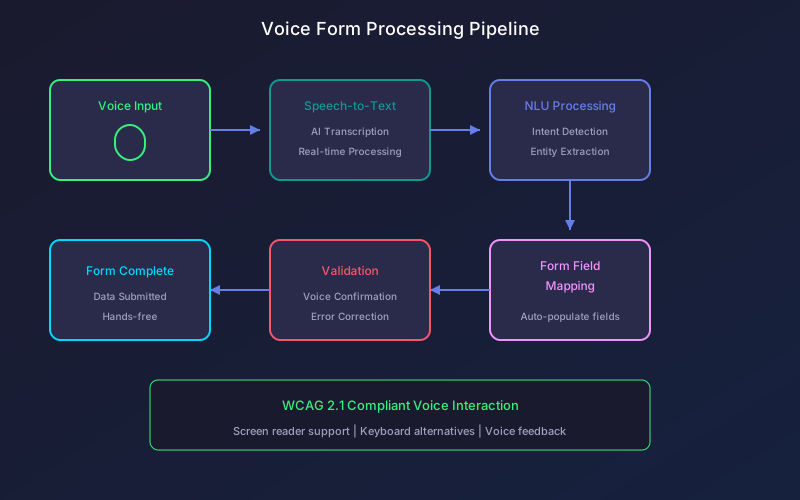
How Voice Form Technology Works
Modern voice-enabled forms leverage several interconnected technologies:
Speech Recognition
The first step converts audio to text:
- Audio capture: Microphone records user speech
- Signal processing: Noise reduction and audio optimization
- Acoustic modeling: Convert audio signals to phonemes
- Language modeling: Construct words from phoneme sequences
- Text output: Generate transcribed text
Modern speech recognition from providers like Google, Amazon, and Microsoft achieves over 95% accuracy for clear speech, with specialized models for form-relevant vocabulary performing even better.
Natural Language Understanding
Beyond transcription, NLU interprets meaning:
- Intent detection: Understanding what the user wants to do
- Entity extraction: Identifying specific data points (names, emails, numbers)
- Context awareness: Using previous responses to improve understanding
- Clarification: Asking follow-up questions when input is ambiguous
Form Field Mapping
Intelligent mapping connects voice input to form structure:
- Match spoken content to appropriate fields
- Apply formatting rules (phone numbers, dates, addresses)
- Validate entries and request corrections
- Handle structured data like multiple-choice selections
Voice Feedback
Completing the interaction loop:
- Confirm captured information audibly
- Prompt for the next field
- Explain validation errors verbally
- Guide users through complex form sections
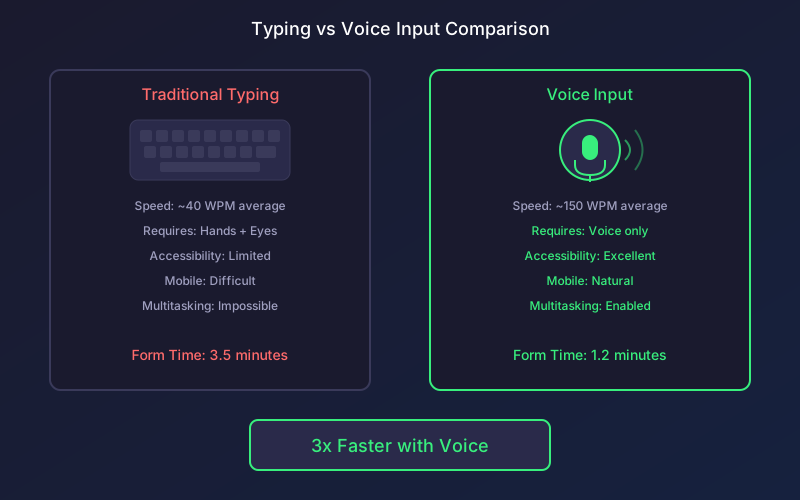
Performance Benefits of Voice Input
Voice-enabled forms offer compelling performance advantages:
Speed Improvements
| Input Method | Average Speed | Form Completion Time (10 fields) |
|---|---|---|
| Desktop typing | 40 WPM | 3.5 minutes |
| Mobile typing | 25 WPM | 5.2 minutes |
| Voice input | 150 WPM | 1.2 minutes |
Source: University of Washington Human-Computer Interaction Research 2023
Voice is roughly 3x faster than typing for most users, with even greater advantages on mobile devices where typing is slower.
Error Reduction
Counter-intuitively, voice input often produces fewer errors:
- Speech recognition has improved dramatically in accuracy
- Users can see and correct transcription in real-time
- Spoken content tends to be more natural and complete
- Fatigue-related typing errors are eliminated
User Satisfaction
Studies show users prefer voice when available:
- 73% of users report voice forms as “easier” than typing
- 68% would choose voice input again if available
- 82% of accessibility-focused users rate voice highly
Implementing Voice-Enabled Forms
Technical Requirements
Browser Compatibility: Modern voice input uses the Web Speech API supported by:
- Chrome (desktop and mobile)
- Safari (desktop and mobile)
- Edge (desktop)
- Firefox (limited support, improving)
User Permissions: Voice input requires explicit microphone permission. Design prompts that:
- Explain why voice is beneficial
- Respect users who prefer typing
- Remember preferences for future visits
Fallback Experiences: Always provide keyboard alternatives for:
- Browsers without voice support
- Users who prefer not to grant microphone access
- Environments where speaking is not appropriate
UX Design Patterns
Clear Voice Activation: Make voice input discoverable:
- Visible microphone icons on voice-enabled fields
- Clear instructions for first-time users
- Obvious recording state indicators
Real-Time Feedback: Show users what is being captured:
- Live transcription display
- Waveform visualization during recording
- Immediate validation results
Easy Correction: Make fixing errors simple:
- Edit transcribed text directly
- “Try again” voice commands
- Seamless switch between voice and typing
Progress Confirmation: Reinforce successful completion:
- Audio confirmation of saved responses
- Visual checkmarks for completed fields
- Summary before final submission
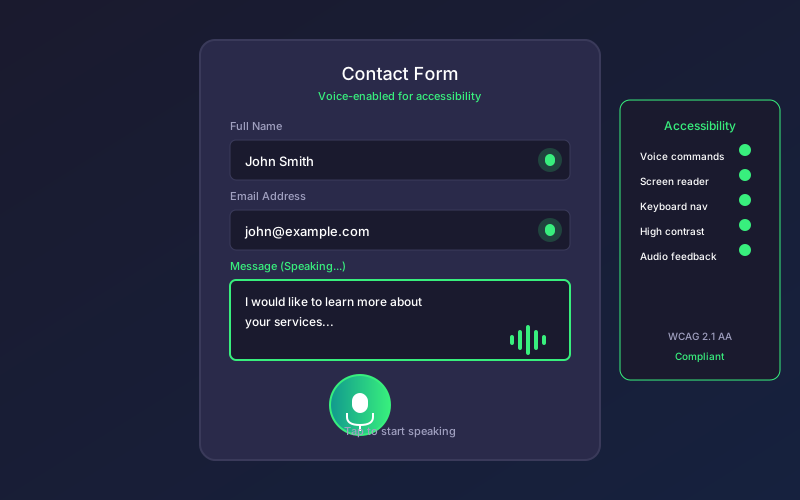
Accessibility-First Design
When building voice forms, prioritize:
Screen Reader Compatibility:
- Announce voice availability to screen reader users
- Provide equivalent keyboard navigation
- Read transcription results aloud
- Support standard screen reader form navigation
Keyboard Alternatives:
- Every voice function has keyboard equivalent
- Tab navigation works normally
- Enter to submit, Escape to cancel
- Clear focus indicators throughout
Visual Clarity:
- High contrast recording indicators
- Large, clear microphone buttons
- Readable transcription display
- Status messages that work at any zoom level
Cognitive Accessibility:
- Simple, consistent interaction patterns
- Clear error messages with recovery guidance
- No time pressure during voice input
- Option to review all entries before submission
Voice Form Use Cases
Healthcare Intake Forms
Voice forms transform patient intake:
- Patients can complete forms while waiting
- Reduces need for clipboards and pens
- Supports patients with hand injuries or arthritis
- Staff can assist verbally when needed
Example flow: “What brings you in today?” Patient speaks symptoms naturally Form captures and categorizes information
Customer Service Requests
Voice-enabled support forms:
- Faster issue description than typing
- Natural problem explanation
- Emotional context captured in description
- Reduces frustration during already stressful situations
Accessibility Surveys
When gathering accessibility feedback:
- Demonstrates commitment to accessibility
- Allows users to share experience naturally
- Captures detailed qualitative feedback
- Models accessible interaction patterns
Field Service Reports
Technicians completing reports on-site:
- Hands-free data entry
- Works with gloves or protective equipment
- Captures observations as they happen
- Reduces post-visit documentation burden
Automotive and IoT
Connected devices with limited input:
- In-car form completion
- Smart device registration
- Wearable feedback collection
- Kiosk and digital signage interactions
Technical Challenges and Solutions
Background Noise
Challenge: Voice recognition struggles in noisy environments.
Solutions:
- Noise cancellation algorithms
- Push-to-talk activation
- Visual confirmation before committing
- Easy retry mechanisms
Accents and Dialects
Challenge: Speech recognition accuracy varies across accents.
Solutions:
- Multilingual and accent-aware models
- User-specific adaptation over time
- Spelling confirmation for critical fields
- Alternative input always available
Privacy Concerns
Challenge: Users may hesitate to speak sensitive information.
Solutions:
- On-device processing when possible
- Clear privacy explanations
- Option to type sensitive fields
- Visual confirmation of what is transmitted
Specialized Vocabulary
Challenge: Technical terms, names, and jargon may be misrecognized.
Solutions:
- Custom vocabulary training
- Spelling mode for unusual words
- Confirmation for critical data
- Learning from corrections
Measuring Voice Form Success
Adoption Metrics
- Voice feature discovery rate: Percentage of users who see voice option
- Voice activation rate: Percentage who try voice input
- Voice completion rate: Percentage who finish using voice
Performance Metrics
- Recognition accuracy: Percentage of correctly transcribed input
- Correction rate: How often users need to fix transcription
- Time to completion: Voice vs typing comparison
- Error rate at submission: Data quality comparison
Satisfaction Metrics
- Post-form surveys: Ask about voice experience specifically
- Return usage: Do users choose voice again?
- Accessibility feedback: Specific input from accessibility-focused users
The Future of Voice Forms
Voice form technology continues advancing rapidly:
Improved Recognition
- Near-perfect accuracy for common use cases
- Better handling of accents and languages
- Real-time translation during form completion
- Context-aware vocabulary adaptation
Conversational Voice Forms
- Natural dialogue replacing field-by-field input
- AI understanding unstructured voice input
- Proactive clarification and confirmation
- Emotional intelligence in response handling
Multimodal Integration
- Seamless switching between voice, touch, and gesture
- AR/VR form completion with voice
- Ambient computing form interactions
- Predictive voice with smart suggestions
Privacy-Preserving Voice
- Fully on-device processing for sensitive forms
- Encrypted voice transmission
- Anonymized voice data for improvement
- User control over voice data retention
FAQ
How accurate is voice-to-text for form filling?
Modern speech recognition achieves over 95% accuracy for clear speech in quiet environments. For form-specific vocabulary like names, addresses, and common business terms, accuracy is typically higher. Custom vocabulary training can push accuracy above 98% for specialized use cases. Real-time visual confirmation allows users to catch and correct any recognition errors.
Does voice form filling work on mobile devices?
Yes, mobile devices have excellent voice support. Both iOS and Android provide native speech recognition APIs that work with web-based voice forms. Mobile voice input is particularly valuable since typing on small screens is slower and more error-prone. Battery impact is minimal for typical form completion durations.
What about users who cannot speak or prefer not to use voice?
Voice should always be an enhancement, never a requirement. All voice-enabled forms must maintain full keyboard and mouse accessibility. Users should be able to complete any form without ever activating voice features. This dual-mode approach ensures maximum accessibility for all users regardless of their abilities or preferences.
How do voice forms handle sensitive information like passwords?
Sensitive fields like passwords should default to keyboard input with voice as an optional enhancement. When voice is used for sensitive data, implement additional safeguards: private listening mode that does not echo spoken content, immediate encryption before transmission, and clear privacy indicators. Many users prefer typing for passwords regardless of voice availability.
What languages are supported for voice forms?
Major speech recognition APIs support 100+ languages with varying accuracy levels. English, Spanish, Mandarin, and major European languages have the highest accuracy. For multilingual forms, implement language detection or allow users to specify their preferred language. Test voice features specifically in each target language before deployment.
Ready to create accessible, mobile-friendly forms? Try Pixelform free — build professional forms that work great on any device.