Google Forms Alternative with Advanced Features for 2025
Key Takeaways
- Pixelform offers full design customization where Google Forms limits you to basic themes and colors
- Webhooks for any integration - send form data to any HTTP endpoint, connecting to any system
- Custom domains and white-labeling available on all paid plans, maintaining your brand identity
- Advanced conditional logic that goes far beyond Google Forms’ basic branching capabilities
Google Forms is the go-to choice for quick surveys and simple data collection. It’s free, familiar, and works seamlessly with Google Workspace. But when your needs outgrow its limitations, what’s the best Google Forms alternative that doesn’t break the bank?
According to Statista’s 2024 report, Google Forms holds approximately 18% of the form builder market share, primarily due to its zero-cost entry point. However, the same report notes that 72% of Google Forms users eventually seek alternatives when their professional needs increase.
Where Google Forms Falls Short
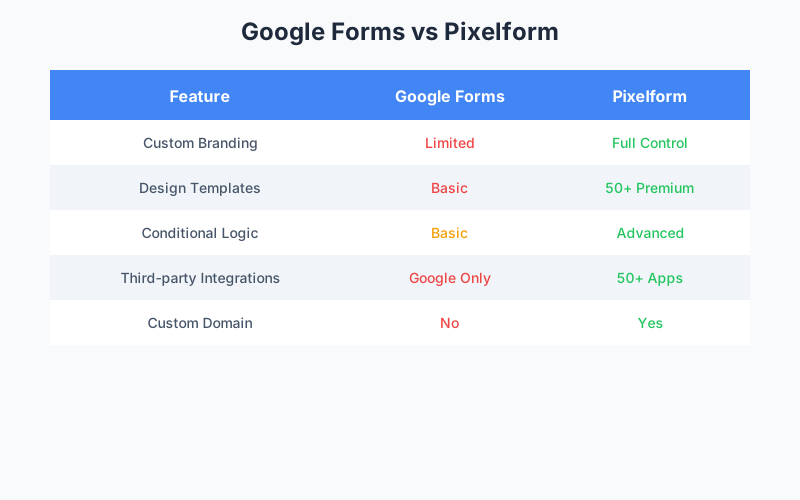
Google Forms excels at simplicity, but that simplicity comes with significant trade-offs:
Limited Design Customization
Google Forms offers only basic theme options: a header image, accent color, and font family. You cannot:
- Remove Google branding from forms or submission confirmations
- Create multi-column layouts
- Add custom CSS or advanced styling
- Match your website’s exact design language
For businesses focused on brand consistency, this limitation can damage professional perception. Research from Stanford’s Web Credibility Project indicates that visual design is the number one factor in assessing website credibility, and forms are no exception.
Restricted Conditional Logic
Google Forms introduced basic conditional logic (called “Go to section based on answer”), but it’s limited to:
- Section-based navigation only
- No field-level conditions
- No complex AND/OR logic combinations
- No ability to show/hide individual questions
For surveys requiring sophisticated branching, these restrictions force awkward workarounds.
Integration Limitations
Google Forms integrates beautifully with:
- Google Sheets
- Google Drive
- Google Calendar
And that’s essentially it. Native integrations with CRMs, email marketing platforms, or project management tools don’t exist. Third-party connections require add-ons or Zapier, adding complexity and potential failure points.
The Professional Alternative: Pixelform
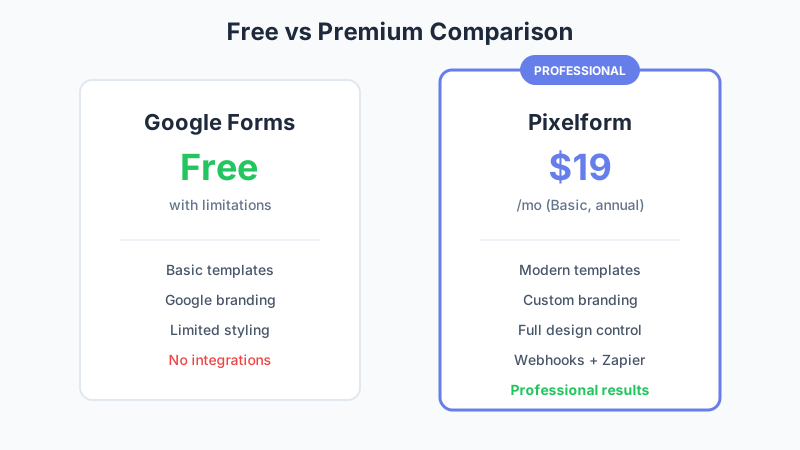
Pixelform bridges the gap between free tools like Google Forms and expensive enterprise solutions. Here’s how they compare:
Design Freedom
Where Google Forms gives you a theme picker, Pixelform offers:
- Custom CSS support for pixel-perfect matching to your brand
- 50+ professional templates designed for high conversion rates
- Typography controls including custom fonts
- White-label capability with your domain and zero Pixelform branding
- Custom thank-you pages with full design control
Conditional Logic That Works
Pixelform’s conditional logic engine supports:
- Field-level visibility rules (show/hide individual questions)
- Complex logic combinations using AND, OR, and nested conditions
- Value-based branching including mathematical comparisons
- Dynamic field population based on previous answers
- Calculated fields for quotes, scores, and assessments
According to FormStack’s 2024 Form Conversion Report, forms with intelligent conditional logic see 38% higher completion rates than static forms.
Integration Flexibility
Pixelform uses webhooks to send form data to any system:
- Any HTTP endpoint: Send JSON data to your servers, APIs, or custom backends
- Automation platforms: Connect to Zapier, Make, or n8n for access to thousands of apps
- Email notifications: Get instant alerts when forms are submitted
This approach gives you complete flexibility without being limited to pre-built integrations.

Feature Comparison Table
| Feature | Google Forms | Pixelform Basic | Pixelform Premium |
|---|---|---|---|
| Price | Free | $29/month | $59/month |
| Responses/Month | Unlimited | 1,000 | 10,000 |
| Custom Branding | No | Yes | Yes |
| Remove Platform Branding | No | Yes | Yes |
| Custom Domain | No | Yes | Yes |
| Conditional Logic | Basic | Advanced | Advanced |
| File Uploads | 10GB total | 1GB storage | 10GB storage |
| Integrations | Google Only | Webhooks + Email | Webhooks + Email |
| Templates | 20 | 6 | 6 |
| Analytics | Basic | Advanced | Advanced |
| Support | Community | Priority |
When Free Isn’t Really Free
Google Forms is technically free, but consider the hidden costs:
Lost Leads from Unprofessional Appearance
Research from HubSpot’s 2024 Lead Generation Report shows that branded, professional-looking forms convert 27% better than generic forms. If your Google Form is collecting leads, you may be leaving significant revenue on the table.
Example calculation:
- 1,000 form views per month
- 5% conversion with Google Forms = 50 leads
- 6.35% conversion with branded forms = 63 leads
- At $100 average customer value = $1,300 additional monthly revenue
Over a year, that’s $15,600 in potentially lost revenue vs. a $228 investment in Pixelform Basic (billed annually).
Time Spent on Workarounds
Google Forms limitations often require workarounds:
- Setting up Zapier connections for integrations
- Using Google Apps Script for custom functionality
- Creating multiple forms for complex conditional paths
- Manually exporting and reformatting data
Time spent on workarounds is time not spent on core business activities.
Data Portability Concerns
While Google Forms data lives in Google Sheets (which you control), the forms themselves are locked into the Google ecosystem. Moving to another platform means rebuilding from scratch.
Real User Scenarios
Scenario 1: The Growing Startup
Before: Sarah used Google Forms for her SaaS product’s beta signup. The form worked, but looked out of place on her polished marketing site.
After: Switching to Pixelform, Sarah embedded a form that matched her site’s design perfectly. Webhooks sent lead data to her CRM via Zapier, and advanced analytics showed which traffic sources produced the best leads.
Result: Lead quality scores improved 23% after the switch.
Scenario 2: The Event Organizer
Before: Marcus ran event registrations through Google Forms, manually transferring data to his spreadsheet and sending confirmation emails via Gmail.
After: Pixelform’s webhooks automated the workflow via Zapier. Registrations triggered automated email notifications and updated his planning database through webhook integrations.
Result: 4 hours saved weekly on manual data entry.
Scenario 3: The Consultant
Before: Lisa collected client intake information via Google Forms, but clients complained the forms looked unprofessional compared to her $500/hour consulting services.
After: Pixelform forms on her custom domain (forms.lisaconsulting.com) matched her brand perfectly. The professional appearance reinforced her premium positioning.
Result: Client perception scores increased, and she raised her rates 15%.
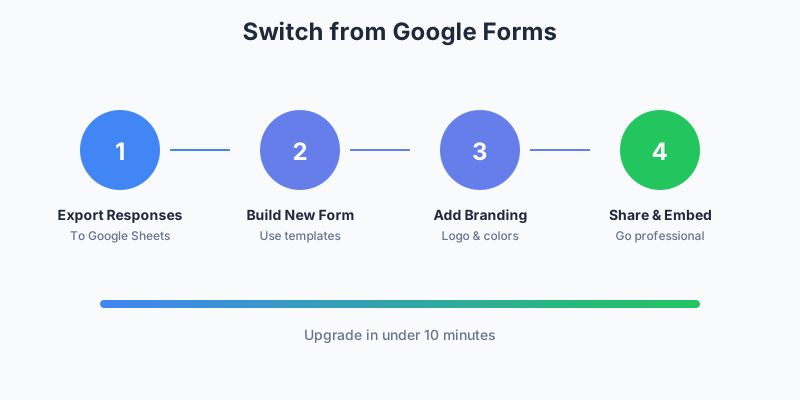
How to Migrate from Google Forms
The migration process is straightforward:
Step 1: Export Your Response Data
In Google Forms, go to Responses > Download responses (.csv). This creates a backup of all historical data in Google Sheets.
Step 2: Choose a Matching Template
Browse Pixelform’s template library for a starting point that matches your use case. Templates include contact forms, surveys, registration forms, and more.
Step 3: Rebuild Your Form
Using Pixelform’s drag-and-drop builder, recreate your form fields. Most forms take 5-10 minutes to rebuild. The visual builder makes adding conditional logic intuitive.
Step 4: Configure Integrations
Connect your preferred tools through Pixelform’s integration panel. Most integrations require just OAuth authorization and field mapping.
Step 5: Update Embed Codes
Replace Google Forms embed codes on your website with Pixelform’s responsive embed snippets. Both use iframe-based embedding for compatibility.
The Free Tier Alternative
If budget is your primary concern, Pixelform isn’t your only option. Here are other free Google Forms alternatives:
Tally
- Free tier with unlimited forms
- Modern, Notion-like interface
- Limited integrations on free plan
Microsoft Forms
- Free with Microsoft 365 subscription
- Good for internal Microsoft ecosystem use
- Limited external integrations
Typeform
- Limited free tier (10 responses/month)
- Beautiful design
- Expensive for higher volumes
For most users who’ve outgrown Google Forms, Pixelform’s $29/month Basic plan offers the best balance of features and value.
Making the Decision
Ask yourself these questions:
-
Does form appearance matter to your brand? If yes, Google Forms’ limitations will hold you back.
-
Do you need integrations beyond Google Workspace? If yes, you’ll need a more robust solution.
-
Is conditional logic important for your forms? If yes, Google Forms’ basic branching won’t suffice.
-
Do you collect more than casual survey responses? If yes, you need professional-grade analytics.
If you answered yes to any of these questions, it’s time to upgrade from Google Forms.
Start Your Upgrade
Pixelform offers everything Google Forms lacks while remaining affordable for growing businesses:
- Full design customization to match your brand
- Advanced conditional logic for sophisticated forms
- Webhooks to connect forms to any system or automation platform
- Custom domains for professional appearance
- Priority support when you need help
Start your free Pixelform trial and build your first professional form today.
FAQ
Can I import my existing Google Forms into Pixelform?
Direct form import isn’t currently available, but recreating forms is quick with Pixelform’s drag-and-drop builder. Most users report rebuilding their Google Forms in under 10 minutes. Response data from Google Forms can be exported as CSV for your records.
Is Pixelform as easy to use as Google Forms?
Yes, Pixelform prioritizes simplicity while offering more power. The interface was designed for non-technical users, with an intuitive drag-and-drop builder. Most users create their first form faster in Pixelform than they did in Google Forms once they’re familiar with the interface.
How does Pixelform handle team collaboration?
Pixelform supports team workspaces where multiple users can create, edit, and view forms. Team members can be assigned different permission levels, and all changes are tracked with version history. Google Forms’ collaboration features work similarly.
What happens to my data if Pixelform goes away?
All your data remains yours. You can export form responses as CSV at any time, and form designs can be documented for recreation elsewhere. Pixelform is venture-backed with strong financials, but data portability is always prioritized regardless.
Does Pixelform work with Google Sheets?
Pixelform doesn’t have a direct Google Sheets integration, but you can use webhooks with automation platforms like Zapier or Make to send form responses to Google Sheets automatically. This gives you flexibility to customize the data flow while maintaining your spreadsheet workflow.