Microsoft Forms Alternative for Non-Microsoft Users in 2025
Key Takeaways
- No Microsoft 365 subscription required with Pixelform - use any email, any ecosystem
- Webhooks for any integration - connect to any system via HTTP endpoints, not limited to one ecosystem
- Advanced features Microsoft Forms lacks including custom domains, white-labeling, and advanced conditional logic
- Works with any tech stack - Mac, Linux, Chrome OS, or Windows without Microsoft dependencies
Microsoft Forms is a capable tool for organizations already invested in the Microsoft ecosystem. But what if you use Google Workspace? What if your team runs on Macs? What if you simply don’t want to pay for Microsoft 365 just to create forms?
According to Okta’s 2024 Businesses at Work Report, 68% of organizations use multi-cloud strategies, meaning they don’t exclusively rely on Microsoft. For these users, Microsoft Forms’ tight ecosystem integration becomes a limitation rather than a benefit.
The Microsoft Lock-In Problem
Microsoft Forms is “free” with Microsoft 365, but that means:
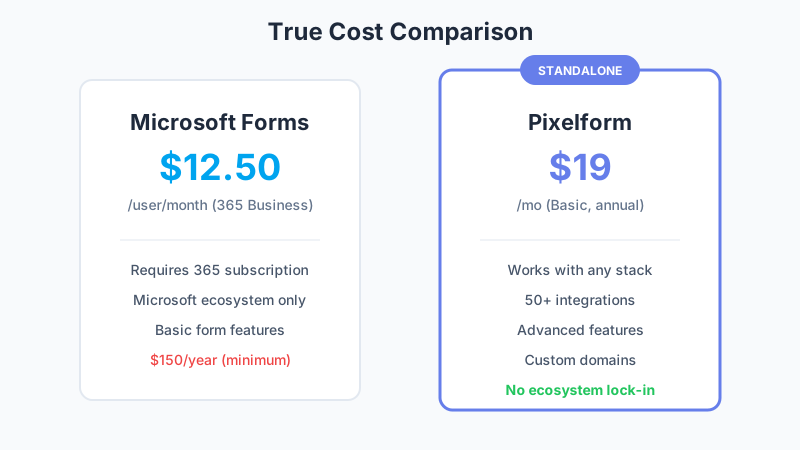
The Hidden Cost
Microsoft 365 Business Basic costs $6/user/month. That’s $72/user/year just to access Forms. For a 10-person team, that’s $720/year before you’ve done anything.
Compare that to Pixelform:
- Basic: $29/month for 1,000 responses
- Premium: $59/month for 10,000 responses
- Business: $149/month for 50,000 responses
Even for a single user, Pixelform Premium costs less annually than Microsoft 365 Basic while offering more form-specific features.
Ecosystem Restrictions
Microsoft Forms only integrates natively with:
- Microsoft Teams
- SharePoint
- Power Automate
- OneDrive
- Excel
If your organization uses Slack instead of Teams, Notion instead of SharePoint, or Google Sheets instead of Excel, you’re constantly fighting against Microsoft Forms’ preferences.
Platform Limitations
While Microsoft Forms works in any browser, the experience is optimized for:
- Windows users
- Edge browser
- Microsoft account holders
Users without Microsoft accounts face friction when submitting forms, and some features work best (or only) in the Microsoft ecosystem.
What Microsoft Forms Gets Right
To be fair, Microsoft Forms has genuine strengths:
Simplicity: The interface is clean and intuitive. Creating a basic form takes minutes.
Integration with Office: If you live in Excel and Teams, the native connections are seamless.
Quiz features: The quiz mode with automatic grading works well for education.
Price for existing 365 users: If you already pay for Microsoft 365, Forms adds no marginal cost.
Enterprise compliance: Microsoft’s compliance certifications (SOC, HIPAA, etc.) apply to Forms.
But if you’re not already in the Microsoft ecosystem, these benefits don’t justify the lock-in.
Pixelform: Freedom from Ecosystem Lock-In
Pixelform was built for the multi-tool, multi-platform reality of modern work:
Works With Everything
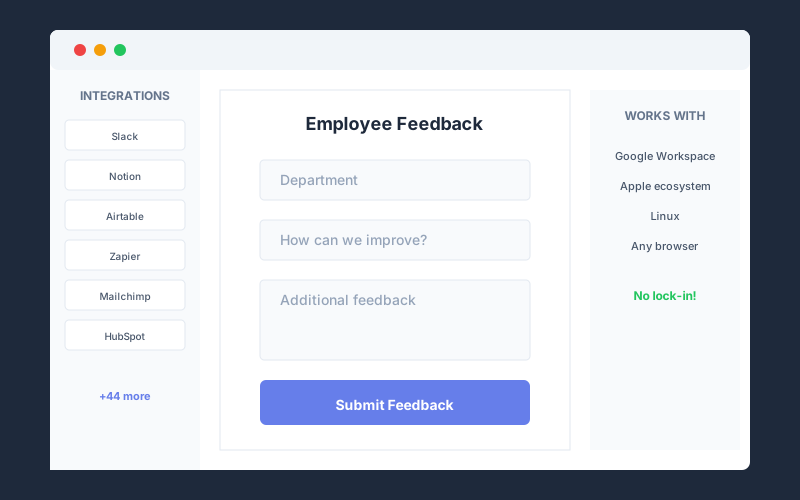
Pixelform uses webhooks to send form data anywhere:
Webhooks:
- Send JSON data to any HTTP endpoint
- Connect to your own servers and APIs
- Integrate with any system that accepts HTTP requests
Email Notifications:
- Instant alerts when forms are submitted
- Multiple recipients supported
- Customizable notification content
Automation Platforms:
- Use Zapier, Make, or n8n to connect to thousands of apps
- Build custom workflows without coding
- Complete flexibility without ecosystem lock-in
No Account Friction
Form respondents don’t need any account to submit responses. There’s no “Sign in with Microsoft” barrier. Anyone with a browser can respond, reducing friction and increasing completion rates.
Platform Agnostic
Pixelform works identically on:
- Windows, Mac, Linux, Chrome OS
- Chrome, Firefox, Safari, Edge
- iOS, Android
- Any email provider
Your tech stack is your choice, not dictated by your form builder.
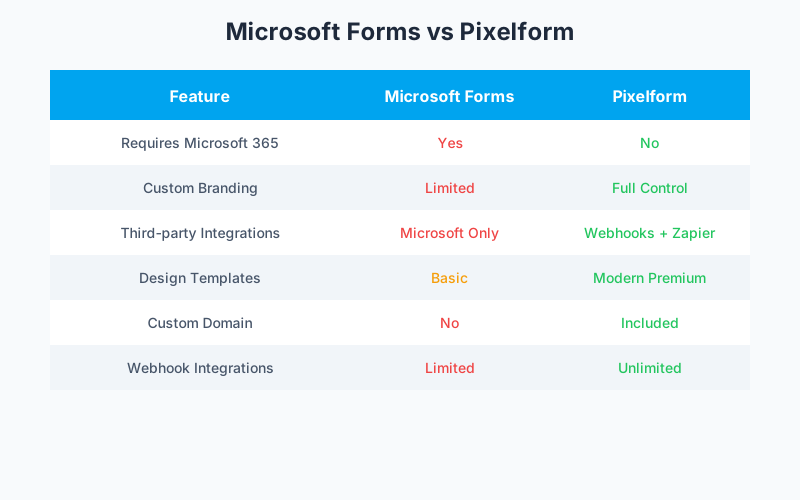
Feature Comparison
| Feature | Microsoft Forms | Pixelform |
|---|---|---|
| Requires Microsoft 365 | Yes | No |
| Custom domains | No | Yes |
| Remove branding | No | Yes |
| Payment collection | No | Via webhooks |
| Custom CSS | No | Yes |
| Third-party integrations | Microsoft only | Webhooks + Email |
| Conditional logic | Basic | Advanced |
| File uploads | 10MB limit | 100MB limit |
| Response limit | None | 1,000-50,000/month |
| Quiz mode | Yes | Yes |
| Templates | 20+ | 50+ |
| API access | Via Graph API | REST API |
Microsoft Forms has no response limit (a genuine advantage for high-volume internal use), but lacks the customization and integration flexibility that external-facing forms require. Pixelform plans range from 1,000 to 50,000 responses per month.
Real Scenarios: When to Switch
Scenario 1: The Google Workspace Shop
Your company uses Google Workspace for email, docs, and storage. Microsoft Forms creates friction because:
- Responses go to OneDrive, not Google Drive
- No native Google Sheets connection
- Team needs separate Microsoft accounts
Pixelform solution: Connect to Google Sheets via webhooks and automation platforms like Zapier or Make. Responses flow to your existing spreadsheets automatically. No Microsoft accounts needed.
Scenario 2: The Design-Conscious Brand
Your marketing team wants forms that match your website’s design. Microsoft Forms offers:
- Basic color themes
- No custom fonts
- No CSS customization
- Microsoft branding on all forms
Pixelform solution: Full design control with custom CSS, fonts, colors, and white-labeling. Your forms look like your website, not like Microsoft.
Scenario 3: The Slack-First Team
Your team communicates via Slack, not Teams. Getting Microsoft Forms notifications into Slack requires:
- Third-party automation tools
- Complex workflows
- Ongoing maintenance
Pixelform solution: Webhooks can send form data to automation platforms like Zapier or Make, which then post to Slack. This approach works with any communication tool, not just Slack.
Scenario 4: The Multi-Platform Team
Your team uses tools from different ecosystems - Google Docs, Slack, Notion, and more. Microsoft Forms:
- Only integrates with Microsoft tools
- Requires workarounds for other platforms
- Creates ecosystem friction
Pixelform solution: Webhooks send form data to any HTTP endpoint, so you can connect to any system. Use automation platforms to build workflows across multiple ecosystems without lock-in.
The Migration Process
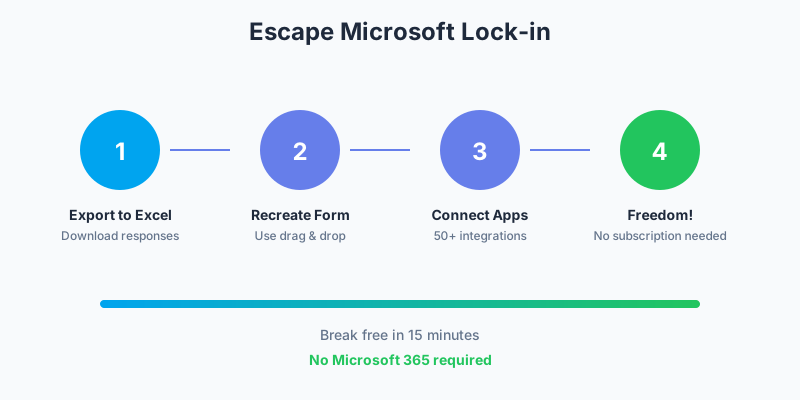
Already using Microsoft Forms? Here’s how to switch:
Step 1: Export Your Data
In Microsoft Forms, open your form and go to the Responses tab. Click “Open in Excel” to export all responses to a spreadsheet you can keep for records.
Step 2: Document Your Form Structure
Screenshot your current form or export it as a PDF (Print > Save as PDF) to reference while rebuilding.
Step 3: Create in Pixelform
Use Pixelform’s drag-and-drop builder to recreate your form. The process typically takes:
- Simple forms: 5 minutes
- Medium complexity: 10-15 minutes
- Complex forms with logic: 20-30 minutes
Step 4: Set Up Integrations
Connect your preferred tools in Pixelform’s integration panel. Most integrations require just OAuth authorization.
Step 5: Update Distribution
Replace Microsoft Forms links and embeds with your new Pixelform URLs and embed codes.
Cost Analysis: Breaking Free
Let’s calculate the true cost comparison:
Microsoft Forms for a 5-person team:
- Microsoft 365 Business Basic: $6/user/month
- Annual cost: $6 x 5 x 12 = $360/year
- 3-year cost: $1,080
Pixelform for a 5-person team:
- Premium plan: $49/month (billed annually)
- Annual cost: $588/year
- 3-year cost: $1,764
The math:
- If you’d buy Microsoft 365 only for Forms: Pixelform saves money
- If you already have Microsoft 365: Microsoft Forms has zero marginal cost
- If you want features Microsoft Forms lacks: Pixelform justifies the cost
For teams that don’t need Microsoft 365 for other purposes, Pixelform’s subscription plans offer a more focused investment in form capabilities.
When to Stay with Microsoft Forms
Microsoft Forms remains the right choice if:
- Your organization already uses Microsoft 365 extensively
- You primarily create internal forms and surveys
- Integration with Teams, SharePoint, and Power Automate is essential
- You need unlimited responses for high-volume internal use
- Enterprise compliance requirements favor Microsoft’s certifications
When to Switch to Pixelform
Pixelform is the better choice if:
- You don’t use Microsoft 365 or want alternatives
- You need external-facing forms with professional branding
- Integration with non-Microsoft tools is important
- You want custom domains and white-labeling
- Payment collection is a requirement
- You want affordable subscription plans starting at $29/mo
Make the Switch
Pixelform offers everything you need to break free from Microsoft ecosystem lock-in:
- Webhooks to connect forms to any system or automation platform
- Custom branding that matches your website
- No Microsoft account required for you or respondents
- Works on any device, any browser, any operating system
- Flexible subscription plans starting at $29/mo Basic, $59/mo Premium, or $149/mo Business
Start your free Pixelform trial and experience form building without ecosystem restrictions.
FAQ
Can Pixelform connect to Microsoft tools if I need it to?
Pixelform doesn’t have native Microsoft integrations, but webhooks let you send form data to any system. You can use automation platforms like Zapier or Make to connect Pixelform to Microsoft Teams, Excel, and other Microsoft tools when needed.
Is Microsoft Forms really free?
Microsoft Forms is included with Microsoft 365 subscriptions, but those subscriptions aren’t free. If you’re not already paying for 365, Forms effectively costs $6-12.50/user/month. For single users or small teams, Pixelform often costs less.
What about data security and compliance?
Pixelform is GDPR compliant with data stored in SOC 2 certified data centers. While Microsoft offers more extensive enterprise certifications (FedRAMP, HIPAA, etc.), Pixelform meets the security requirements of most SMB and mid-market organizations.
Can I use Pixelform with my existing Microsoft 365 setup?
Absolutely. Pixelform doesn’t require you to abandon Microsoft tools. You can use Pixelform for forms while continuing to use Outlook, Teams, and other Microsoft products. Zapier connects Pixelform to Microsoft’s ecosystem when needed.
How do response limits work in Pixelform vs Microsoft Forms?
Microsoft Forms has no response limits, which is valuable for high-volume internal surveys. Pixelform limits responses by plan (1,000-50,000/month across Basic, Premium, and Business tiers) but offers more advanced features. For most external-facing use cases, Pixelform’s limits are sufficient while the additional features justify the trade-off.