How to Build a Survey Form: Complete Guide to High-Response Surveys
Key Takeaways
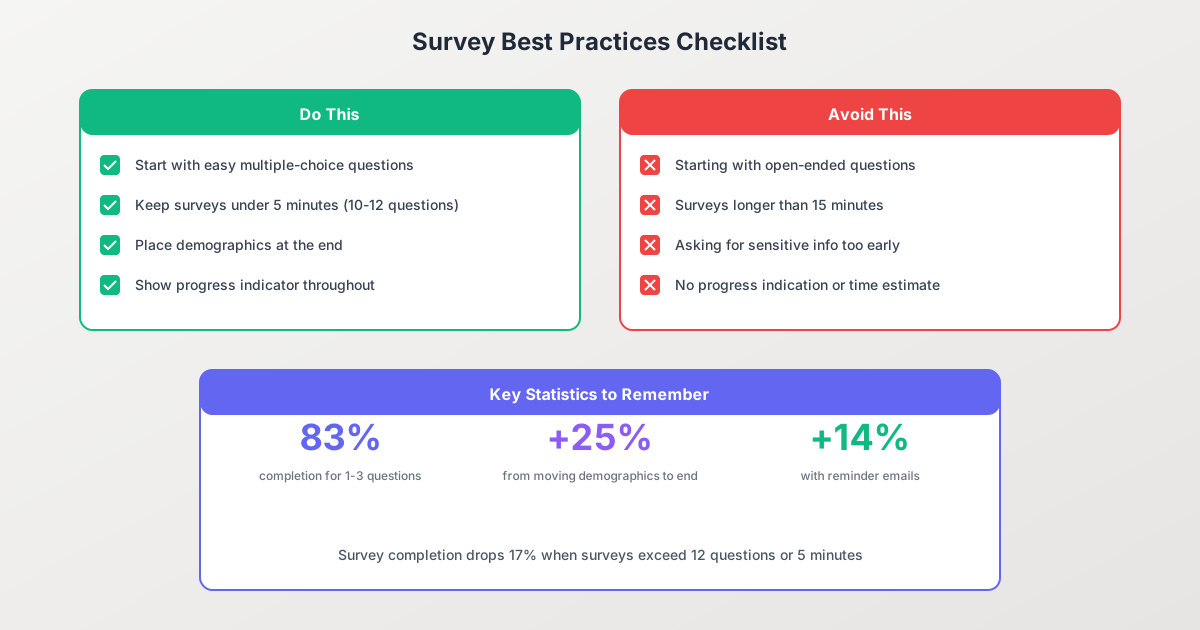
- Surveys with 1-3 questions achieve an 83% completion rate, while surveys with 15+ questions drop to just 42%
- Starting with multiple-choice questions instead of open-ended ones increases completion rates from 83% to 89%
- Moving demographic questions to the end of your survey can boost completion by 25%
- In-app surveys achieve 60-70% response rates, significantly outperforming email surveys at 15-25%
- A single reminder email can increase response rates by up to 14%
Creating a survey form that people actually complete requires more than just writing questions. The difference between a 20% response rate and an 80% response rate often comes down to strategic design choices that reduce friction and keep respondents engaged.
In this comprehensive guide, you’ll learn how to build survey forms that collect quality data while maximizing completion rates. We’ll cover everything from choosing the right question types to optimizing your survey structure based on the latest research.

Why Survey Design Matters
Survey abandonment is a significant problem. According to research from SurveySparrow, the average survey response rate hovers between 10-30% depending on the channel and audience. But well-designed surveys consistently outperform these benchmarks.
The key insight is that every design decision either adds or removes friction. Cumulative friction leads to abandonment, while a frictionless experience leads to completion.
What the data tells us:
- Survey completion drops 17% when surveys exceed 12 questions or take longer than 5 minutes
- Surveys that open with multiple-choice questions have an 89% completion rate, compared to 83% for those starting with open-ended questions
- The majority of respondents are willing to spend a maximum of 15 minutes on any survey
Understanding these benchmarks helps you set realistic expectations and identify optimization opportunities.
Step 1: Define Your Survey Objectives
Before building your survey, clarify exactly what you need to learn. Vague objectives lead to vague questions, which lead to unusable data.
Ask Yourself These Questions
-
What decisions will this data inform? If you can’t connect survey results to a specific action or decision, reconsider whether you need that data.
-
Who is your target audience? B2B audiences typically have 12% higher response rates than B2C audiences. Internal surveys perform 20% better than external ones.
-
What’s your minimum viable response count? Determine the statistical significance you need before launching.
-
How will you analyze the results? Plan your analysis approach upfront to ensure your questions generate usable data.
Setting Realistic Response Rate Goals
Based on current benchmarks, here’s what you can expect:
| Survey Type | Average Response Rate |
|---|---|
| In-app (logged-in users) | 60-70% |
| SMS surveys | 40-50% |
| Web pop-up (modal) | ~40% |
| In-app surveys (general) | 25% |
| Email surveys | 15-25% |
| External surveys | 10-20% |
Anything above 50% is considered excellent, while 33% is about average.
Step 2: Choose the Right Question Types
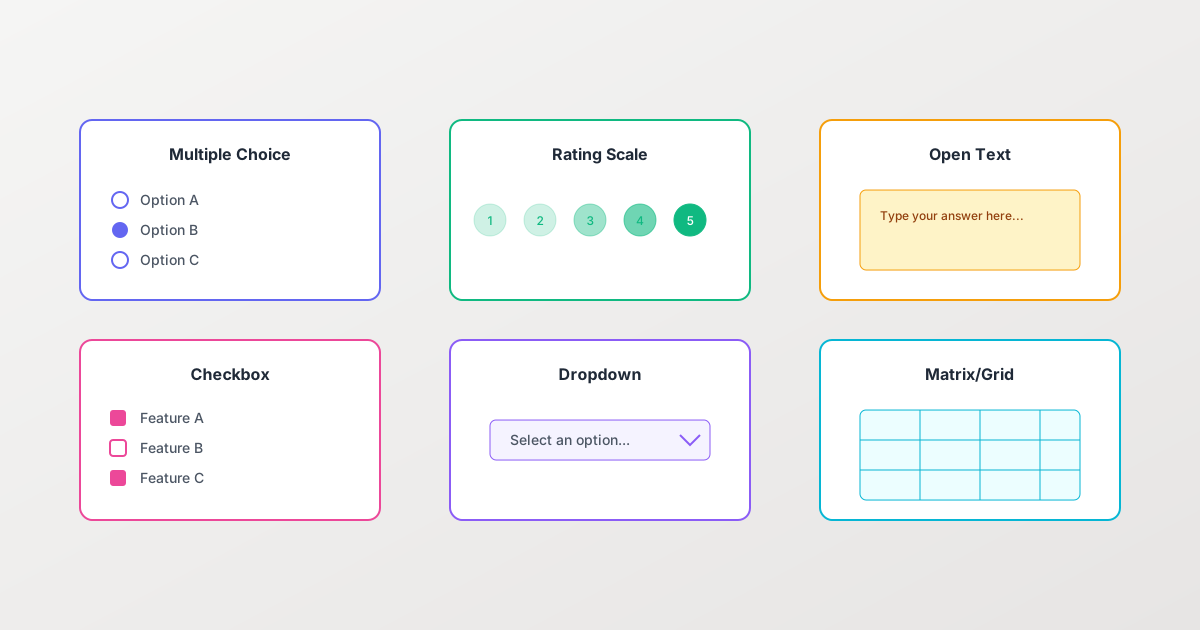
Different question types serve different purposes. The key is matching the question type to the data you need.
Multiple Choice Questions
Best for: Categorical data, preferences, behavior patterns
Advantages:
- Fast to answer
- Easy to analyze
- High completion rates
- Reduces cognitive load
Example:
How did you hear about us?
○ Search engine
○ Social media
○ Friend or colleague
○ Advertisement
○ Other
Best practices:
- Include 4-7 options maximum
- Add “Other” with text input for unexpected responses
- Randomize option order to prevent bias
Rating Scales
Best for: Satisfaction measurement, agreement levels, likelihood assessment
Advantages:
- Quantifiable results
- Easy to track over time
- Supports statistical analysis
Types of rating scales:
- Likert scale (1-5 or 1-7): Agreement/disagreement
- Net Promoter Score (0-10): Recommendation likelihood
- Semantic differential: Between two opposite adjectives
- Star ratings (1-5): Overall satisfaction
Best practices:
- Use balanced scales with equal positive and negative options
- Include a neutral midpoint
- Label all points clearly, not just endpoints
Open-Ended Questions
Best for: Qualitative insights, unexpected feedback, the “why” behind responses
Advantages:
- Captures nuanced feedback
- Reveals insights you didn’t anticipate
- Provides context for quantitative data
Disadvantages:
- Lower completion rates
- Time-consuming to analyze
- Respondent fatigue
Best practices:
- Use sparingly (1-2 per survey maximum)
- Place important open questions early, before fatigue sets in
- Be specific: “What could we improve about our checkout process?” beats “Any feedback?”
Matrix/Grid Questions
Best for: Rating multiple items on the same scale efficiently
Advantages:
- Efficient for related questions
- Maintains visual consistency
- Easier comparison for respondents
Disadvantages:
- Can feel overwhelming
- Higher abandonment on mobile
- Risk of straight-lining (selecting same answer for all items)
Best practices:
- Limit to 5-7 rows maximum
- Avoid on mobile surveys
- Randomize row order
Dropdown Selects
Best for: Long lists of options, standardized data (countries, dates, categories)
Advantages:
- Saves space
- Good for standardized responses
- Prevents typos
Best practices:
- Pre-select most common option when appropriate
- Enable search for long lists
- Consider radio buttons if fewer than 7 options
Step 3: Structure Your Survey for Maximum Completion
Survey structure significantly impacts completion rates. Research shows that strategic ordering can increase completion by 25% or more.

The Optimal Survey Flow
1. Introduction (Required)
- Welcome message explaining the purpose
- Time estimate (critical for setting expectations)
- Privacy/anonymity assurance if applicable
2. Easy Warm-Up Questions
- Start with simple multiple-choice questions
- Build momentum and engagement
- Avoid asking for sensitive information
3. Core Survey Content
- Your main questions go here
- Group related questions together
- Use logical transitions between sections
4. Open-Ended Questions
- Place after respondents are invested
- Limit to 1-2 questions
- Make them optional when possible
5. Demographics (If Needed)
- Always place at the end
- Only ask what you’ll actually use
- A nonprofit saw 25% higher completion by moving demographics to the end
6. Thank You Page
- Confirm submission success
- Explain next steps
- Offer contact information for questions
The Psychology Behind This Structure
Commitment and consistency: Once people start a task, they want to finish it. Easy opening questions create initial commitment.
Sunk cost effect: After completing several questions, abandoning feels like wasted effort.
Fatigue management: Save cognitively demanding questions (open-ended, sensitive) for after engagement is established, but before fatigue sets in.
Step 4: Optimize Survey Length
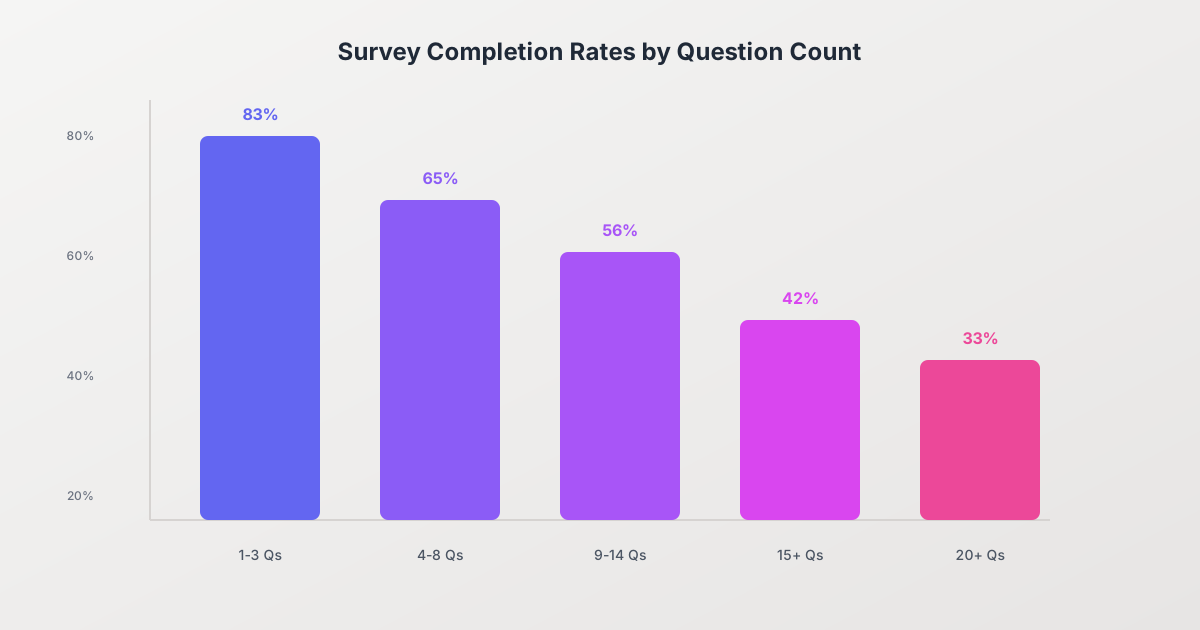
Survey length is the single biggest factor in completion rates.
Completion Rates by Question Count
According to research from Survicate and SurveySparrow:
| Question Count | Average Completion Rate |
|---|---|
| 1-3 questions | 83% |
| 4-8 questions | 65% |
| 9-14 questions | 56% |
| 15+ questions | 42% |
| 20+ questions | ~33% |
Time-Based Guidelines
- Under 5 minutes: Ideal for most surveys
- 5-10 minutes: Acceptable for engaged audiences
- 10-15 minutes: Maximum for most respondents
- 15+ minutes: Expect significant drop-off
How to Shorten Your Survey
-
Eliminate “nice to have” questions: If you won’t act on the data, don’t ask.
-
Use conditional logic: Show questions only when relevant, reducing perceived length.
-
Combine questions: Can two questions become one matrix question?
-
Remove redundancy: Don’t ask the same thing in different ways.
-
Pre-fill known data: If you have information from other sources, don’t ask for it again.
Step 5: Implement Conditional Logic
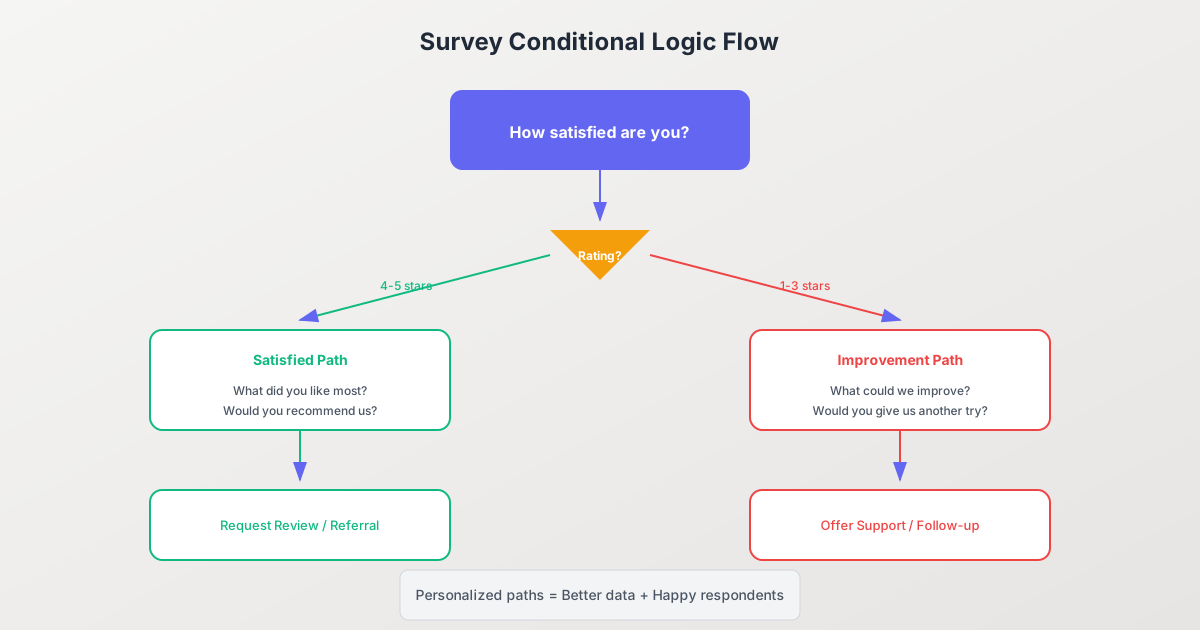
Conditional logic (also called skip logic or branching) creates personalized survey paths based on responses. This reduces survey length for individual respondents while collecting more relevant data.
Common Conditional Logic Patterns
Satisfaction Branching:
- High satisfaction (4-5 stars) → Ask for testimonial, referral
- Low satisfaction (1-3 stars) → Ask for specific improvement feedback
Qualification Filtering:
- If “No” to screening question → End survey or skip to relevant section
- If meets criteria → Continue to detailed questions
Product/Service Specific:
- Based on which product they use → Show relevant feature questions
- Based on frequency of use → Adjust question depth
Benefits of Conditional Logic
- Shorter surveys: Respondents only see relevant questions
- Better data quality: More specific, targeted questions
- Higher completion rates: Less irrelevant content
- Improved experience: Feels personalized and respectful of time
Implementation Tips
- Map out all possible paths before building
- Test every branch thoroughly
- Avoid overly complex logic chains
- Ensure no dead ends exist
Step 6: Choose the Right Distribution Channel
Your distribution channel significantly impacts response rates.
Channel Comparison
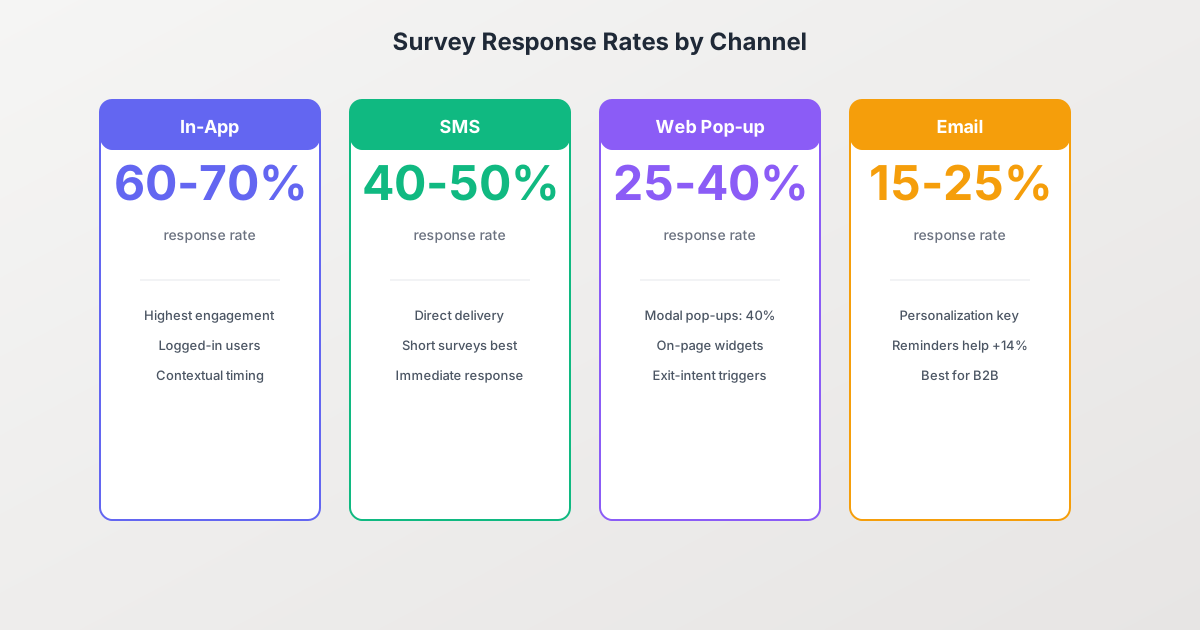
In-App Surveys (60-70% response rate)
- Best for: Product feedback, feature requests, UX research
- Advantages: Contextual, reaches active users, high engagement
- Best practices: Trigger based on specific actions, keep very short
SMS Surveys (40-50% response rate)
- Best for: Post-interaction feedback, appointment follow-ups
- Advantages: High open rates, immediate response
- Best practices: Send within 2 hours of interaction, limit to 1-3 questions
Web Pop-ups (25-40% response rate)
- Best for: Website feedback, exit surveys
- Advantages: Captures visitors in context
- Best practices: Use exit-intent triggers, central modals perform best (40%)
Email Surveys (15-25% response rate)
- Best for: Customer satisfaction, detailed feedback
- Advantages: Reach large audiences, allows longer surveys
- Best practices: Personalize subject lines, send reminders
Timing Matters
- Post-purchase surveys: Send within 24-48 hours
- Event surveys: Send within 2 hours for 32% more completions
- Customer satisfaction: Regular cadence (quarterly) prevents survey fatigue
- Reminder emails: Single reminder at 3-7 days boosts response by 14%
Step 7: Write Effective Survey Questions
Question wording directly impacts data quality and completion rates.
Question Writing Best Practices
Be Specific:
- Bad: “How was your experience?”
- Good: “How satisfied were you with the checkout process?”
Avoid Leading Questions:
- Bad: “How much did you enjoy our amazing new feature?”
- Good: “How would you rate the new feature?”
Use Simple Language:
- Avoid jargon and technical terms
- Write at an 8th-grade reading level
- Use active voice
One Question at a Time:
- Bad: “How satisfied are you with our pricing and support?”
- Good: Ask pricing and support satisfaction separately
Provide Context When Needed:
Thinking about your most recent purchase:
How satisfied were you with the delivery speed?
Balancing Open-Ended vs. Closed-Ended Questions
According to research from Nielsen Norman Group and SurveyMonkey:
Closed-ended questions excel at:
- Measurement and comparison
- Tracking trends over time
- Statistical analysis
- Higher completion rates (15-40% better than open-heavy surveys)
Open-ended questions excel at:
- Discovery and exploration
- Understanding the “why”
- Capturing unexpected insights
- Providing narrative context
Best practice: Start with a closed-ended question, follow with an optional open-ended prompt: “What led you to give that rating?”
Step 8: Design for Mobile
Over 50% of surveys are now completed on mobile devices. Poor mobile experience tanks completion rates.
Mobile Survey Design Checklist
- Single column layout
- Large tap targets (minimum 44x44 pixels)
- Readable font sizes (16px minimum)
- Avoid matrix questions (convert to individual questions)
- Progress indicator visible without scrolling
- Test on actual devices, not just emulators
Mobile-Specific Best Practices
- Reduce typing: Use selection-based questions over text input
- Shorten even more: Mobile users have less patience
- Enable native keyboards: Use correct input types for email, numbers
- Vertical scrolling only: Avoid horizontal interactions
- Quick-tap answers: Large, well-spaced response options
Step 9: Test Before Launching
Pre-launch testing catches issues that tank completion rates.
Testing Checklist
Functional Testing:
- All questions display correctly
- Conditional logic works as expected
- Submit button functions
- Confirmation page shows
- Data records properly
User Testing:
- Time 3-5 people completing the survey
- Watch for confusion points
- Get feedback on question clarity
- Test on multiple devices
Analytics Setup:
- Track question-level completion
- Monitor drop-off points
- Record time per question
- Enable A/B testing capability
Step 10: Analyze and Iterate
Survey optimization is an ongoing process.
Key Metrics to Track
- Overall completion rate: Benchmark against industry standards
- Question-level drop-off: Identify problem questions
- Time per question: Spot confusing or difficult questions
- Response quality: Check for straight-lining or nonsense responses
Continuous Improvement
- Review analytics monthly
- A/B test question wording, order, and format
- Remove or revise low-performing questions
- Update surveys based on changing needs
Build Your Survey Form with Pixelform
Creating effective surveys doesn’t require extensive technical skills. With the right tools, you can implement all these best practices quickly.
Pixelform makes survey creation straightforward with:
- Intuitive drag-and-drop builder for creating any question type
- Built-in conditional logic for personalized survey paths
- Mobile-responsive design that works on any device
- Real-time analytics to track completion and optimize
- Seamless integrations with your existing tools
Create your first survey with Pixelform and start collecting better data today.
FAQ
How many questions should my survey have?
For maximum completion rates, aim for 5-10 questions that can be completed in under 5 minutes. Surveys with 1-3 questions achieve 83% completion, while surveys with 15+ questions drop to around 42%. Only include questions where you’ll use the data to make decisions.
What’s a good survey response rate?
A good response rate depends on your distribution channel. In-app surveys typically achieve 25-70%, SMS surveys get 40-50%, and email surveys average 15-25%. Anything above 50% is considered excellent, while 33% is about average across all channels.
Should I offer incentives to increase survey responses?
Incentives can increase response rates by 10-30%, but use them strategically. They work best for longer surveys or hard-to-reach audiences. Be aware that incentives may attract respondents primarily interested in the reward rather than providing thoughtful feedback.
How do I reduce survey abandonment?
Key strategies include: starting with easy multiple-choice questions, keeping surveys under 5 minutes, showing a progress indicator, placing demographics at the end, using conditional logic to skip irrelevant questions, and testing on mobile devices before launch.
What’s the difference between anonymous and confidential surveys?
Anonymous surveys collect no identifying information whatsoever. Confidential surveys may collect identifying information but promise it won’t be shared or linked to responses. Anonymous surveys typically get more honest responses for sensitive topics but prevent follow-up.
How often should I send customer satisfaction surveys?
For ongoing relationships, quarterly surveys prevent survey fatigue while maintaining regular feedback. For transactional feedback, send within 24-48 hours of the interaction. Event-based surveys perform best when sent within 2 hours. Always respect unsubscribe requests and survey frequency preferences.
Ready to create surveys that people actually complete? Build your first survey with Pixelform and see how intuitive survey creation can be.