Nonprofit Donation Forms That Increase Giving
Key Takeaways
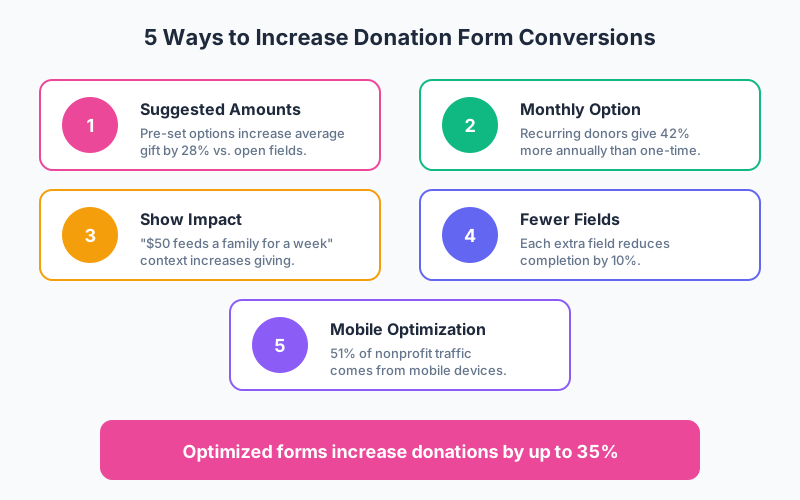
- Suggested donation amounts increase average gift size by 28% compared to open-ended amount fields, according to nonprofit benchmarking studies
- Monthly giving programs generate 42% more annual revenue per donor than one-time gifts, making recurring options essential
- Reducing form fields from 11 to 4 can increase completion rates by 160% while still capturing necessary donor information
- Mobile optimization is critical as 51% of nonprofit website traffic now comes from mobile devices (M+R Benchmarks 2024)
Every nonprofit knows the challenge: you’ve inspired someone to give, they click your donate button, and then… they abandon the form. According to nonprofit industry research, donation page abandonment rates average 60-70%. The difference between struggling organizations and thriving ones often comes down to how well their donation forms convert.
In this guide, we’ll explore the anatomy of high-converting donation forms, proven optimization strategies, and templates you can implement to increase online giving.
Why Donation Form Design Matters
Your donation form is the final step in the giving journey. A donor has been moved by your mission, decided to contribute, and clicked to give. At this critical moment, form friction can stop them cold.
The cost of abandonment is real:
- A 60% abandonment rate means for every $1,000 you could have raised, you’re losing $600
- Each abandoned donor represents not just one gift, but lifetime giving potential
- Poor mobile experience drives away the 51% of visitors on phones
The good news? Small improvements yield significant results. Nonprofit benchmarks show that optimized donation forms can increase conversion rates by 35% or more.
Essential Elements of Effective Donation Forms
1. Strategic Suggested Amounts
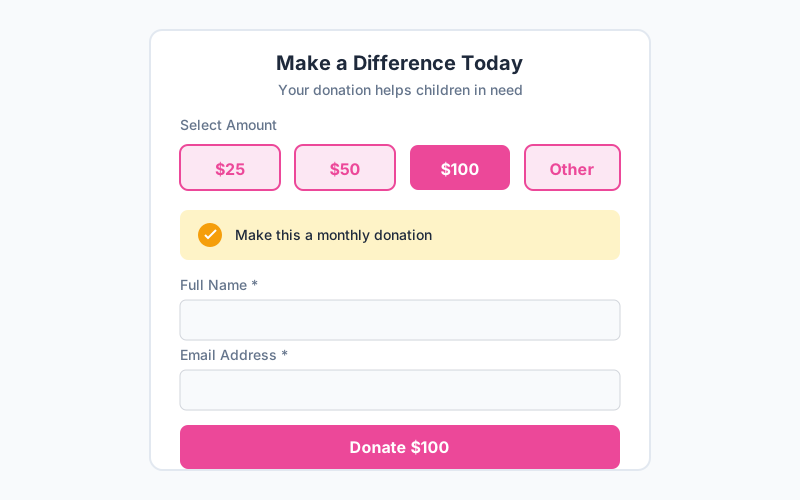
Never use an open text field for donation amounts. Suggested amounts serve multiple purposes:
Anchoring effect: The highest visible amount influences perceived norms. If donors see $25, $50, $100, $250, many will gravitate toward the middle-upper options.
Reduced friction: Clicking a pre-set amount is easier than typing.
Average gift lift: Studies show suggested amounts increase average gifts by 28%.
Best practices for suggested amounts:
- Include 4-5 options
- Start with your current average gift
- Make the second-highest option visually prominent
- Always include an “Other” option for flexibility
- Consider using odd amounts ($35, $75) which can increase conversions
2. Monthly Giving Option
Recurring donors are the backbone of sustainable nonprofit funding. According to the 2024 M+R Benchmarks study, monthly donors give 42% more annually than one-time donors.
Make monthly giving prominent:
- Include a toggle or checkbox for recurring gifts
- Highlight the impact of monthly giving (“$25/month provides 300 meals per year”)
- Consider defaulting to monthly with a one-time option
- Show the annual impact of monthly amounts
3. Impact Statements
Connect donation amounts to tangible outcomes. Instead of just “$50,” show “$50 provides school supplies for 5 children.”
Effective impact messaging:
- Be specific and concrete
- Use numbers donors can visualize
- Match impacts to suggested amounts
- Update seasonally for relevance
4. Minimal Required Fields
Each form field is a potential point of abandonment. Only ask for what’s absolutely necessary to process the gift.
Essential fields only:
- Name (for receipt)
- Email (for confirmation and stewardship)
- Payment information
- Billing address (required by payment processors)
Move these to optional or post-donation:
- Phone number
- How did you hear about us
- Comments or dedications
- Employer matching information
Optimizing for Different Giving Types
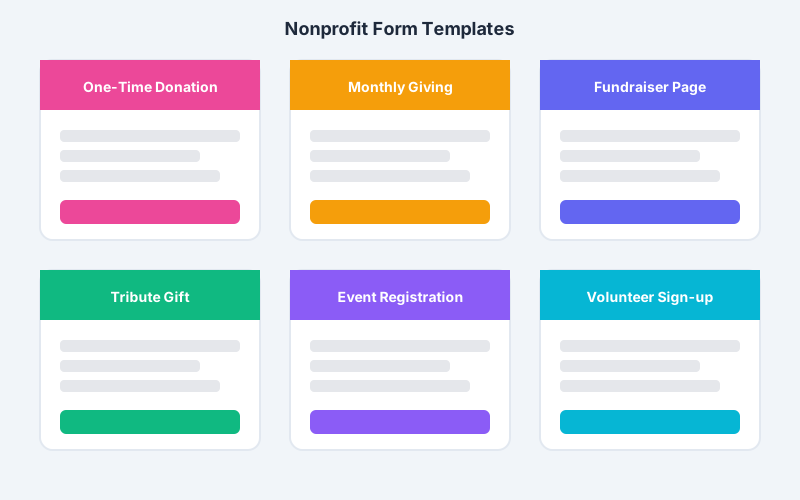
One-Time Donations
One-time gifts are often entry points to deeper engagement. Your form should make giving easy while opening doors for future connection.
Form elements:
- Clear suggested amounts with impact statements
- Prominent monthly giving upgrade option
- Simple fields (name, email, payment)
- Option to receive newsletter (pre-checked appropriately for your region)
- Matching gift employer field (optional)
Monthly Giving
Recurring gifts require trust. Your monthly giving form should emphasize security, flexibility, and long-term impact.
Form elements:
- Monthly amount options (often lower than one-time: $15, $25, $50, $100)
- Clear explanation of billing schedule
- Easy cancellation policy statement
- First-month bonus or incentive if applicable
- Welcome email sequence trigger
Tribute and Memorial Gifts
Donors giving in honor or memory of someone have specific needs. Offer dedicated tribute forms or conditional sections.
Form elements:
- Tribute type (in honor of / in memory of)
- Honoree name
- Notification option for honoree or family
- Notification recipient contact info
- Personal message option
Fundraising Events
Event registration with donation components requires careful design to balance ticket sales with additional giving.
Form elements:
- Ticket type and quantity selection
- Attendee information for each ticket
- Optional additional donation
- Meal preferences or accessibility needs
- Sponsorship upgrade options
Mobile Optimization Essentials
With 51% of nonprofit website traffic coming from mobile devices, your donation form must work flawlessly on phones.
Design Principles
Single-column layout: Side-by-side fields don’t work on mobile. Stack everything vertically.
Large touch targets: Buttons and form fields should be at least 44px tall for easy tapping.
Smart keyboards: Trigger numeric keyboards for amount and phone fields, email keyboards for email fields.
Autofill support: Enable browser autofill for common fields to reduce typing.
Payment Experience
Digital wallets: Apple Pay and Google Pay reduce checkout to a single tap for mobile users. Choose a payment processor that supports these options.
Minimal typing: Every keystroke on mobile is friction. Use dropdowns and selections where possible.
Save progress: If users navigate away, save their entered information for return.
Testing Checklist
Before launching any donation form, test on:
- iOS Safari
- Android Chrome
- Multiple screen sizes
- Slow network connections
- Different payment methods
Trust Signals That Increase Giving
Donors need to trust that their money will reach you safely and be used well.
Security Indicators
SSL certificate: Your donation page must use HTTPS. Display the lock icon prominently.
Payment processor logos: Show recognizable payment partners like Stripe or PayPal.
PCI compliance statement: Briefly mention that payment data is secure.
Organizational Credibility
Charity ratings: Display GuideStar, Charity Navigator, or BBB Wise Giving Alliance seals if you have favorable ratings.
Impact statistics: Show concrete numbers: “45,000 meals served in 2024.”
Testimonials: Brief donor or beneficiary quotes build confidence.
Photos: Real images of your work (not stock photos) humanize your mission.
Post-Donation Experience
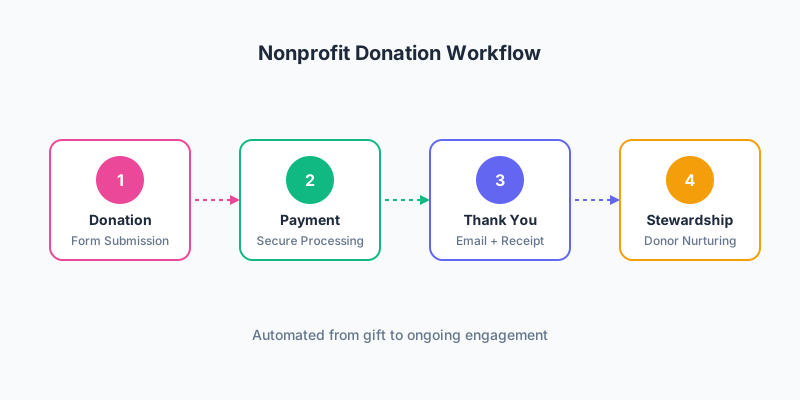
The moment after a donation is critical for donor retention. Your thank-you page and confirmation email set expectations for the relationship.
Thank-You Page
Immediate confirmation: Show the gift was received successfully.
Emotional reinforcement: Remind donors of the impact they’re making.
Social sharing: Offer easy ways to share their giving on social media.
Next steps: Invite them to subscribe, volunteer, or learn more.
Receipt information: Explain when and how they’ll receive their tax receipt.
Confirmation Email
Send immediately (within seconds) and include:
- Sincere thanks and impact statement
- Transaction details and receipt
- Organization contact information
- Links to learn more about programs
- Invitation to engage further
Stewardship Sequence
Build ongoing engagement with automated emails:
- Day 3: Story of impact related to their gift
- Day 7: Newsletter subscription or volunteer opportunities
- Month 1: Update on programs they supported
- Month 3: Impact report or annual report highlights
- Month 11: Year-end giving reminder (for one-time donors)
Integrating with Your Nonprofit Tech Stack
Your donation form should connect with other systems via webhooks and automation platforms.
CRM Integration
Use webhooks to send donor information to your donor management system:
- Bloomerang: Small-to-mid size nonprofits
- Little Green Light: Budget-friendly option
- Salesforce Nonprofit: Enterprise organizations
- Blackbaud Raiser’s Edge: Large institutions
Connect via webhooks or automation platforms like Zapier or Make to map form fields to CRM fields and create automated acknowledgment workflows.
Email Marketing
Connect donations to your email platform through webhooks for automated sequences:
- Tag new donors for welcome series
- Update recurring donor status
- Trigger upgrade campaigns for one-time donors
- Segment by giving level for personalized communication
Accounting
Connect to accounting software via automation platforms for streamlined reconciliation:
- QuickBooks Online
- Xero
- Sage Intacct
Measuring Donation Form Performance
Track these key metrics to optimize your giving:
| Metric | Benchmark | Action if Below |
|---|---|---|
| Form Conversion Rate | 15-25% | Reduce fields, improve UX |
| Average Gift Size | Org-specific | Adjust suggested amounts |
| Recurring Percentage | 15-20% of donations | Make monthly more prominent |
| Mobile Conversion | Should match desktop | Fix mobile experience |
| Abandonment Rate | 50-60% | Add trust signals, simplify |
A/B Testing Ideas
Continuously test to improve:
- Suggested amount values
- Default selection (middle vs. none)
- Monthly vs. one-time default
- Button text (“Donate Now” vs. “Give Today” vs. “Send My Gift”)
- Impact statement wording
- Form length variations
- Trust seal placement
FAQ
What donation amounts should I suggest on my form?
Analyze your existing donor data to find your average gift, then create 4-5 options around that anchor. For example, if your average is $75, suggest $35, $50, $75, $100, and $250. Make the option just above average visually prominent to encourage slightly larger gifts while keeping entry-level options accessible.
How can I increase monthly giving through my donation form?
Make recurring giving visually prominent with a clear toggle or checkbox. Show the annual impact of monthly amounts, such as “$25/month provides 300 meals per year.” Consider offering a small incentive for monthly donors, like exclusive updates or a welcome gift. Test defaulting to monthly with a one-time option.
Should I require donors to create an account?
No. Requiring account creation significantly increases abandonment. Offer optional account creation on the thank-you page for donors who want to track their giving history. Guest checkout should always be available and be the default experience for first-time donors.
How do I handle tribute and memorial gifts?
Add a conditional section that appears when donors select “This gift is in honor/memory of someone.” Collect the honoree’s name and optionally offer to send a notification to the honoree or their family. Include a personal message field and notification recipient address when applicable.
What payment methods should I offer?
When choosing your payment processor, look for one that accepts major credit cards (Visa, Mastercard, American Express) and digital wallets (Apple Pay, Google Pay). Consider adding PayPal for donors who prefer it. Bank transfers (ACH) are excellent for larger gifts and recurring donations due to lower fees. Some organizations also accept cryptocurrency donations.
Start Increasing Your Online Giving Today
Your donation form is the bridge between donor intent and donor action. By implementing these best practices—strategic suggested amounts, prominent monthly giving, minimal fields, mobile optimization, and strong trust signals—you can significantly increase both conversion rates and average gift sizes.
Remember the key principles:
- Make giving as frictionless as possible
- Connect donations to tangible impact
- Optimize for mobile-first experiences
- Build trust with security and credibility signals
- Create seamless post-donation stewardship
Ready to capture donor information effectively? Create your donor intake form with Pixelform and connect it via webhooks to your payment processor and CRM to build a complete giving experience.