SaaS Onboarding Forms That Reduce Churn
Key Takeaways
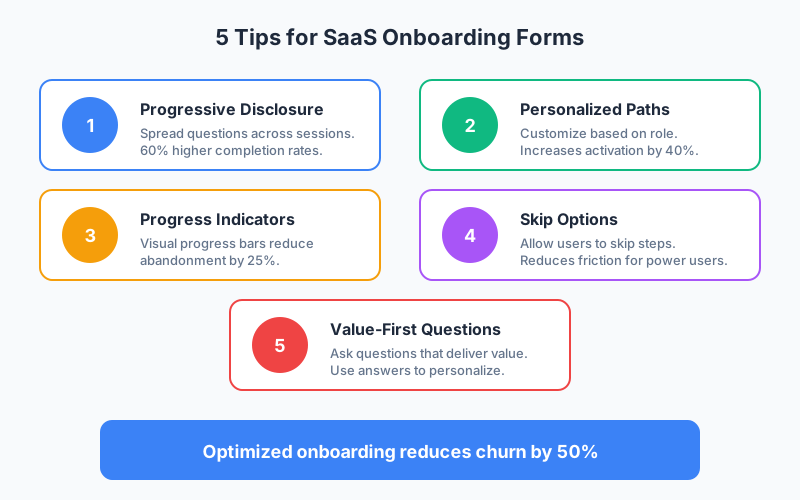
- Optimized onboarding reduces churn by up to 50% according to SaaS retention studies, making it one of the highest-leverage improvements you can make
- Progressive disclosure increases completion rates by 60% compared to presenting all questions upfront
- Personalized onboarding paths increase activation rates by 40% when users see relevant content for their role and goals
- Users who complete onboarding are 3x more likely to become long-term customers than those who skip it
The first few minutes in your product determine whether users become customers or churned statistics. According to Mixpanel, 80% of users who don’t experience value within the first session never return. Your onboarding forms are the bridge between signup and that critical first value moment.
In this guide, we’ll explore how to design SaaS onboarding forms that activate users, reduce churn, and provide valuable data for product improvement.
Why Onboarding Forms Matter for SaaS
The gap between signup and activation is where most SaaS products lose users. A well-designed onboarding flow:
Reduces time to value:
- Guides users to their first success
- Eliminates confusion about where to start
- Personalizes the experience to their needs
Collects valuable data:
- Understands user goals and use cases
- Segments users for appropriate experiences
- Informs product development priorities
Reduces support burden:
- Answers common questions proactively
- Sets appropriate expectations
- Surfaces relevant help resources
According to Wyzowl, 86% of people say they’re more likely to stay loyal to a company that invests in onboarding content.
Types of SaaS Onboarding Forms
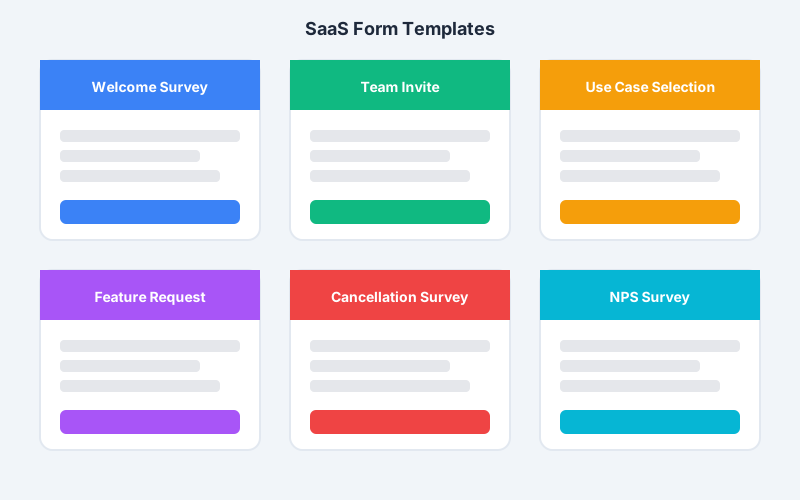
1. Welcome Survey
The first interaction after signup sets the tone for the relationship.
What to ask:
- Role or job title
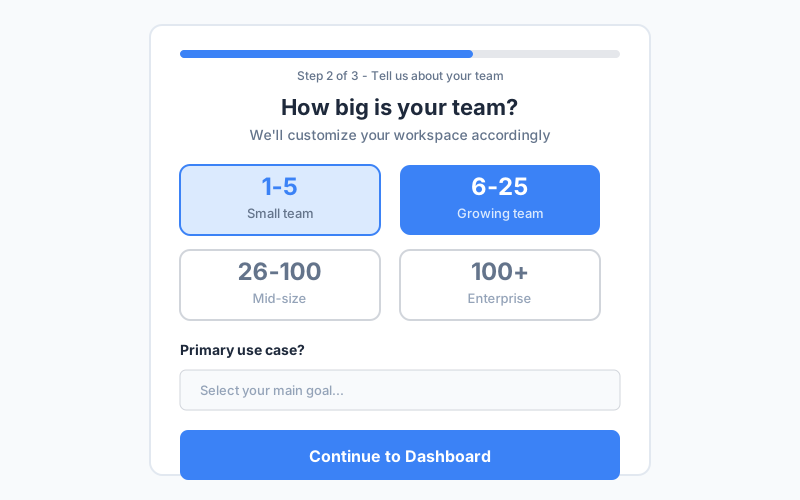
- Team size or company size
- Primary goal or use case
- How they heard about you
What to avoid:
- Too many questions (3-5 max)
- Sensitive information (save for later)
- Questions irrelevant to their experience
How to use the data:
- Customize dashboard layout
- Prioritize relevant features
- Personalize onboarding emails
- Route to appropriate resources
2. Team Size and Structure Form
For collaboration tools, understanding team context is essential.
Questions to ask:
- How many team members?
- What departments are involved?
- Who else will use the product?
- Existing tools in your stack?
Use this to:
- Set up appropriate workspace structure
- Suggest team invitation flow
- Recommend permission settings
- Enable relevant integrations
3. Use Case Selection
Different users need different paths to value.
Design approach:
- Visual cards with illustrations
- Clear descriptions of each path
- “Most popular” badges where appropriate
- Option to explore multiple paths
Example for a project management tool:
- Marketing campaigns
- Software development
- Client projects
- Personal productivity
Each selection leads to a customized template or setup flow.
4. Integration Setup Form
Connect your product to the user’s existing workflow.
Form elements:
- List of supported integrations
- Pre-checked common tools
- OAuth connection flows
- Manual configuration options
Make it skippable: Not everyone needs integrations on day one. Offer easy skip with reminder to return later.
5. Feature Preference Form
Let users prioritize what matters to them.
Approach:
- Show core features with brief descriptions
- Allow ranking or selection
- Explain how selections affect their experience
- Keep it quick (under 30 seconds)
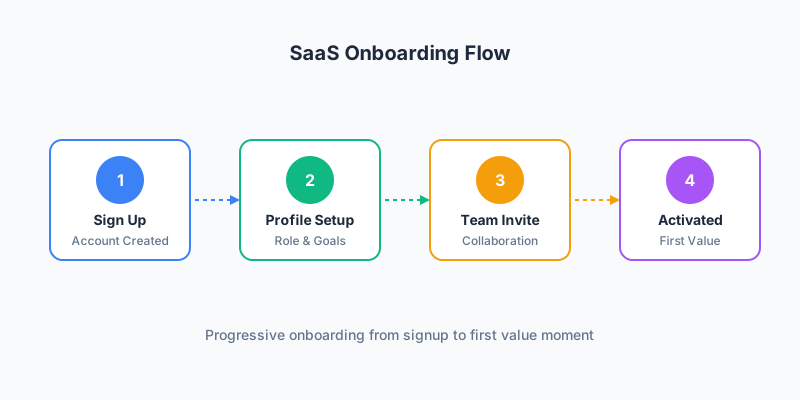
Progressive Disclosure: The Key to Completion
Asking everything upfront leads to abandonment. Progressive disclosure spreads information gathering across the user journey.
Phase 1: Immediate (During Signup)
Ask only what’s essential:
- Email (required for account)
- Password (or social auth)
- Name (for personalization)
That’s it. Everything else can wait.
Phase 2: Post-Signup Welcome
First value-exchange:
- Role/title (customizes interface)
- Primary goal (guides onboarding path)
- Team size (affects recommendations)
These questions help you help them. Make that value exchange clear.
Phase 3: Contextual Collection
Ask when relevant:
- Company name → when creating first project
- Billing info → when trying premium features
- Integrations → when connecting external data
- Team invites → when collaborating
Each request happens at the moment it provides value.
Phase 4: Ongoing Refinement
Continuous learning:
- Feature usage feedback
- Satisfaction surveys
- Feature request forms
- Exit interviews if churning
This data improves both their experience and your product.
Designing Effective Onboarding Flows
Progress Indicators
Show users where they are in the process:
- Step count (“Step 2 of 4”)
- Progress bar (visual completion)
- Time estimate (“Takes about 2 minutes”)
- Completion benefits (“Unlock templates”)
According to UX research, progress indicators reduce abandonment by 25%.
Skip Options
Power users resent forced flows. Always offer:
- “Skip for now” on non-essential steps
- “Skip all” to jump to product
- Reminder to complete later
- In-app prompts when relevant
Balance guidance with user autonomy.
Value Messaging
Connect each question to user benefit:
Instead of: “Select your industry”
Try: “Tell us your industry so we can show you relevant templates”
Make the value exchange explicit.
Visual Design
Reduce cognitive load:
- One question per screen for key steps
- Large, clickable cards over dropdowns
- Icons and illustrations for visual interest
- Consistent, branded styling
Segmentation and Personalization
Use onboarding data to create tailored experiences.
Role-Based Paths
Different roles need different experiences:
| Role | Primary Focus | Key Features |
|---|---|---|
| Developer | API access, integrations | Documentation, SDKs |
| Manager | Reporting, team oversight | Dashboards, permissions |
| Individual | Getting work done | Workflows, templates |
| Admin | Setup, security | Settings, SSO |
Company Size Segments
Scale changes needs:
Individuals/Small teams (1-10):
- Quick setup
- Templates to start
- Self-service focus
Mid-size (11-100):
- Team collaboration features
- Workflow customization
- Training resources
Enterprise (100+):
- Custom onboarding
- Implementation support
- Security and compliance
Industry Customization
When relevant, industry context improves experience:
- Pre-built templates for their industry
- Relevant case studies and examples
- Industry-specific terminology
- Compliance considerations
Reducing Friction Points
Social Proof Integration
Build confidence during onboarding:
- Customer logos on signup page
- “Join 10,000+ teams” messaging
- Industry-specific testimonials
- Reviews and ratings where relevant
Help Availability
Never leave users stranded:
- Contextual tooltips on form fields
- Link to documentation
- Chat widget for questions
- Video walkthroughs for complex steps
Error Prevention
Design forms that prevent mistakes:
- Inline validation as users type
- Clear error messages with solutions
- Smart defaults based on selections
- Confirmation before irreversible actions
Post-Onboarding Forms
The relationship doesn’t end after initial setup.
Feature Request Forms
Capture user needs:
- Simple submission form
- Categorization by feature area
- Voting on existing requests
- Status updates when implemented
NPS and Satisfaction Surveys
Measure and improve:
- Trigger based on usage milestones
- Keep surveys brief (1-3 questions)
- Follow up on negative scores
- Track trends over time
Cancellation and Exit Surveys
Learn from churned users:
- Ask why they’re leaving
- Offer alternatives (pause, downgrade)
- Capture feedback for improvement
- Leave door open for return
This data is invaluable for reducing future churn.
Integrating Onboarding Data
Connect form data to your systems:
CRM and Sales Tools
Enrich customer records:
- Salesforce - Lead qualification
- HubSpot - Contact enrichment
- Pipedrive - Deal context
- Intercom - Support context
Product Analytics
Understand user behavior:
- Amplitude - User properties
- Mixpanel - Cohort analysis
- Heap - Session context
- PostHog - Feature adoption
Marketing Automation
Personalize communication:
- Customer.io - Onboarding emails
- Mailchimp - Segment newsletters
- Braze - Multi-channel messaging
- Iterable - Lifecycle campaigns
Measuring Onboarding Success
Key Metrics
Track these to optimize:
| Metric | What It Measures | Target |
|---|---|---|
| Completion Rate | % finishing onboarding | 70%+ |
| Time to Complete | Duration of onboarding | Under 5 min |
| Activation Rate | % reaching first value | 50%+ |
| 7-Day Retention | Return after onboarding | 40%+ |
| Support Tickets | Questions during onboarding | Decreasing |
A/B Testing Ideas
Continuously improve:
- Number of onboarding steps
- Question ordering
- Visual design variations
- Required vs optional fields
- Progress indicator styles
- Skip option placement
Cohort Analysis
Compare performance across:
- Traffic sources
- Signup dates
- Pricing plans
- Company sizes
- Industries
- Referral types
FAQ
How many questions should a SaaS onboarding survey include?
Keep initial onboarding to 3-5 questions maximum. Users are eager to try your product, not answer surveys. Focus on questions that directly impact their experience: role, team size, and primary use case. Collect additional data progressively as users engage with features where that information becomes relevant.
When should I trigger onboarding surveys?
Trigger the welcome survey immediately after signup while engagement is highest. Space subsequent data collection across the user journey: team info when inviting members, integration preferences when accessing connected features, feedback after achieving milestones. This progressive approach maintains engagement without overwhelming.
How can I increase onboarding form completion rates?
Use progress indicators to show users their advancement. Keep each step focused on one topic. Explain how their answers benefit them specifically. Offer skip options for non-essential questions. Use visual cards instead of dropdowns where possible. Test different flows to find what works for your audience.
Should onboarding forms be required or optional?
Make only critical questions required. Users resent forced friction, and requiring too much leads to abandonment or fake data. Essential items like account email are required. Profile customization should be optional with clear value messaging. Trust users to complete optional fields when they see the benefit.
How do I use onboarding data to reduce churn?
Segment users based on onboarding responses to deliver personalized experiences. Track which segments have highest activation and retention. Identify at-risk users based on incomplete onboarding and trigger re-engagement. Use collected use cases to prioritize feature development. Follow up with low-scoring NPS respondents immediately.
Start Improving Your SaaS Onboarding Today
Effective onboarding forms are a leverage point for your entire business. By collecting the right data at the right time, you can personalize experiences, increase activation, and dramatically reduce churn.
Key principles to implement:
- Use progressive disclosure to spread data collection
- Personalize paths based on role and goals
- Show progress and allow skipping
- Connect every question to user value
- Integrate data with your systems
- Continuously measure and iterate
Ready to build better SaaS onboarding? Create your onboarding forms with Pixelform and start converting more signups into activated, long-term customers.