Restaurant Order Forms for Online Ordering
Key Takeaways
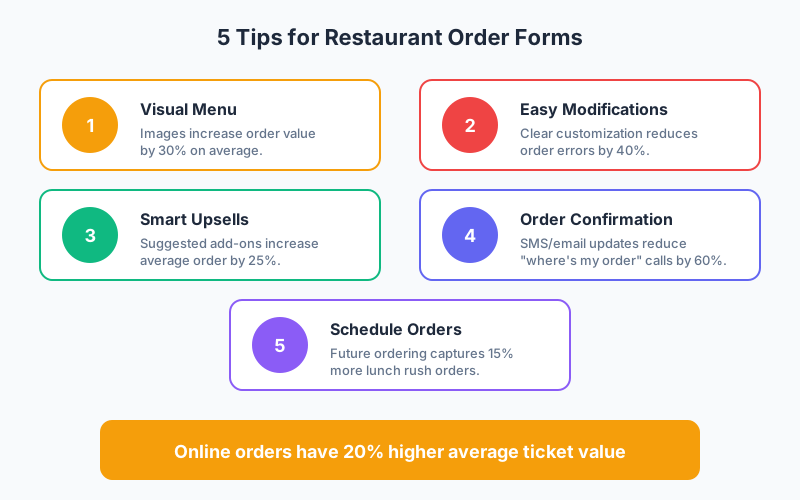
- Online orders have 20% higher average ticket values compared to phone orders, according to restaurant industry data
- Visual menus with food images increase order value by 30% by triggering appetite appeal and reducing decision friction
- Smart upsell suggestions at checkout boost average orders by 25% when presented at the right moment
- Order confirmation SMS reduces “where’s my order” calls by 60%, freeing up staff for customer service
The restaurant industry has permanently shifted toward digital ordering. According to the National Restaurant Association, 60% of restaurant orders now originate online or through apps. For independent restaurants competing against platforms like DoorDash and Uber Eats (and their hefty fees), having your own optimized order forms is essential.
In this guide, we’ll cover everything you need to create restaurant order forms that increase sales, reduce errors, and keep customers coming back.
Why Your Own Ordering System Matters
Third-party delivery apps charge 15-30% commission on every order. For a restaurant operating on thin margins, that’s often the difference between profit and loss.
Benefits of direct ordering:
- Keep 100% of order value instead of paying platform fees
- Own customer data for marketing and loyalty programs
- Control the experience from ordering to delivery
- Build brand loyalty rather than platform loyalty
- Set your own delivery zones and times
The key is making your direct ordering experience as smooth as the apps customers are used to.
Essential Elements of Restaurant Order Forms
1. Visual Menu Display
People eat with their eyes first. Your order form should showcase your food appealingly.
Best practices:
- High-quality photos for each menu item
- Consistent image style and sizing
- Brief, appetizing descriptions
- Clear pricing with any variations
- Dietary icons (vegetarian, gluten-free, spicy)
Studies show that menus with photos increase order value by 30% compared to text-only menus. The investment in food photography pays for itself quickly.
2. Easy Customization Options
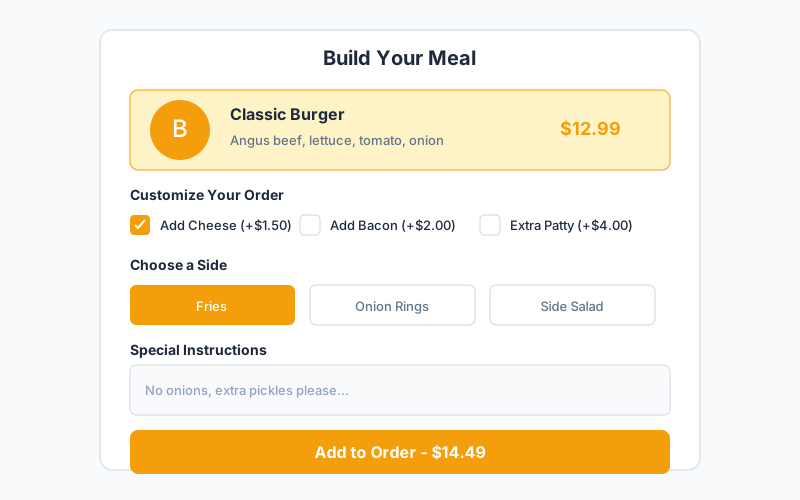
Customers expect to modify orders. Make customization intuitive:
Standard customizations:
- Protein choices (for bowls, salads)
- Size options (small, medium, large)
- Add-ons with clear pricing
- Removal of ingredients (no onions, etc.)
- Preparation preferences (spice level, doneness)
Form implementation:
- Use checkboxes for add-ons
- Radio buttons for single selections
- Clear price implications (+$2.00)
- Free-text field for special requests
3. Smart Upselling
Strategic suggestions can significantly increase average order value without feeling pushy.
Effective upsell moments:
- Item addition: “Add bacon to your burger? (+$2)”
- Combo suggestion: “Make it a combo with fries and drink for $4 more”
- Checkout prompt: “Don’t forget dessert!”
- Order review: “Add a side of ranch?”
Position your highest-margin items as suggestions. Data shows suggested items are selected 25% of the time when presented contextually.
4. Clear Order Summary
Before checkout, show a complete order review:
- All items with quantities
- All customizations
- Individual item prices
- Subtotal
- Tax (if applicable)
- Delivery fee (if applicable)
- Discount codes applied
- Final total
Allow easy quantity adjustments and item removal from this screen.
Types of Restaurant Order Forms
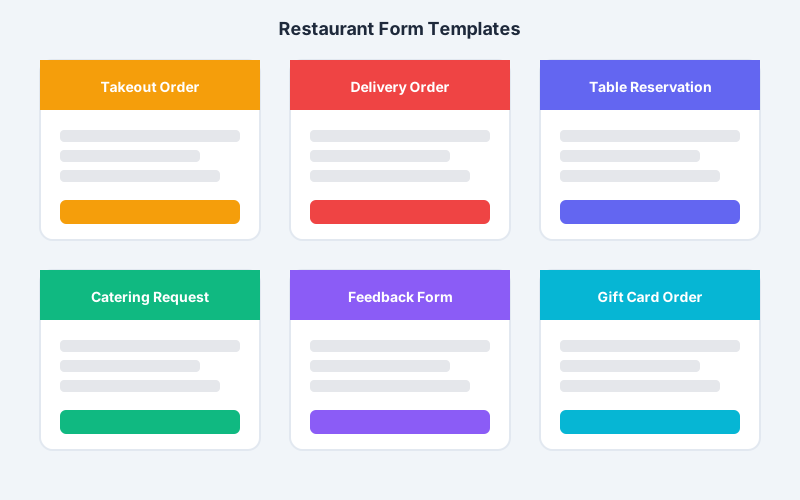
Takeout Order Form
Takeout is straightforward: customer orders, pays, and picks up.
Essential fields:
- Customer name
- Phone number
- Email (for confirmation)
- Order items with customizations
- Pickup time selection
- Special instructions
- Payment information
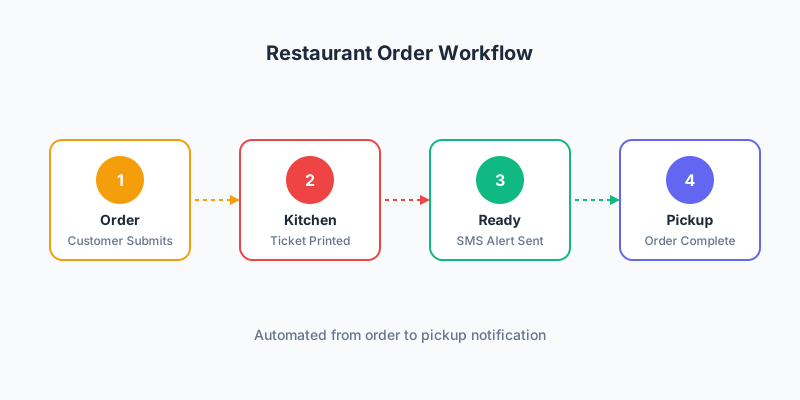
Workflow:
- Order submitted
- Kitchen receives ticket
- Order prepared
- Customer notified when ready
- Customer picks up
Delivery Order Form
Delivery adds complexity with addresses, zones, and timing.
Additional fields:
- Delivery address (with validation)
- Apartment/unit number
- Delivery instructions (“Leave at door”)
- Delivery time preference
- Driver tip option
Considerations:
- Define delivery zones with different fees
- Set minimum order amounts for delivery
- Block orders outside delivery hours
- Calculate accurate delivery estimates
Catering Order Form
Catering orders are larger, more complex, and need advance planning.
Form structure:
- Event date and time
- Number of guests
- Event type (corporate, wedding, etc.)
- Menu selections (often package-based)
- Dietary restrictions summary
- Setup and service needs
- Contact information
- Budget indication
Catering forms often work better as inquiry forms that lead to phone consultations for customization.
Table Reservation with Pre-Order
Combine reservations with advance ordering to streamline service.
Fields:
- Date and time
- Party size
- Seating preference
- Pre-order selection (optional)
- Special occasions
- Dietary restrictions
Pre-ordering reduces wait times and increases average checks since customers order thoughtfully rather than quickly.
Mobile Optimization for Restaurant Forms
70% of restaurant website traffic comes from mobile devices. Your forms must be mobile-first.
Design Requirements
Touch-friendly interface:
- Large buttons (at least 44px)
- Adequate spacing between elements
- Easy quantity adjustment (+ and - buttons)
- Swipe-friendly menu navigation
Fast performance:
- Optimize image sizes
- Minimize form complexity
- Load menu items progressively
- Cache repeat customer data
Payment Experience
Mobile payment options:
- Apple Pay and Google Pay integration
- Saved payment methods for repeat customers
- Quick checkout for logged-in users
Digital wallets reduce checkout time dramatically and increase conversion rates on mobile.
Location Features
Leverage mobile capabilities:
- Auto-detect location for delivery
- Show distance to restaurant
- Provide directions integration
- Send pickup notifications based on proximity
Building an Efficient Kitchen Workflow
Your order form should integrate with kitchen operations.
Order Routing
Send orders directly to where they’re needed:
- Kitchen display system (KDS) for food preparation
- Thermal printer for tickets
- POS integration for sales tracking
- Inventory system for stock updates
Order Timing
Manage kitchen capacity effectively:
- Set preparation time estimates per item
- Limit orders during busy periods
- Offer time slots for scheduled orders
- Send realistic ready times to customers
Order Accuracy
Reduce errors with clear communication:
- Print special instructions prominently
- Highlight allergen modifications
- Use consistent naming conventions
- Enable kitchen staff to flag issues
Increasing Average Order Value
Strategic Menu Presentation
Menu engineering principles:
- Place highest-margin items prominently
- Use decoy pricing to guide choices
- Create combo deals that increase spend
- Highlight popular items with badges
Cross-Selling Techniques
Suggest complementary items:
- Appetizers when ordering entrees
- Beverages with food orders
- Desserts at checkout
- Sides to complete meals
Minimum Order Incentives
Encourage larger orders:
- Free delivery above $X
- Discount code unlock at threshold
- Free item with minimum order
- Loyalty points multiplier
Customer Communication
Keep customers informed throughout the order process.
Order Confirmation
Send immediately upon order submission:
- Order summary with all items
- Estimated ready/delivery time
- Order number for reference
- Contact information for questions
Status Updates
SMS notifications for:
- Order received confirmation
- Order being prepared
- Order ready for pickup
- Driver on the way (delivery)
- Delivered confirmation
Proactive communication reduces anxiety and support calls.
Feedback Request
After order completion:
- Send feedback request via email
- Keep survey brief (1-3 questions)
- Respond quickly to negative feedback
- Use positive reviews for marketing
Integrating with Restaurant Systems
Point of Sale (POS) Integration
Connect order forms to your POS system:
- Toast - Popular cloud POS
- Square - Versatile with strong online tools
- Clover - Good for multi-location
- Lightspeed - Strong inventory features
Loyalty Programs
Build repeat business:
- Points per dollar spent
- Visit-based rewards
- Birthday and anniversary perks
- Referral bonuses
Marketing Automation
Turn orders into ongoing relationships:
- Welcome series for first-time customers
- Re-engagement for lapsed customers
- New menu item announcements
- Special event promotions
Handling Special Dietary Needs
Allergens and dietary restrictions are critical to get right.
Clear Allergen Information
For each menu item:
- List common allergens
- Use universal icons
- Allow customers to flag allergies
- Route allergy orders for special handling
Dietary Filters
Enable filtering by:
- Vegetarian
- Vegan
- Gluten-free
- Dairy-free
- Nut-free
- Halal/Kosher
Kitchen Protocols
Ensure form data reaches kitchen:
- Highlight allergen orders visibly
- Separate preparation when needed
- Train staff on cross-contamination
- Document allergen handling
Measuring Order Form Performance
Track these metrics to optimize your forms:
| Metric | Benchmark | Improvement Strategy |
|---|---|---|
| Conversion Rate | 15-25% | Simplify checkout |
| Cart Abandonment | 30-40% | Add payment options |
| Average Order Value | Track trend | Add upsells |
| Order Accuracy | 95%+ | Improve form clarity |
| Customer Return Rate | 25-40% | Implement loyalty |
A/B Testing Ideas
Test variations to improve performance:
- Menu item ordering and grouping
- Photo styles and sizes
- Upsell timing and placement
- Checkout flow steps
- Button text and colors
FAQ
How can I reduce online order errors at my restaurant?
Clear customization options with checkboxes and dropdowns prevent most errors compared to free-text fields. Display an order summary requiring confirmation before payment. Send confirmation emails with complete order details so customers can verify. Train kitchen staff to clarify unclear special instructions by contacting customers directly.
What’s the best way to handle peak hour ordering?
Implement order throttling that limits orders during busy periods or extends preparation times automatically. Offer scheduled ordering so customers can place lunch orders in the morning. Use time slots instead of ASAP for better kitchen management. Consider pausing online orders temporarily during extreme rushes.
Should I offer both pickup and delivery on the same form?
Yes, but use conditional logic to show relevant fields. When pickup is selected, show pickup time slots and store location. When delivery is selected, show address fields, delivery fee, and minimum order requirements. This keeps the form streamlined for each order type.
How do I integrate online orders with my kitchen display system?
Most modern KDS systems accept orders via API or email. Form builders can send order data to systems like Fresh KDS, QSR Automations, or your POS’s built-in display. Alternatively, orders can trigger thermal printer tickets. Ensure the order format matches your kitchen’s ticket layout.
What payment methods should I accept for online orders?
Accept major credit cards plus Apple Pay and Google Pay for mobile convenience. Consider adding PayPal for customers who prefer it. For delivery, decide whether to accept cash and how drivers handle it. Prepayment for pickup eliminates no-shows and speeds up the pickup process.
Start Taking Online Orders Today
An optimized order form is your restaurant’s most valuable digital asset. By implementing visual menus, easy customization, smart upselling, and seamless mobile checkout, you can compete with delivery platforms while keeping more revenue and building direct customer relationships.
Key principles to remember:
- Make your menu visual and appetizing
- Simplify customization and modifications
- Integrate with kitchen systems for accuracy
- Communicate proactively throughout the process
- Build loyalty through excellent digital experiences
Ready to increase your restaurant’s online orders? Create your restaurant order form with Pixelform and start converting more website visitors into hungry customers.