How to Reduce Form Abandonment: A Complete Guide to Keeping Users Engaged
Key Takeaways
- 67% of users permanently abandon forms if they encounter complications according to Baymard Institute research
- The average form abandonment rate is 67.91% for ecommerce checkouts, even higher for complex forms
- Addressing just 3 friction points can reduce abandonment by 50% in most cases
- Real-time validation alone reduces abandonment by 22% by catching errors before submission
Form abandonment costs businesses billions annually. Every time a user starts your form but doesn’t finish, you lose a potential customer, lead, or valuable feedback. This guide reveals why users abandon forms and exactly how to fix it.
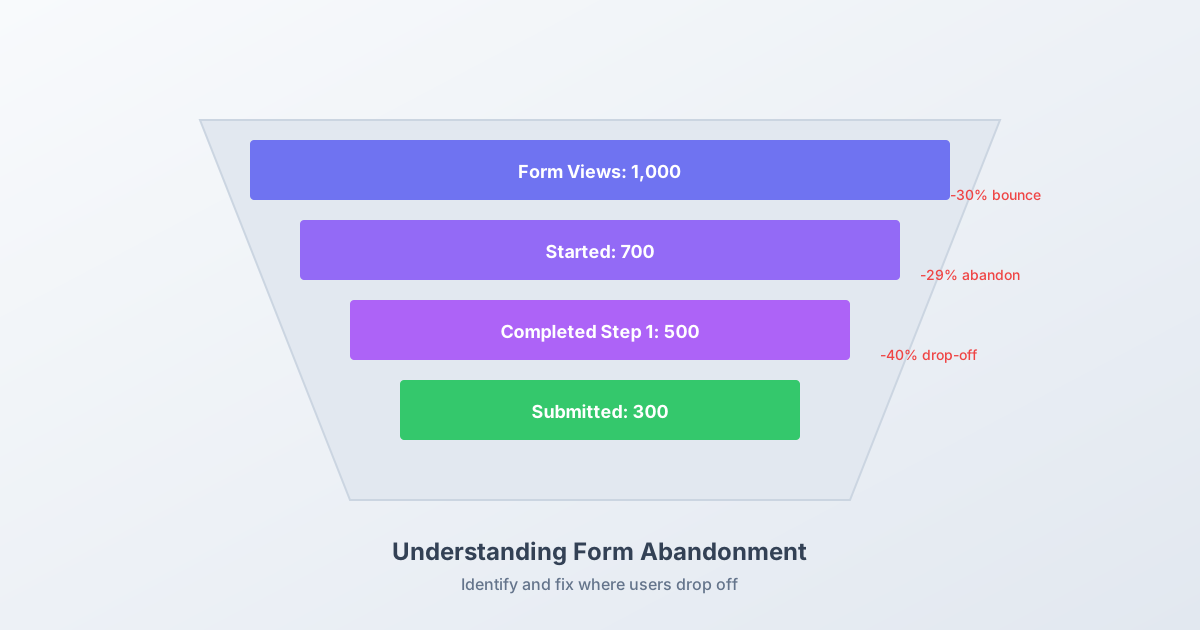
Understanding Form Abandonment
Form abandonment occurs when a user begins filling out a form but leaves before submitting. According to Baymard Institute’s comprehensive research, the average documented online shopping cart abandonment rate is 70.19%.
For non-ecommerce forms, abandonment varies widely:
- Lead generation forms: 30-50% abandonment
- Registration forms: 40-60% abandonment
- Complex multi-step forms: 50-80% abandonment
- Survey forms: 50-70% abandonment
Understanding why users abandon is the first step to fixing it.
The 9 Primary Reasons Users Abandon Forms
Reason 1: Too Many Fields
The data: HubSpot research found reducing form fields from 4 to 3 increased conversions by 50%.
Every additional field is a decision point where users can choose to leave. Nielsen Norman Group research confirms that form length directly correlates with abandonment rates.
Solution: Audit every field. For each one, ask: “What’s the minimum information needed to accomplish this goal?”
Reason 2: Unexpected Complexity
Users assess form difficulty in the first 2-3 seconds. If it looks overwhelming, they bounce before even starting.
Solution: Use progressive disclosure. Show only essential fields initially, revealing additional questions as needed.
Reason 3: Poor Mobile Experience
The data: Mobile users are twice as likely to abandon poorly optimized forms according to Google research.
Tiny tap targets, horizontal scrolling, and wrong keyboard types create immense frustration on mobile.
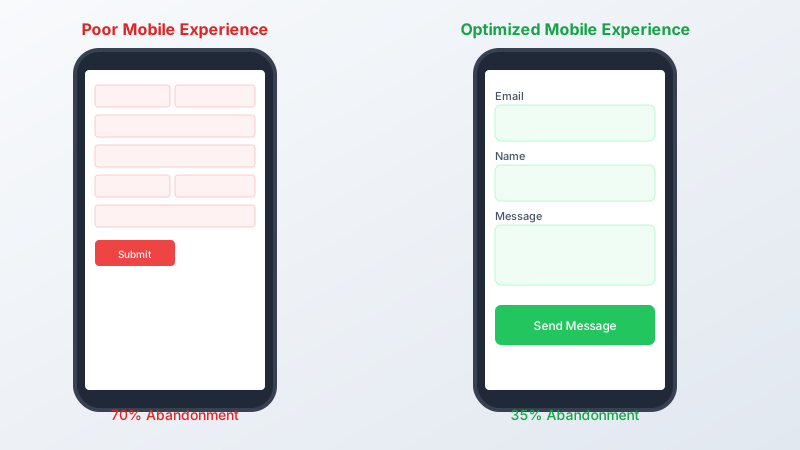
Solution: Design mobile-first with 44px minimum touch targets, single-column layouts, and appropriate input types.
Reason 4: Confusing Error Messages
Generic errors like “Invalid input” leave users guessing what went wrong. When users can’t easily fix errors, they leave.
Solution: Provide specific, actionable error messages next to the problem field.
Reason 5: Security Concerns
The data: 79% of consumers are concerned about how companies use their data according to Pew Research.
Users hesitate to share personal information when trust signals are absent.
Solution: Add trust badges, privacy links, and clear explanations of how data will be used.
Reason 6: No Progress Indication
On long or multi-step forms, users need to know how much remains. Uncertainty breeds abandonment.
Solution: Add progress bars, step indicators, or time estimates.
Reason 7: Mandatory Account Creation
The data: 24% of users abandon checkout specifically because the site required account creation according to Baymard Institute.
Forcing registration adds significant friction to the primary goal.
Solution: Offer guest options or create accounts automatically post-submission.
Reason 8: Hidden Costs or Requirements
Surprises late in the form process frustrate users. This is especially true for pricing, shipping costs, or additional requirements.
Solution: Be transparent about all requirements from the beginning.
Reason 9: Technical Issues
Broken validation, slow load times, and form submission failures cause immediate abandonment.
Solution: Test thoroughly across browsers and devices. Monitor error logs.
15 Strategies to Reduce Form Abandonment
Strategy 1: Minimize Form Fields Ruthlessly
Start by cutting fields, not adding features.
Before: Name, Email, Phone, Company, Title, Website, Budget, Timeline, Message After: Name, Email, Message
You can always collect additional information later in the relationship.
Strategy 2: Implement Save and Continue
For longer forms, allow users to save progress and return later.

Implementation:
- Auto-save as users complete sections
- Email link to continue later
- Store progress in browser localStorage
This is essential for forms taking more than 5 minutes to complete.
Strategy 3: Use Multi-Step Design Strategically
The data: Multi-step forms can increase conversions by 300% according to conversion research.
Break complex forms into digestible steps:
- Step 1: Contact info (easy, low commitment)
- Step 2: Qualification questions
- Step 3: Specific details
Each step should have a clear purpose and feel manageable.
Strategy 4: Add Real-Time Validation
Validate fields as users complete them, not after submission.
Good validation:
- Triggers on blur (leaving the field)
- Shows success states for valid input
- Provides specific error guidance
- Never clears the entire form
Bad validation:
- Triggers while still typing
- Shows vague error messages
- Requires form resubmission to see results
Strategy 5: Optimize Your CTA Button
Your submit button should promise value, not describe an action.
Weak CTAs:
- Submit
- Send
- Continue
Strong CTAs:
- Get My Free Report
- Start My Trial
- Unlock Access
Test different variations to find what resonates with your audience.
Strategy 6: Show Progress and Time Estimates
Help users understand the commitment:
- “Step 2 of 3”
- “About 2 minutes remaining”
- Progress bar visualization
Setting accurate expectations reduces abandonment from uncertainty.
Strategy 7: Remove Distractions
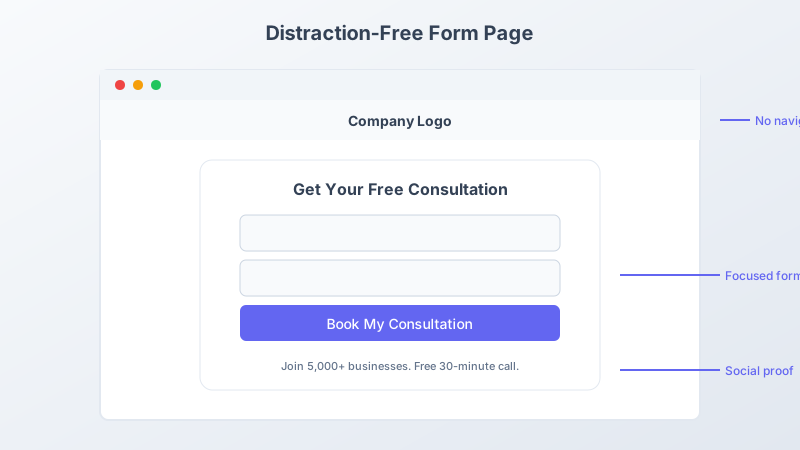
On form pages, minimize competing elements:
- Reduce or remove navigation
- Eliminate sidebar content
- Focus attention on completion
Every link is an exit opportunity.
Strategy 8: Provide Social Proof
Show others have successfully completed the process:
- “Join 50,000+ subscribers”
- Customer testimonials near form
- Trust badges and certifications
Social proof reduces perceived risk.
Strategy 9: Enable Autofill
Use proper HTML attributes to enable browser autofill:
<input type="text" name="name" autocomplete="name" />
<input type="email" name="email" autocomplete="email" />
<input type="tel" name="phone" autocomplete="tel" />
Autofill dramatically reduces typing effort.
Strategy 10: Optimize for Mobile
Mobile form essentials:
- Single-column layout
- Large touch targets (44px minimum)
- Appropriate keyboard types
- No horizontal scrolling
- Consider sticky submit buttons
Test on actual devices, not just browser simulators.
Strategy 11: Address Objections Proactively
Anticipate and answer concerns before they cause abandonment:
| Objection | Preemptive Solution |
|---|---|
| ”Will I get spammed?" | "We only email about your request" |
| "Is my data safe?” | Show security badge, link to privacy policy |
| ”How long will this take?" | "Takes about 30 seconds” |
Strategy 12: Offer Multiple Contact Options
Some users prefer alternatives to forms:
- Phone number for those who want to call
- Email address for direct contact
- Live chat option
Multiple options reduce form-specific friction.
Strategy 13: Use Exit Intent Recovery
When users move to leave, show a targeted intervention:
- Simplified version of the form
- Different value proposition
- Discount or incentive (where appropriate)
Exit intent can recover 10-15% of abandoning users.
Strategy 14: Follow Up on Abandoned Forms
For partial form completions:
- Send reminder emails (if you have email)
- Offer assistance
- Provide alternative contact methods
Timing matters: follow up within 24 hours for best results.
Strategy 15: Continuously Test and Optimize
Form optimization is ongoing:
- A/B test field count, order, and design
- Monitor abandonment by field
- Track mobile vs. desktop completion
- Analyze error patterns
Small improvements compound over time.
Measuring Form Abandonment
Track these metrics to understand your abandonment:
Form abandonment rate: (Form views - Completions) / Form views
Field-level drop-off: Which specific field causes users to leave
Time to abandonment: How long users engage before leaving
Device-specific rates: Mobile vs. desktop abandonment
Use this data to prioritize improvements. Focus on the fields and issues causing the most drop-off.
Quick Wins to Implement Today
Start with these high-impact, low-effort changes:
- Remove one field - Immediate impact with minimal risk
- Improve error messages - Specific guidance reduces frustration
- Add mobile keyboard types - Zero development cost
- Update CTA text - Simple copy change with measurable impact
- Add progress indicator - Reduces uncertainty on multi-step forms
FAQ
What is a normal form abandonment rate? Form abandonment rates typically range from 30% to 80% depending on form type and complexity. Lead generation forms average 40-50% abandonment, while complex checkout forms can see 70%+ abandonment. Focus on improving your baseline rather than hitting an arbitrary target.
At what field do users typically abandon forms? Abandonment often spikes at fields requesting sensitive information (phone, address, payment details), open-ended questions requiring significant thought, or fields where users encounter validation errors. Analytics can reveal your specific drop-off points.
Should I use CAPTCHA on my forms? CAPTCHAs increase abandonment by 3-8% on average. Use them only when spam is a significant problem, and choose user-friendly options like reCAPTCHA v3 (invisible) over traditional CAPTCHAs. Consider honeypot fields as a less intrusive alternative.
How can I recover users who abandon forms? Exit intent popups can recover 10-15% of abandoning visitors. For captured emails, follow-up sequences within 24 hours show strong results. Retargeting ads can remind users to return. Always offer easy ways to save progress and continue later.
Is it better to have one long form or multiple short steps? Multi-step forms typically outperform long single-page forms for anything requiring more than 4-5 fields. They reduce perceived effort and create momentum. However, for simple 2-3 field forms, single-step is usually better.
Build Forms Users Actually Complete
Form abandonment isn’t inevitable. By understanding why users leave and systematically addressing friction points, you can dramatically improve completion rates.
Pixelform helps you build low-abandonment forms from the start:
- Clean, distraction-free form experience
- Built-in mobile optimization
- Real-time validation included
- Analytics to identify drop-off points
Start building better forms and reduce your abandonment rate today.